
This is something that originally had me stumped. So I thought it worth posting a quick note here in case anyone else ran into the same issue.
I was recently out shooting with the Olympus M.Zuiko 12-40mm f/2.8 Pro lens, and when I took it out my camera bag it was in manual focus mode. And I couldn’t find a way to switch the Olympus 12-40mm lens from manual focus to autofocus. I was looking for buttons or switches on the lens. I looked for menu settings on the camera. I even had to do a web search to confirm that there wasn’t a version of the lens that was manual focus only. It had me stumped.
The 12-40mm lens doesn’t have an AF/MF button or switch. Instead, you use the focus ring itself: slide it forward for autofocus, back toward the camera for manual focus.
While I’m referring here to the 12-40mm lens, several other Olympus/OM System lenses have the same type of mechanism for switching between manual and automatic focus.
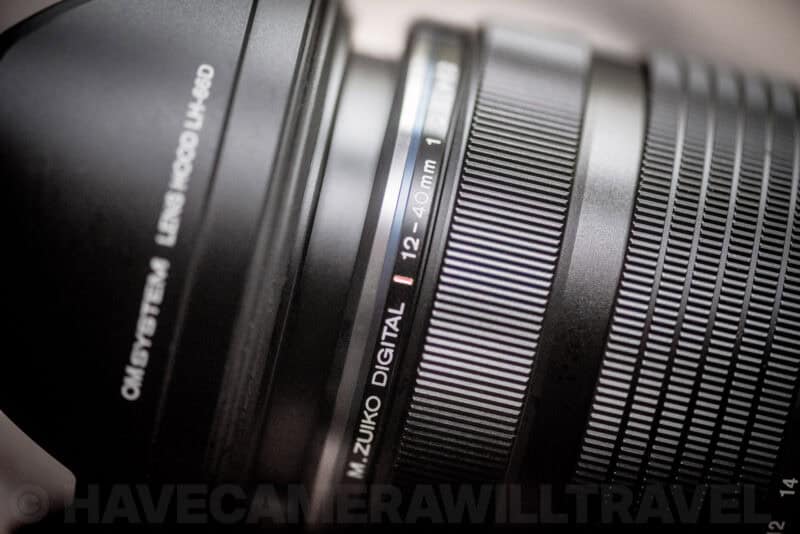
To put it in autofocus mode, slide the focus ring away from the camera body until it clicks in place. Like this:

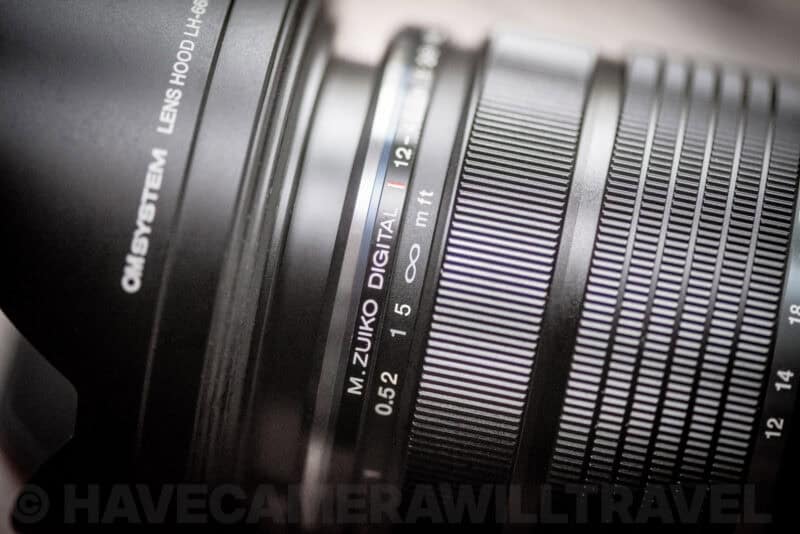
To switch to manual focus, slide that same ring toward the camera body. That will also expose the focus distance ruler printed on the lens barrel’s surface. Like this:

So it turns out that the solution is very simple. And, when you know about it, it’s actually quite intuitive. But if you don’t know about it, it’s not immediately apparent — at least, not to me — because it’s not the way that most other lenses do it. Not that it matters, because it’s not like there’s another option on this lens, but it’s not my favorite implementation of the toggle because I’ve found it too easy to accidentally toggle it as I’m pulling the lens in or out of my bag and there’s no locking mechanism.
If sliding the ring back doesn’t put you into manual focus, check the camera rather than the lens. Olympus and OM System bodies have a menu setting called MF Clutch, and when it’s set to Inoperative the camera ignores the clutch completely and stays in whatever focus mode you’ve selected. Switch it back to Operative and the ring behaves normally again. The other thing worth knowing is that when the clutch is operative it overrides the focus mode set in the camera — pull the ring back and you’re in manual focus regardless of what the body is set to.
Anyway, I hope this saves someone else some temporary confusion!
OM SYSTEM M.Zuiko Digital ED 12-40mm f/2.8 PRO II
OM System released a second version of this lens in 2022: the OM SYSTEM M.Zuiko Digital ED 12-40mm f/2.8 PRO II. It works the same way.
These shots show what it looks like on the newer lens:
Related: Olympus / OM System Lens Filter Size Chart
Related: How to Switch Between Autofocus (AF) & Manual Focus (MF) on the Olympus 12-100mm f/4 IS PRO



Thank you for the information. I just got the lens, so it is good to know.
I suspect the same is true of the 40-150 mm lens.
I don’t know about that specific lens off-hand, but I’ve since come across the same approach used on a number of Olympus lenses, so there’s a good chance it’s the same.
Oh, you saved me! I have yet to play with my new OM-1, as it’s been one thing or another to figure out! But this had me stopped in my tracks! I searched for a button or something! Anything to take it off Manual focus to use all the gadgets! I took the camera in a bag to the zoo, but put it back in when I couldn’t understand and had grand kids to juggle! Sooo frustrating! But, you just gave me the simple answer, Thank you!
Glad it was helpful!
I haven’t had a chance to play with the new OM-1 yet, but I have one lined up soon and am looking forward to it. The original film OM-1 was the first SLR I ever used, way back when, so I have a soft spot for them.
Thank you so much! Bought the lens secondhand and could not work out how to get off auto focus.
Thank you, I could not get my 12-100 to autofocus and this worked
Thank you so much, I’m using the 40 – 150 F2.8 Pro and the same thing happened to me at an engagement party, had to pack that lens away, which was so disappointing, its such a great lens.
Looking at getting the 12 – 40 Pro, sounds like its also a fantastic lens.
Perfect! Thank you. I had used this lens and was super happy with it and then all of a sudden my photos weren’t in focus. I realized it was in manual focus but couldn’t figure out how to return to auto.
Thankyou so much! I’ve been downlading manuals, asking people and getting nowhere other than frustrated!
Thankyou, thankyou, thankyou
Thank u sooo much had two days out with the camera starting to get very frustrated, went and reset factory setting, been thought all the menus and some tutorials…. Bring back a printed manual… So thanks a lot for your post… Was beginning to wish I had bought it from a shop so I could take it back… Your a star..
You are my hero!!! Was so stumped by this, so glad someone mentions it.
Thanks muchos! I had this problem the other day while taking pictures and could not figure it out what I did. It ruined my day photographing. Appreciate your tip!
Great stuff! This is so simple but I never knew
Thanks, you’ve saved my day. Simple but hidden feature.
Does it matter which mode the M/Auto ring switch is in for removing and installing the lens on an OM-D E-M1?
Thank you,
Gordon
One more thanks. Had me stumped.
Thanks a lot.you saved my day!
Thank you! I was struggling with this!!! Now I remember after reading your post.
Many thanks it saved me instantly ??
Walked out this morning with this (new) lens on a (new) Lumix body. Immediately stumped that I couldn’t autofocus! You just made it all clear, thank you!!
Thank you so much! This has been troubled me for a while now. Who could think of that???
Unbelievable that so many hours have been lost searching for a solution to something that should never happen. I’m surprised I haven’t accidentally moved that ring until now. And there is no way I would ever have thought to slide the focusing ring up and back. Thanks for the help!
Thank you, you solved my mystery of the day….~
Thank you , thank you i was going crazy.
❤️ I appreciate your help
Lovely article.
Thank you!
Genius feature. So simple it confounded me.
Thank you so much! You saved me a lot of time as I was ready to return the lens. This is such a silly feature.
It certainly had me stumped for a while.
You are my SAVIOUR!
god bless you!
Lost 1/2 a day on this and this post saved me instantly. Tethered my camera for the first time and Olympus Capture wouldn’t give me a drop down menu for auto-focus, it was permanently set to “MF”. Which ironically had me saying “MF” quite a bit ;-) 2 seconds into reading your post and it’s fixed and I am on my way again. Thank you!!
This had me stumped, thanks for the info!
Good on ya. Thanks for that. Just got my new 12-40 pro and yep – was getting confused alright. But – all good now! Cheers.
Yes was stumped all day on both my 12-40 and 70-150 that ring worked.Had both lenses for 4 years no problem just recently I must have been inadvertently been leaving the ring on the wrong setting. Kudo’s for the great type you saved me a lot of time and such!
Many thanks . After a lot of searching how great to see a straightforward down to earth contribution . Thanks +++