Quick Summary
- Dual Slots: The D850 uses one XQD/CFexpress B slot and one SD slot.
- Photo Modes: Configure slots for Overflow (sequential), Backup (mirror), or RAW+JPEG separation.
- Video Destination: Unlike photos, video storage is managed separately in the Movie Shooting Menu.
Archival Note (February 2026): I first documented the D850’s card management when it was my primary high-resolution body. While many have since moved to the Z-series, the D850 remains one of the best DSLRs ever made. I’ve recently revisited this guide to ensure the menu paths and CFexpress compatibility notes are accurate for those still using this workhorse today.
Managing the dual slots on the Nikon D850 offers a lot of flexibility, but it can be confusing because the settings are split across different menus. Whether you want to prioritize speed, create an instant backup, or separate your video files, here is how I set up my workflow on this body.
1. Saving photos to the memory cards
In the Photo Shooting Menu (green camera icon), look for ‘Primary slot selection’. This tells the camera which card to treat as the “main” card for writing data.

You can choose either XQD (which also applies to CFexpress B) or SD. I typically set the faster XQD/CFexpress slot as my primary to ensure the buffer clears as quickly as possible during burst shooting.
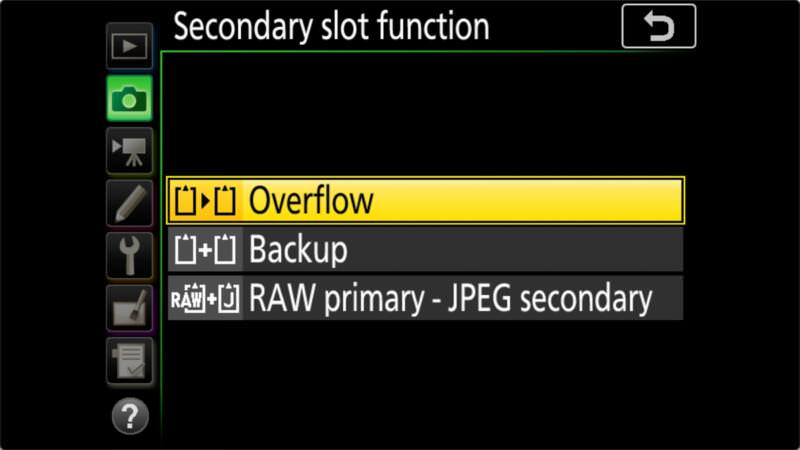
Next, move to ‘Secondary slot function’ to decide how the two cards work together:
- Overflow: The camera fills the primary card first, then automatically switches to the secondary card. This is best for maximum total storage.
- Backup: The camera writes the same file to both cards simultaneously. It’s slightly slower and uses a bit more battery, but it’s essential for high-stakes shoots like weddings.
- RAW primary – JPEG secondary: If you shoot RAW+JPEG, it splits the formats. Interestingly, if you only shoot RAW, it reverts to a “Backup” behavior and saves a RAW file to both.

2. Saving videos to the memory cards
The D850 handles video storage independently. To change where your movies are saved, you must go to the Movie Shooting Menu (yellow movie camera icon) and find ‘Destination’.

Unlike photos, you don’t have an overflow or backup option for video. You simply choose which slot (XQD or SD) the video files should live on. I personally save video to the SD slot to keep my high-speed CFexpress card dedicated to my high-resolution RAW stills.
Pro tips for D850 card management
- CFexpress Compatibility: Remember that CFexpress Type B cards only work if you have updated to firmware v1.20 or later. I recommend checking for the latest version (v1.30) to ensure the best performance.
- Card-to-Card Copying: If you forgot to set the backup mode, you can manually copy files between cards in-camera.
- Formatting Shortcut: You can format cards quickly by holding down the two buttons marked with the red [Format] icons (the Trash and Mode buttons) for a few seconds.


