
Quick Summary
- Silent Shutter Feature: The Sony a7 III’s silent shutter is genuinely silent, which is beneficial in quiet or discreet shooting scenarios.
- Lens Noise: Minor noise from the lens during autofocus; mitigated with manual focus.
- Mode Limitation: Silent shooting available in P, A, S, or M shooting modes.
- Potential Issues: With banding.
Some cameras say they have a silent shutter, but when you go use them you find that there’s still a slight click. So it might be quiet — maybe even very quiet — but perhaps not truly silent. Even some mirrorless cameras, where there’s no mirror slap, aren’t as silent as you might expect.
In normal shooting, it’s often not enough to worry about. But chances are that if you’re looking to take photos silently, there’s a good reason. Maybe you’re shooting shy wildlife, or a stage performance or dance recital, or in a gallery. Or a wedding. Basically, anywhere you just don’t want to disturb others or call attention to yourself.
I was pleasantly surprised to find that when the Sony a7 III claims to have a silent shutter, it’s really true. There’s no click at all — at least from the shutter. The only confirmation that you have taken a photo is a momentary blackout through the viewfinder or on the back screen’s live view.

Of course, there is a caveat. The shutter is silent, but you can still get some slight noise from the lens as the autofocus locks. How loud that is will vary from lens to lens, but it’s essentially imperceptible for the ones I’ve been using — the 24-70 f/2.8 and the 16-35mm f/2.8. It’s certainly not loud enough for me to consider it a problem in even the quietest shooting situations. And if it was, you can prevent even that by shooting with manual focus.
Making your Sony a7 III shoot silently isn’t available in every shooting mode, and not every feature is available when you turn the silent shooting on (more on that below). Specifically, the silent shooting option is only available when shooting still images in the P, A, S, or M shooting modes.
Setting up the a7 III to shoot silently is a two-step process. It’s not complicated, but I’m posting this here in the hope that it saves someone the amount of time I spent searching through the menu system for the options in the camera’s settings.
It makes no difference which order you do these — but you’ll want to do both.
Switch to silent shooting
There’s a simple setting to toggle that enables the silent shutter. You find it under the tab with the camera icon and the number 2, then subpage 4/9, which is labeled Shutter/SteadyShot, and down to the Silent Shooting option.

It’s a simple toggle, on or off.

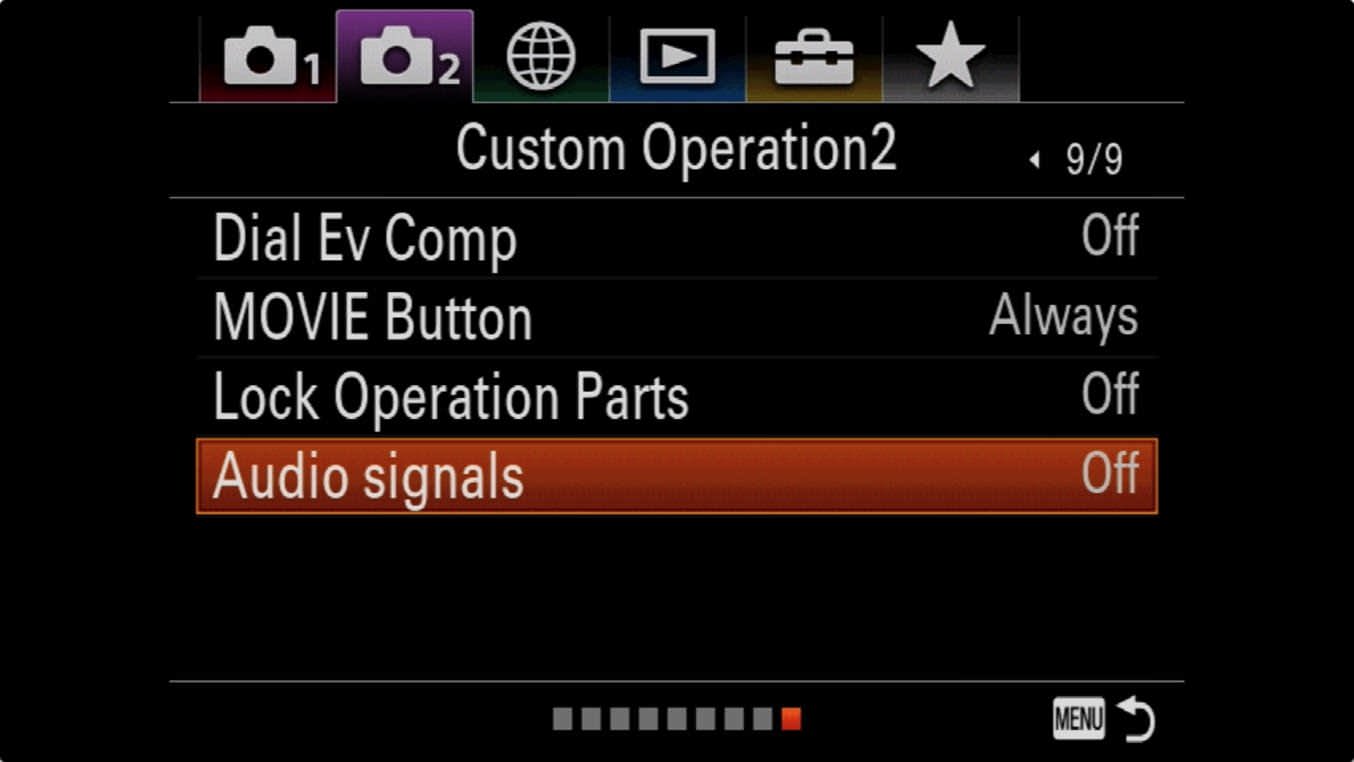
Turn off the focus beep sound (Audio Signals)
By default, the a7 III has the beep enabled to let you know when focus has been established. It’s usually one of the first things I turn off on any digital camera.
You can find the relevant setting under the camera icon with the 2 next to it. Then scroll right to the last subpage under that tab (9/9) and then the very last setting called Audio Signals.
What silent shooting turns off on the Sony a7 III
Enabling the silent shooting option does bring with it some limitations.
Firstly, the silent shooting mode only works when taking still images in the P, A, S, and M shooting modes.
When it’s enabled, these functions aren’t available:
- Using the flash
- Auto HDR
- Picture Effect
- Picture Profile
- Long Exposure NR
- e-Front Curtain Shut.
- BULB shooting
In addition, if you have the RAW file type set to uncompressed and you’re shooting RAW images (either as just RAW or RAW+JPEG), you won’t be able to use bracketing.
One item on that list is worth spelling out: Picture Profile covers S-Log2, S-Log3 and HLG, which the a7 III’s menu labels only as PP7, PP8 and PP10. So switching silent shooting on takes your log and HLG profiles with it. If you shoot stills and video on the same body, that’s the limitation most likely to trip you up, because nothing on screen tells you why the profile you set has stopped applying.
If you’re shooting with a low ISO and point your camera towards a very bright light, you might get some highlights showing as dark tones on the back screen. It shouldn’t affect the final image.
And, finally, there are two situations where the shutter sound might beep, neither of which come up in normal shooting:
- registering faces using the Face Registration feature.
- registering a reference frame when setting up a custom white balance.
Shooting silently with the Sony a7 III
I like the way that Sony has implemented silent shooting on the a7 III and has been leaving the feature on even for general shooting when I don’t need to be especially quiet. The limitations of using it aren’t ones that I run into in my usual shooting.


If you do leave it on all the time, one thing to be aware of is that the electronic shutter isn’t any quicker off the mark than the mechanical one. Imaging Resource measured full-autofocus shutter lag at 0.325 second with the electronic shutter, against 0.196 second with the mechanical shutter and the electronic front curtain. Sony also notes that with silent shooting on, it takes about half a second longer after you switch the camera on before you can start shooting. Neither is a big deal for most work, but both cut against the assumption that silent means faster.
What would make the feature even better is if Sony found a way to incorporate into the shutter button the kind of subtle tactile feedback that the newest smartphones have been adding — not really a click, as such, but a barely felt tap that provides just enough feedback without creating any noise (aka, a haptic). That would be helpful as confirmation that you’ve taken the shot.
The downside of the fully electronic shutter
Since this model has come out, electronic shutters have become commonplace. But at the time, it was something quite new, so we were still learning about them. The information below remains accurate, but in today’s context it’s less novel than it was at the time.
After I originally wrote this, I learned from other shooters about a drawback of shooting with the fully electronic shutter. And that is that you can get banding in some circumstances when using it with some artificial light sources.
Banding isn’t the only side effect worth knowing about. Because the electronic shutter reads the sensor line by line rather than exposing the whole frame at once, a fast-moving subject or a quick pan can come out skewed or bent. Sony’s own manual warns about it, and notes that the distortion is more noticeable with RAW File Type set to Uncompressed; shooting JPEG, or compressed RAW in continuous drive, reduces it. If things are moving quickly, switch silent shooting off and use the mechanical shutter.
This isn’t something I’ve personally run into with the a7 III. I even went back through my shots to try to find some examples of it, but I couldn’t find any. It’s not a fault in this camera specifically; many other new cameras with electronic shutters suffer from it. It’s due to the electronic shutter and the way it interacts with some artificial light sources (but not, apparently, constant LED light sources). Shutter speed also factors in.
So it’s not something that affects every situation and every shot, but it could potentially be a problem. So it’s definitely worth keeping an eye out for if you’re using the silent shutter setting in an important shoot.



The banding problem is common when shooting musicians/bands at small night clubs and venues. I’m not a stage lighting expert, but it appears that the LEDs they use are exactly what create the banding phenomenon in fully electronic curtain imaging. I’ve shot scores of bands at local venues, and it only took me two tries with electronic shutter to learn the hard way that mechanical shutter is the only solution (e-first curtain seems to be OK though). The reason I found this blog is because I’ve been searching for any reports on which Sony a7 has the quietest mechanical shutter. My a7rII is too loud for intimate venues, and my OG a7 is too loud for small rock venues. I just sold my a7rII and am shopping cameras with leaf curtains. (www.jdbamford.com/p-performance)
there are two options in sony menu
silent shooting and e front curtain
what is the difference
Any issues (other than the lighting caveat) using it for fast indoor sports? I have tried it a couple of times and didn’t really notice anything. I sometimes shoot with a gopro attached to the hotshoe on an A7iii and it’s nice to go silent so the shutter sound doesn’t end up in the video audio.
Nothing specific issues come to mind.
Nothing specific come to mind.
Thank you for the thorough and we’ll explained review.
Banding? Flickering ?
I’ve not run into those issues.
Yes it happens only in ac light sources, not with DC sources like LED bulbs. Learned it a very hard way.