
When you look at the Nikon Z 24-70mm f/4 S lens, you’ll notice two rotating rings. The broad one is for zoom. There’s also a narrow one closer to the camera. You might think it’s the focus ring, and you’d be right . . . sort of.
Nikon calls it the Control Ring, a feature found on many Nikon Z lenses. And the reason for that is that you can customize what it does to some extent.
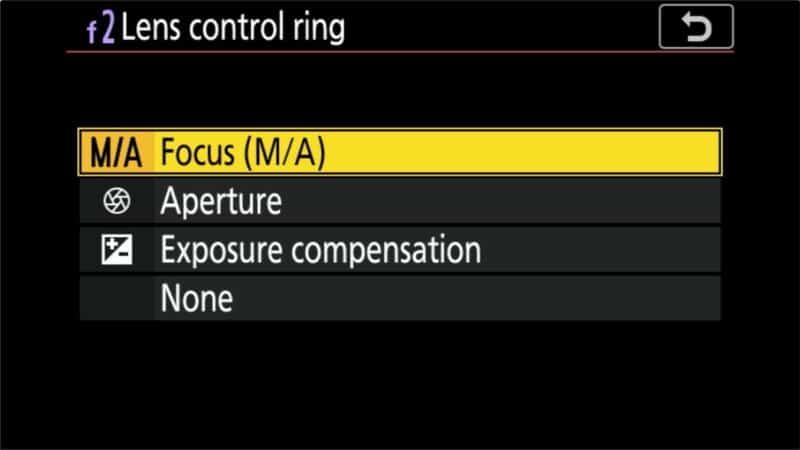
By default, it’s set up to be the manual focus ring. But you can change that; it can also be set to some other settings. The available options are:
- Focus (M/A) (default)
- Aperture
- Exposure Compensation
- ISO Sensitivity
- None (This disables it)
It’s worth mentioning an exception. That is when you’re shooting in manual focus mode (i.e., you’ve flipped the switch on the side of the lens from A to M). In manual-focus mode, the Control Ring will only work as a focus ring.
There’s a second way to end up in the same place: if the camera body itself is set to manual focus, focus is manual no matter which way the switch on the lens is flipped. So if the ring is stubbornly focusing when you’ve assigned it to aperture or ISO, check the camera’s focus mode as well as the lens switch.
How to customize the behavior of the lens Control Ring
If you go looking for how to set that in the lens’s manual, you won’t find it — and that’s not just because you need a magnifying glass to be able to read the manual’s tiny text. The reason is that it’s controlled in the camera’s settings, not with a switch on the lens itself.
For these examples, I’m using the Nikon Z7. It’s the same for the Z6.
You find the setting in two places in the camera’s menu. One assigns the behavior when shooting photos. The other is for shooting video. That means you can set them to different settings for photo and video modes.
Customizing the lens’s Control Ring for shooting photos
You can find the option under:
MENU > Controls > Custom Settings Menu (the pencil icon) > f2 > Custom Control Assignment > Lens Control Ring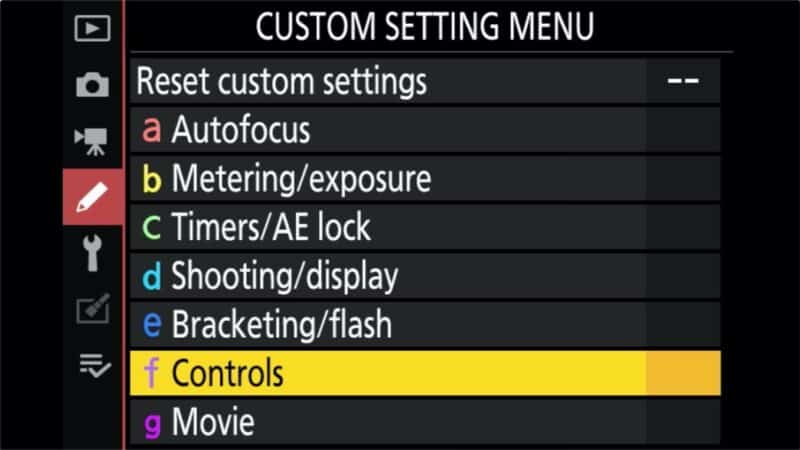
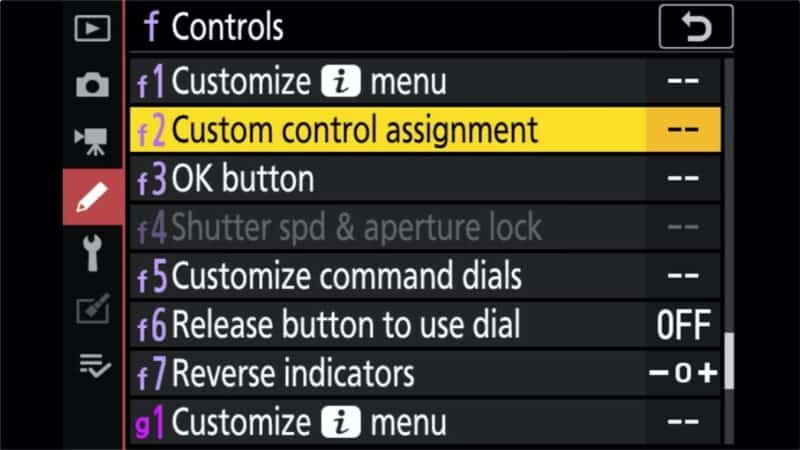
After doing that, the section at left will give you a visual representation of what button or control you’re changing. The section at the right of the menu screen is a kind of menu system, with an icon for the button or ring and its currently assigned function next to it.
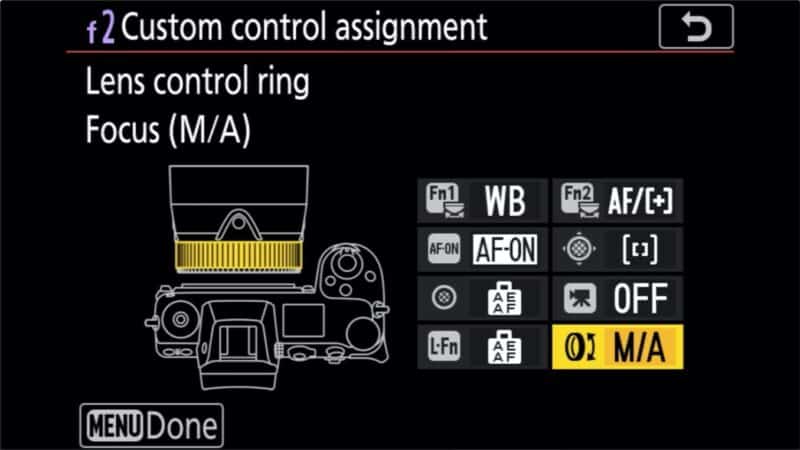
Using the controls on the back of the camera, navigate down to the bottom right icon that has what looks like a ring with a two-headed arrow showing rotation. If this is the first time you’re doing this, it will have M/A for manual/autofocus.
Click OK to open the choices, and then select the one you want to apply.
Once you’re done, press the MENU button on the back of the camera.
One thing to know before you change it: the assignment lives in the camera, not the lens. Set the ring to Aperture and every Z lens you put on that body with a control ring will do the same thing. It’s also an easy ring to nudge by accident with your left hand, which is why some owners leave it on Focus (M/A) or set it to None.
Customizing the lens’s Control Ring for shooting video
It’s basically the same for setting it for video shooting, but it’s a separate menu item. You find it under:
MENU > Movie > Custom Settings Menu (the pencil icon) > g2 > Custom Control Assignment > Lens Control Ring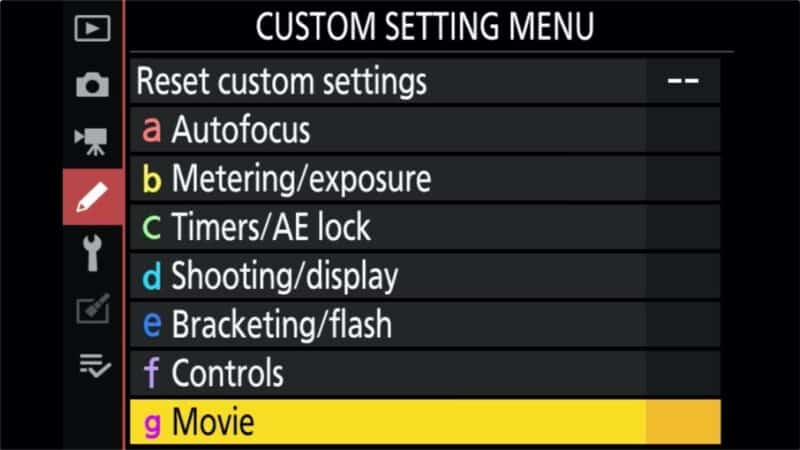
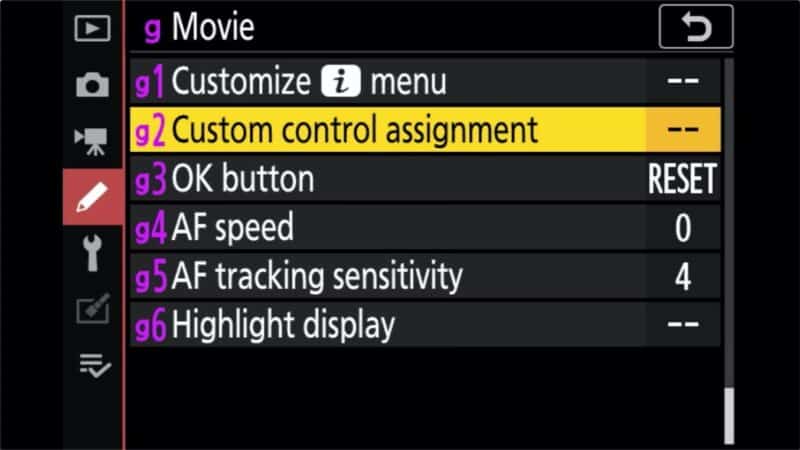
Once again, the section at left will give you a visual representation of what button or control you’re changing. The section at the right of the menu screen is a kind of menu system, with an icon for the button or ring and its currently assigned function next to it.
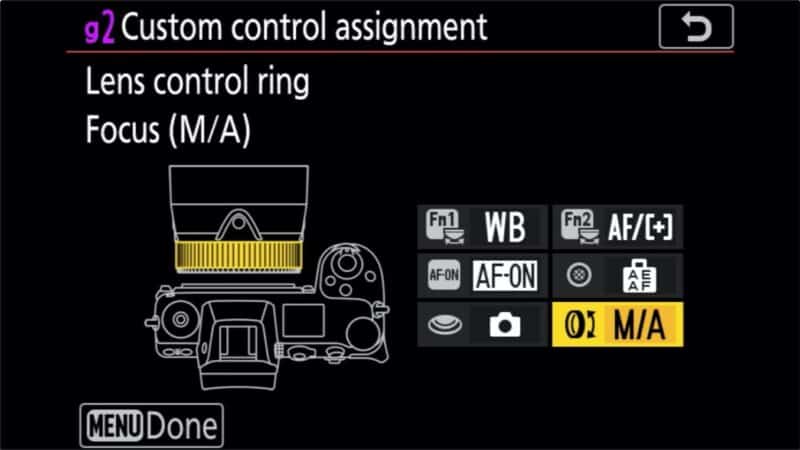
Choose from the available options. One minor difference you might notice is that here it’s called Power Aperture rather than just Aperture in the photo mode.
Q&A about the Nikon NIKKOR Z 24-70mm f/4 S zoom lens
What size lens filters does it take?
The Nikon NIKKOR Z 24-70mm f/4 S zoom lens has a lens diameter of 72mm. So it takes 72mm screw-in filters.
What lens hood does it take?
The lens hood for the Nikon NIKKOR Z 24-70mm f/4 S zoom lens is model HB-85.
What is its minimum focusing distance?
It has a minimum focusing distance of 0.99 ft. (0.3m) from the focal plane. That applies at all zoom positions, but the maximum magnification of 0.30x only comes at 70mm.
What are its maximum and minimum apertures?
It has a maximum aperture of f/4 and stops down to a minimum aperture of f/22, and you can see sample images shot with this lens to get a sense of its rendering.



Hi,
On my Nikon Z7 I use the control ring to modify the aperture, but it is available only in M and A modes (control dial). How to setup the camera to use it in U1, U2 and U3 ?
Thanks for help.
Joel