PRE-RELEASE SPECIFICATION DISCLAIMER (MARCH 2026)
The Nikon Z7 III hasn’t yet been officially released, so this forecast is based on Nikon’s established EXPEED 7 architecture and leaked specifications for high-resolution 2026 sensors. While the data requirements are calculated with confidence based on current N-RAW bitrates, they remain subject to final revision until the official Nikon Z7 III documentation is released. But as you plan ahead for buying the Z7 III, I hope it gives some useful information about what to expect and what to budget for (especially as memory card prices continue to climb!)
The Nikon Z7 III is widely expected to push Nikon’s high-resolution series into the 8K RAW era. With a sensor expected to exceed 60 megapixels, the data payload generated by this camera is staggering. Simply carrying over your older memory cards will likely cripple the camera’s most advanced features.
Preparing for a camera of this caliber means moving away from “peak” marketing speeds and looking strictly at sustained write capabilities. Here is what you’ll need to keep the Z7 III’s buffer clear and ensure that 8K video shooting runs smoothly.
Which Z7 Generation are you shooting? If you’re shooting with a current model, please see my verified guides here:
– Nikon Z7 II Memory Card Recommendations
– Nikon Z7 Memory Card Recommendations
Nikon Z7 III quick recommendations
Slot 1 (primary): CFexpress Type B
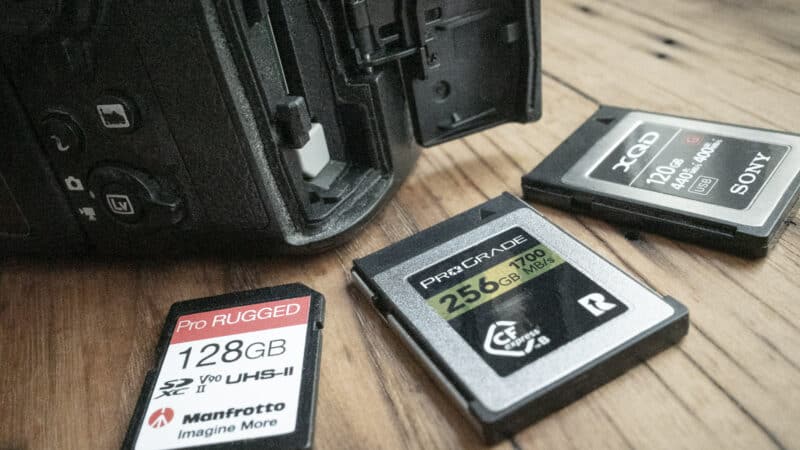
CFexpress cards have been evolving quickly. A recent evolution has been from CFexpress 2.0 to CFexpress 4.0. While most cameras still have a CFexpress 2.0 interface, the spec is designed to be backward compatible, so 4.0 cards will work in 2.0 devices (at 2.0 speeds). That's especially pertinent because many of the memory card makers are upgrading their lines to 4.0, making 2.0 cards harder to find in stores.
ProGrade Digital Iridium CFexpress 4.0 Type B (VPG400)
- Card Type: CFexpress 4.0 Type B
- VPG Rating: VPG400
- Maximum Read Speed: 3550 MB/s
- Sustained Write: 850–1500 MB/s (capacity dependent)
- Storage Capacities: 400GB, 800GB, 1.6TB
Check current price and availability at:
Delkin Devices BLACK CFexpress 4.0 Type B (VPG400)
- Card Type: CFexpress 4.0 Type B
- VPG Rating: VPG400
- Maximum Read Speed: 3700 MB/s
- Minimum Sustained Write: 2040 MB/s
- Storage Capacities: 512GB, 1TB, 2TB
Check current price and availability at:
Lexar Professional DIAMOND CFexpress 4.0 Type B
- Card Type: CFexpress 4.0 Type B
- VPG Rating: VPG400
- Maximum Read Speed: 3700 MB/s
- Minimum Sustained Write: 3200 MB/s
- Storage Capacities: 128GB, 256GB, 512GB, 1TB
Check current price and availability at:
Angelbird AV PRO SE CFexpress B — CFexpress 4.0 Type B (MK2)
- Card Type: CFexpress 4.0 Type B
- VPG Rating: not published (Angelbird uses sustained-write specs)
- Maximum Read Speed: 3700 MB/s
- Sustained Write: 500–3500 MB/s (capacity dependent)
- Storage Capacities: 256GB, 512GB, 1TB, 2TB, 4TB
Check current price and availability at:
SanDisk Extreme PRO CFexpress 4.0 Type B
- Card Type: CFexpress 4.0 Type B — backward compatible
- VPG Rating: VPG400/800 (128–400GB) · VPG1600 (1TB–4TB)
- Maximum Read Speed: 3700 MB/s
- Storage Capacities: 128GB, 256GB, 400GB, 1TB, 2TB, 4TB
Check current price and availability at:
Lexar Professional GOLD CFexpress 4.0 Type B
- Card Type: CFexpress 2.0 Type B
- Minimum Sustained Write: 3300 MB/s
- Storage Capacities: 128GB, 256GB
Check current price and availability at:
ProGrade Digital Gold CFexpress 4.0 Type B (works in 2.0 cameras)
- Card Type: CFexpress 4.0 Type B
- Maximum Read Speed: 3400 MB/s
- Storage Capacities: 128GB, 256GB, 512GB, 1TB, 2TB, 4TB
Check current price and availability at:
Recommendations checked: August 2026
Slot 2 (secondary): SD UHS-II V90
With a camera this good, you don't want to skimp on a memory card that's too slow to let you use all the camera's features; that's just asking for problems. Here are some good choices that will let you use all the features of your camera.
SanDisk Extreme PRO V90 UHS-II
- Type: SDXC
- Video Speed Class: V90
- UHS Bus Interface Type: UHS-II
- Maximum Read Speed: 310 MB/s
- Storage Capacities: 128GB, 256GB, 512GB, 1TB, 2TB
Check current price and availability at:
SanDisk is probably the best-known of the SD card manufacturers listed here, and the Extreme Pro range is their top model.
One thing to note with SanDisk cards is that they recycle their model names. And in this case, not only are there older cards that carry the Extreme Pro name, but there are also V30 and V60 versions. This is the newest V90 version.
You'll probably find those older versions work just fine — it really depends how far back you go — but you can tell the latest version because it's labeled with both V90 and UHS-II and has 310MB/s read and 304 MB/s write ratings listed on the card itself.
ProGrade Digital SDXC UHS-II V90 300R Iridium
- Type: SDXC
- Video Speed Class: V90
- UHS Bus Interface Type: UHS-II
- Maximum Read Speed: 300 MB/s
- Storage Capacities: 128GB, 256GB, 512GB, 1TB
Check current price and availability at:
ProGrade Digital emerged after corportate upheaval at Lexar several years ago, and they have since built a very well-regarded brand. They cater to the top end of the market. And, having used a number of their cards (and top-notch memory readers) intensively for several years now, I've found them to be excellent.
Lexar Professional 2000x GOLD V90 UHS-II
- Type: SDXC
- Video Speed Class: V90
- UHS Bus Interface Type: UHS-II
- Maximum Read Speed: 300 MB/s
- Storage Capacities: 64GB, 128GB, 256GB
Check current price and availability at:
This is the fastest card in the Lexar Professional line, with a rated write speed of up to 260 MB/s. It's available in sizes from 64GB to 256GB.
Delkin Devices POWER V90 UHS-II SDXC
- Type: SDXC
- Video Speed Class: V90
- UHS Bus Interface Type: UHS-II
- Maximum Read Speed: 300 MB/s
- Storage Capacities: 64GB, 128GB, 256GB, 512GB, 1TB, 2TB
Check current price and availability at:
Delkin Devices have actually been around for years, but a few years ago they overhauled their SD card lineup to make it both clearer and more competitive. The Power range is their fastest line. This card is rated at V90 with UHS-II.
PNY EliteX-PRO90 V90 UHS-II
- Type: SDXC
- Video Speed Class: V90
- UHS Bus Interface Type: UHS-II
- Maximum Read Speed: 300 MB/s
- Storage Capacities: 64GB, 128GB, 256GB
Check current price and availability at:
New Jersey-based PNY have been making very good flash memory for quite some time, and in my own tests I've found this card to be very fast — even slightly faster than the speeds they claim on the box. It comes in storage capacities of 64GB, 128GB, or 256GB.
Angelbird AV PRO SD MK2 V90 UHS-II
- Type: SDXC
- Video Speed Class: V90
- UHS Bus Interface Type: UHS-II
- Maximum Read Speed: 300 MB/s
- Storage Capacities: 64GB, 128GB, 256GB, 512GB
Check current price and availability at:
Angelbird is a relatively new entrant in the memory card game, and they're a boutique manufacturer catering to the very top end of the market. And in my experience, their reputation for excellence is well deserved. These cards aren't always widely available, but they're well worth trying to track down. An interesting tidbit: the branding on the cards is printed directly onto the card so that there's no adhesive to melt when the cards get hot -- and they will get hot, as all cards do when you push them with high-spec cameras like this. There's also a V60 version. It's also very good, but the one I'm including here is their faster V90 card.
Nextorage NX-F2PRO V90 UHS-II
- Type: SDXC
- Video Speed Class: V90
- UHS Bus Interface Type: UHS-II
- Maximum Read Speed: 300 MB/s
- Storage Capacities: 64GB, 128GB, 256GB, 512GB
Check current price and availability at:
I've found the cards from Japanese memory card maker Nextorage to be excellent. But they're not always widely available at retailers in the US.
Recommendations checked: August 2026
Card Reader: ProGrade Digital USB 4.0 CFexpress Type B Reader
Nikon Z7 III compatibility & technical requirements
Based on the EXPEED 7 architecture, we can calculate the projected storage demands. Recording 8K/60p N-RAW (High Quality) pushes roughly 907 MB/s of sustained data. If your card drops below that speed for even a fraction of a second, the recording will fail.
| Z7 III Feature / Codec | Data Rate Requirement | Minimum Required Card |
|---|---|---|
| 8K/60p N-RAW (High Quality) | ~907 MB/s Sustained | CFexpress Type B (VPG-5 / VPG800 capable) |
| 8K/30p ProRes RAW HQ | ~500 MB/s Sustained | CFexpress Type B (VPG400 Minimum) |
| High-Res RAW Burst (15+ fps) | ~1500 MB/s Peak | CFexpress Type B (CFe 4.0 Recommended) |
| 4K/120p H.265 10-bit | ~50 MB/s Sustained | SDXC V60 or V90 |
Slot 1: Using VPG logos as your safety net
When shopping for your primary CFexpress Type B card, the most reliable indicator of performance is the VPG (Video Performance Guarantee) clapperboard logo. Think of this like the V90 or V60 rating on an SD card; it represents a guaranteed minimum sustained write speed that will never drop, even as the card fills up.
One thing to settle before you spend anything: Nikon’s high-end bodies use CFexpress Type B, the larger of the two camera card shapes, and there’s no reason to expect the Z7 III to be different. Type A is a smaller, slower, Sony-only format — it won’t physically fit a Type B slot, so a Type A card is money wasted here no matter how good it looks on paper.
For the Z7 III’s expected 8K/60p N-RAW video, which generates something on the order of 907 MB/s in its data stream, you need a card that can handle that load without a hiccup.
- VPG400 (400 MB/s): This is the current “gold standard” logo. While 400 MB/s sounds lower than the 907 MB/s required for 8K/60p, that certification indicates a floor, not a ceiling. Some VPG400 cards (like the Nextorage NX-B2PRO or ProGrade Iridium) actually sustain speeds well over 1,500 MB/s in real-world use.1
- VPG800 / VPG1600 (The New Standard): As of early 2026, we are seeing the first cards with these higher certifications. A VPG800 logo guarantees a floor of 800 MB/s, which is actually just shy of the 907 MB/s figure above — though the cards carrying that badge sustain far more than their floor in practice. VPG1600 clears the 8K/60p N-RAW number outright. Ditto on the rarer cards that carry the VPG1600 certification.
There’s a catch with the new badges that the numbers don’t hint at. VPG800 and VPG1600 are defined in the CompactFlash Association’s VPG Profile 5, which is not backward compatible with the Profile 4 that defines VPG400 — the CFA states plainly that VPG800 and VPG1600 cards will not guarantee VPG200 and VPG400 performance. So a camera mode that specifically looks for VPG400 may not accept a VPG800 card unless that card was certified for both and prints both logos, which is exactly why Nextorage makes a point of its NX-B2PRO+ carrying VPG1600 and VPG400 together.
Bottom Line: For the Z7 III, treat the VPG400 logo as the most reliable shortcut to a card that won’t stall. It isn’t a hard requirement, though: VPG certification is voluntary, and plenty of fast cards were simply never submitted for it. What the camera needs is the sustained write speed; the badge is just the guarantee that you’ll get it.
If it has the VPG400 logo, then look for a minimum sustained write speed of at least 1000 to 1300 MB/s.2
If you want total peace of mind for high-frame-rate 8K RAW, step up to a card with a proven sustained write speed comfortably above 1,000 MB/s, such as the Nextorage NX-B2PRO, which maintains a staggering 3,400 MB/s regardless of its VPG label.
Should you buy a CFexpress 4.0 card for the Z7 III?
The CFexpress market is currently transitioning from the older 2.0 spec to the newer, twice-as-fast 4.0 spec. The two generations look almost identical — the one outward difference is a small 4 printed beside the CFexpress logo on a 4.0 card — so navigating this shift is a chance to future-proof your kit and save money if you know what to look for.
While we won’t know for certain if Nikon will upgrade the Z7 III’s internal hardware to the PCIe Gen 4 standard until the official release, the buying strategy remains the same regardless of what slot the camera ultimately features.
The CFexpress standard is perfectly backward compatible. If the Z7 III utilizes a standard 2.0 slot (like the current Z8 and Z9), a 4.0 card will simply throttle down to 2.0 speeds and work flawlessly. If Nikon surprises the market with a 4.0 slot to handle that massive 8K data payload, a 4.0 card will ensure you are utilizing the camera’s absolute maximum buffer clearance.
In a perfectly logical market, you’d just buy the cheapest 2.0 card you could find to save cash. But the market is currently shifting. Because manufacturers are aggressively changing their production lines to the new standard, newer 4.0 cards are sometimes actually cheaper and more readily available than the legacy 2.0 cards they replaced. In a market distortion due to algorithmic pricing based on the limited availability of legacy stock, older 2.0 cards frequently show up at massively inflated prices.
The rule of thumb is to look at the sustained write speeds and go with whatever is cheaper, regardless of whether the label says 2.0 or 4.0. If you spot a 4.0 card for the same price or cheaper than its 2.0 equivalent, grabbing the newer version is a fantastic win. You keep extra money in your pocket today, you guarantee the bandwidth required for 8K video, and you unlock drastically faster desktop offload speeds when you get back to your desk (provided you pair it with a USB 4.0 memory card reader).
The dual-slot bottleneck trap
Whether you take a performance hit depends entirely on how you set the role played by the card in Slot 2. This applies to any dual-slot Nikon body.
If you use Overflow, the camera utilizes the full speed of the CFexpress card first. However, if you set it to Backup — writing the same file to both slots — the camera can only clear its buffer as fast as the slowest card. Pair a fast CFexpress card with a standard UHS-I SD card, and your high-speed camera will lock up almost instantly as the buffer bottlenecks. Because even the fastest UHS-II SD cards simply can’t keep pace with newer CFexpress cards.
It’s worth putting numbers on that gap. The UHS-II bus tops out at 312 MB/s, and real UHS-II SD cards write somewhere in the 120 to 260 MB/s range depending on grade — a V90 card only guarantees a 90 MB/s floor. Set against a CFexpress card sustaining well over 1,000 MB/s, the SD card in Slot 2 is the one setting the pace in Backup mode, by a wide margin.
Note for wedding & sports photographers
You need the security of a backup, but you can’t afford a frozen camera. If you find yourself hitting the bottleneck in Backup mode, here are some workarounds:
- Use High Efficiency* (HE*) RAW: This Nikon-specific compression significantly reduces file size without a perceptible quality loss, giving the SD card less data to chew on and more headroom in working with the camera’s buffer.
- Shoot RAW + JPEG: Send the RAW to Slot 1 and a high-quality JPEG to Slot 2. JPEGs are small enough that even mid-range SD cards can usually keep up.
- The DX Mode Buffer Hack: Dropping to DX mode reduces the resolution, creating more room in the buffer and buying you more time before the bottleneck kicks in.
Notes & References:
- There are two versions of the Prograde Iridium CFexpress Type B card. One has a sustained write speed of 800 MB/s; the other has a sustained write speed of 1500 MB/s. Go for the 1500 one. In both cases, the sustained write speed is labeled on the front of the actual card (Sus.W). The VPG400 logo is simply the highest certification level they’ve officially cleared. So don’t only look for the VPG400 logo — you should also look at the sustained write speeds (which is not the same as the “max speed” that many cards boast on their labels). [↩︎]
- That’s the rule of thumb, but the technicalities get a bit more complicated than that. While a VPG400 logo officially guarantees only 400 MB/s, it is often used as a baseline reliability indicator rather than a performance ceiling. High-end cards built with pSLC (pseudo-Single Level Cell) architecture — such as the Nextorage NX-B2PRO or Delkin BLACK — carry the VPG400 logo to ensure compatibility with older camera firmware handshakes, yet they are physically engineered to sustain write speeds between 1,500 MB/s and 3,400 MB/s. For a high-resolution camera like the Z7 III, the VPG logo serves as the “insurance policy” for data integrity, while the manufacturer’s sustained speed rating provides the “bandwidth” required for 8K/60p N-RAW. Avoid cards that carry a VPG400 logo but list a sustained speed of only 400–600 MB/s; regardless of their memory architecture, they lack the bandwidth for high-bitrate 8K recording and will likely fail. [↩︎]