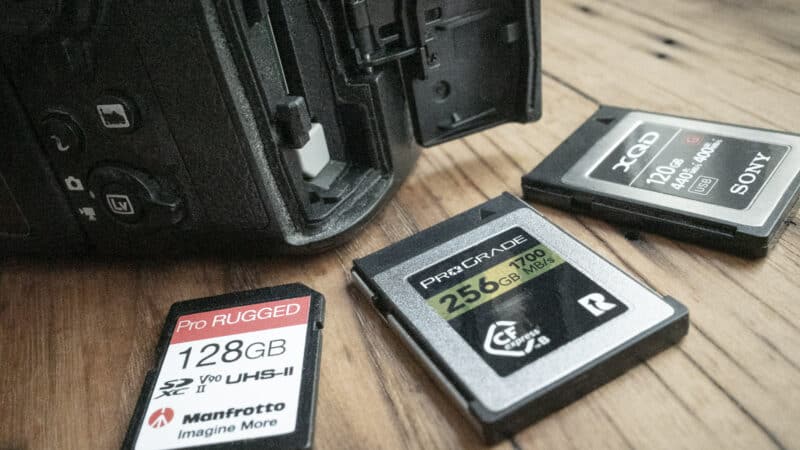
When choosing a memory card for the original Nikon Z7, there is a specific hardware transition you need to account for. The camera was released back in 2018 with a single card slot designed exclusively for XQD cards.
However, modern workflows demand much faster storage to handle the camera’s massive 45.7-megapixel RAW files. Today, the most effective way to run this camera is by utilizing a firmware update that unlocks compatibility with modern CFexpress Type B memory cards. This guide breaks down the hardware limits, the firmware quirk, and exactly which cards provide the best value without overpaying.
Archival Note: Which Z7 Generation are you shooting?
This guide refers specifically to the original Nikon Z7 (single slot).
If you are shooting with a newer generation, they have entirely different hardware limits and speed requirements. Please see my specific guide for the Nikon Z7 II (or any future iterations).
Related: current firmware versions and the step-by-step update procedure are in my Nikon Z7 and Z7 II firmware guide.
Requirements & the CFexpress opportunity
According to the official documentation, the camera can be used with both XQD and CFexpress Type B memory cards. For standard movie recording, cards with write speeds of 45 MB/s or better are required to prevent interrupted playback.
CFExpress Type B is a modern inclusion that was not printed in the original manual. Compatibility with CFexpress cards was added to the Z7 via a firmware release (v.2.20) long after the camera launched. Because the physical form factor and pin layouts of the cards are identical, both types fit securely into the same slot without any physical hardware modifications.
While the Z7’s 4K/30p video demands are relatively low (requiring only about 18 MB/s sustained), the real bottleneck with this camera is high-resolution photography. At 45.7 megapixels, an uncompressed 14-bit RAW file sits around 90MB. If you shoot a 9 fps burst with an older XQD card, the camera’s internal buffer will quickly fill up, locking up the camera while it slowly writes to the card. Here is how modern media changes the performance:
| Media Type | Typical Peak Write Speed | Real-World Z7 Performance impact |
|---|---|---|
| Legacy XQD | ~400 MB/s | Buffer clears slowly; camera locks up during long 45MP bursts. |
| CFexpress Type B | 1200+ MB/s | Buffer clears nearly instantaneously; zero friction during bursts. |
Should you buy a CFexpress 4.0 card for the Z7?
The CFexpress market is currently transitioning from the older 2.0 spec to the newer, twice-as-fast 4.0 spec. Because the cards look identical, navigating this shift is a great opportunity to save money if you know what to look for.
The Nikon Z7 is a CFexpress 2.0 camera. It physically lacks the PCIe Gen 4 hardware required to hit the newer 4.0 speeds. This is a hardware limitation that cannot be changed with a firmware update.
Because the CFexpress standard is backward compatible, you can put a bleeding-edge 4.0 card into the Z7 and it will work flawlessly. The camera simply throttles that card down to 2.0 speeds. While you won’t see an in-camera performance bump from a 4.0 card, this backward compatibility opens up some excellent opportunities for smart buying.
In a perfectly logical market, you’d just buy the cheapest 2.0 card you could find. But the market is currently shifting. Because manufacturers are aggressively changing their production lines to the new standard, newer 4.0 cards are sometimes actually cheaper and more readily available than the legacy 2.0 cards they replaced. In a market distortion due to algorithmic pricing based on the limited availability of legacy stock, older 2.0 cards frequently show up at massively inflated prices.
The rule of thumb is to look at the sustained write speeds and go with whatever is cheaper, regardless of whether the label says 2.0 or 4.0. If you spot a 4.0 card for the same price or cheaper than its 2.0 equivalent, grabbing the newer version is a fantastic win. You keep extra money in your pocket today, and you unlock drastically faster desktop offload speeds when you get back to your desk (provided you pair it with a USB 4.0 memory card reader).
Because the Z7 is primarily a photography camera, you do not need to overpay for ultra-premium cinema-grade cards. Here are excellent, highly-rated options that easily clear the camera’s burst bottleneck, including both standard 2.0 cards and their modern 4.0 replacements:
CFexpress cards have been evolving quickly. A recent evolution has been from CFexpress 2.0 to CFexpress 4.0. While most cameras still have a CFexpress 2.0 interface, the spec is designed to be backward compatible, so 4.0 cards will work in 2.0 devices (at 2.0 speeds). That's especially pertinent because many of the memory card makers are upgrading their lines to 4.0, making 2.0 cards harder to find in stores.
ProGrade Digital Iridium CFexpress 4.0 Type B (VPG400)
- Card Type: CFexpress 4.0 Type B
- VPG Rating: VPG400
- Maximum Read Speed: 3550 MB/s
- Sustained Write: 850–1500 MB/s (capacity dependent)
- Storage Capacities: 400GB, 800GB, 1.6TB
Check current price and availability at:
Delkin Devices BLACK CFexpress 4.0 Type B (VPG400)
- Card Type: CFexpress 4.0 Type B
- VPG Rating: VPG400
- Maximum Read Speed: 3700 MB/s
- Minimum Sustained Write: 2040 MB/s
- Storage Capacities: 512GB, 1TB, 2TB
Check current price and availability at:
Lexar Professional DIAMOND CFexpress 4.0 Type B
- Card Type: CFexpress 4.0 Type B
- VPG Rating: VPG400
- Maximum Read Speed: 3700 MB/s
- Minimum Sustained Write: 3200 MB/s
- Storage Capacities: 128GB, 256GB, 512GB, 1TB
Check current price and availability at:
Angelbird AV PRO SE CFexpress B — CFexpress 4.0 Type B (MK2)
- Card Type: CFexpress 4.0 Type B
- VPG Rating: not published (Angelbird uses sustained-write specs)
- Maximum Read Speed: 3700 MB/s
- Sustained Write: 500–3500 MB/s (capacity dependent)
- Storage Capacities: 256GB, 512GB, 1TB, 2TB, 4TB
Check current price and availability at:
SanDisk Extreme PRO CFexpress 4.0 Type B
- Card Type: CFexpress 4.0 Type B — backward compatible
- VPG Rating: VPG400/800 (128–400GB) · VPG1600 (1TB–4TB)
- Maximum Read Speed: 3700 MB/s
- Storage Capacities: 128GB, 256GB, 400GB, 1TB, 2TB, 4TB
Check current price and availability at:
Lexar Professional GOLD CFexpress 4.0 Type B
- Card Type: CFexpress 2.0 Type B
- Minimum Sustained Write: 3300 MB/s
- Storage Capacities: 128GB, 256GB
Check current price and availability at:
ProGrade Digital Gold CFexpress 4.0 Type B (works in 2.0 cameras)
- Card Type: CFexpress 4.0 Type B
- Maximum Read Speed: 3400 MB/s
- Storage Capacities: 128GB, 256GB, 512GB, 1TB, 2TB, 4TB
Check current price and availability at:
Recommendations checked: August 2026
The legacy option: XQD
If you already own XQD cards, or if the rest of your desk workflow (readers, laptops) is strictly tied to the older XQD standard, they are still fully functional for 4K video and standard single-shot photography. There is no practical reason to buy a new one today, but there’s no need to throw away the ones you already own.
Things worth knowing (firmware & readers)
The Firmware Catch: If your Z7 is somehow still running firmware older than version 2.20, it will not recognize a CFexpress card. You will need an XQD card — at least temporarily — to copy the firmware update file into the camera to run the upgrade. The original Z7 does not support firmware updates wirelessly from the SnapBridge app.
The Formatting Quirk: When you go to format your new CFexpress memory card using the camera’s yellow setup menu, it will still say “Format XQD card” even after the firmware upgrade. This is just a menu text oversight by Nikon and does not affect the actual formatting process.
Always format the card directly in the camera rather than on your computer. If you format the wrong card in the field, stop shooting immediately. Because the camera performs a high-level format that wipes the directory but leaves the data intact, you can usually recover your deleted photos later.


If your card throws read errors over time, you should connect it to your computer and execute a full format instead of a quick format using a dedicated utility tool to deeply restore the flash memory.
Memory card readers
A CFexpress Type B card will physically fit perfectly into an older XQD card reader, but it will not mount on your computer unless the reader’s internal hardware is explicitly cross-compatible. Do not assume an old XQD reader will work.
ProGrade Digital makes high-end, reliable readers, including an XQD/CFexpress B reader with a Thunderbolt 3 connection that handles both protocols smoothly.



first you need a XQD card to update the firmware, then you can use a CFexpress type B
Good point. Note added. Thanks for the suggestion.