
Some of Nikon’s Z mirrorless cameras have a dedicated AF-ON button on the back that is preprogrammed for back-button focus.
But in keeping with its minimalist and retro aesthetic, the Nikon Zf doesn’t have that button.
It does, however, have an AE-L/AF-L button. By default, that is assigned the role indicated on its label: locking auto exposure and autofocus. But you can easily repurpose that button for AF-ON.
It’s a quick two-step process. Here’s how to do it.
Back button focus assigns the camera’s focus function to a button on the back of the camera so that it’s separate from the shutter release button. This allows you to control focusing independently from taking the picture, which gives more control and flexibility for framing the shot. It’s particularly useful in genres like sports and wildlife photography, where maintaining focus on moving subjects is crucial, but I find it incredibly useful for almost any shooting situation. It’s one of the first things I set up with a new camera.

Step 1: Enable AF-ON focus only
By default, the Nikon Zf can autofocus in two ways: by half-pressing the shutter and by using the AF-ON button (assigned by default to a lens button, if that’s available on that particular lens).
But you can disable the autofocus function from the shutter button. Like many photographers, I much prefer to have them separate, and find autofocusing from the shutter button to be a real inconvenience when reframing the shot.
So the first step here is to disable the autofocus role of the shutter button. To do that, go to:
Custom Settings Menu (pencil icon) > a Focus > a6 AF Activation
By default, it’s set to Shutter/AF-ON, which displays on the screen as ON.
To disable the shutter button functionality for focus, change that setting to AF-ON only.

When you go back a level in the menu, the a6 AF activation option will now show as OFF.
Step 2: Reassign the AF-ON button to the AE-L/AF-L button
That’s the first part done. The next step is to reassign the function of the AE-L/AF-L button itself. To do that, we use the Custom Controls.

Drill down to:
Custom Settings Menu (pencil icon) > f Controls > f2 Custom controls (shooting)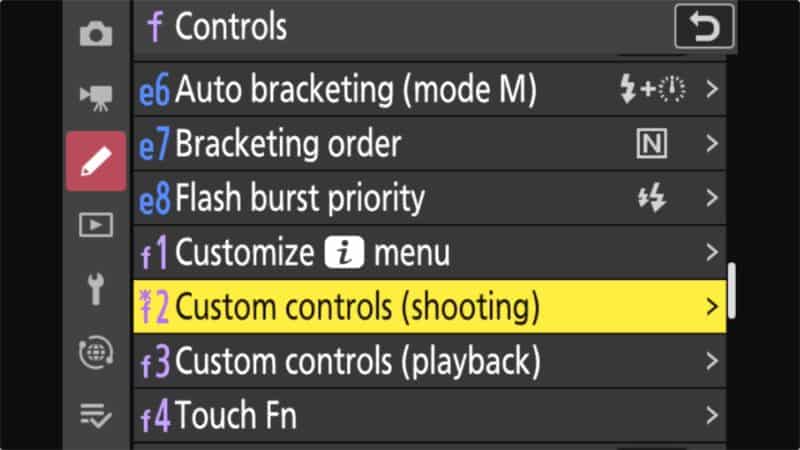
Then you want to click right to the AE-L/AF-L button. You’ll also see it highlighted in yellow in the camera diagram at the left of the screen.

Click OK on that, and then scroll up on the menu until you get to AF-ON.

Select that, and back out by pressing the MENU button.
But what if you want the AE-L function?
Doing this, of course, will mean that the AE-L/AF-L button will no longer work for locking the exposure.
But being able to lock the exposure can be useful in lots of different shooting scenarios. An obvious example is taking the exposure of a subject’s face and then wanting to lock that value as you reframe the photo. Without exposure lock, the camera might recalculate the exposure based on the background or some other bright element in the frame.
I don’t tend to use the AE-L function all that much, but it’s still useful to have available. So what I’ve done is reassign the front Fn button on the camera, which is easily reached with the right-hand fingers when shooting.
You could, of course, choose just about any other control on the camera — that’s the beauty of the ability to customize the functionality of the camera’s controls and buttons (and the lens’s, if you have a lens with a Fn button and/or a customizable utility ring).
An alternative approach
There is, of course, an alternative approach that uses a different technique to get a similar outcome, but does so without reassigning controls.
That is to keep the existing functions as they are and use them as a back-button focus lock override rather than as a back-button focus.
What I mean is that you can still use the shutter button half-press to focus, then lock that focus point in place with the AE-L/AF-L button, reframe the photo while still holding the AE-L/AF-L button, and press the shutter as normal. So long as you haven’t released the AE-L/AF-L button, the shutter button won’t refocus.






This solves my problem (wanting to use Zf focusing as I did with my Fujifilm XT5, i.e., camera on manual focus mode, back button set to autofocus). Your approach allows the Zf to work like my XT5 but (you didn’t mention this) I have to set the Focus Mode to AF-S, and the AF-area Mode to Single-point AF.
I am playing around with other options for back button focusing on the Zf. For instance, keeping Focus Mode on AF-S but AF-area mode to Wide, allows subject detection and focus/recompose.
Anyway, your approach has given me a few options, more than I knew before. Thanks.
Hi. I’m going to use back button focus as you suggest on my Zf. Is there a way to quickly disable it if I hand my camera to someone not familiar with back button focus? Thank you.
Good question, but I’m not sure there’s a quick shortcut to restoring it that doesn’t go through the whole process in reverse.
When I’m in that situation, I just show them that “this button does the focus,” and it usually goes smoothly.