. Photo by David Coleman - havecamerawilltravel.com

How the Nikon Zf’s Dual Memory Card Slots Actually Work

The Nikon Zf pairs a full-size SD slot with a smaller microSD slot, and how you configure them affects more than storage. Here's how to set overflow, backup, and RAW/JPEG splits properly, plus a backup-mode setting that can silently stop 4K60p video recording.

Screenshot of Nikon Zf Menu System for Battery Health Check

How to Know When It’s Time to Replace Your Nikon Zf Battery

Like other newer Nikon cameras, the Nikon Zf has a built-in battery check feature. This isn't so much about showing how much charge is left in the battery (although it does that). More interestingly, it can tell you when the battery has reached the end of its working life and is ready to be put out to pasture.

Nikon Zf sample images header

A Closer Look at the Nikon Zf in Real-World Light

A collection of real-world Nikon Zf sample images, shot in RAW across the mixed and variable lighting typical of street and travel photography, then lightly processed to show the camera's true output.

Nikon Z f. Photo by David Coleman - havecamerawilltravel.com

From ISO 100 to 64,000: the Nikon Zf Side by Side

The Nikon Zf's native ISO runs from 100 to 64,000 — but what does that look like on an actual sensor? Here are unedited, straight-out-of-camera RAW and JPG samples across that range, with downloadable files for your own side-by-side comparisons.

Nikon Zf High ISO Sample Images

Nikon Zf High ISO Sample Images

Straight-out-of-camera Nikon Zf images from ISO 3200 up to 64,000, shot side by side so you can judge for yourself where the noise becomes a problem — with the native ISO range and full RAW files included.

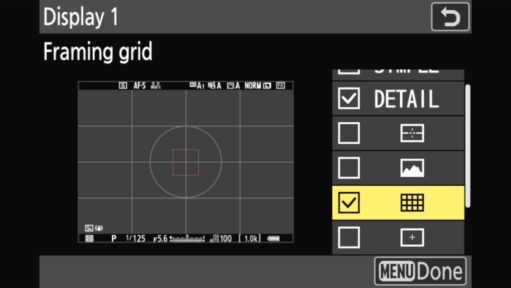
Screenshot of menu system for How to Enable Framing Grids on the Nikon Zf

How to Enable Framing Grids on the Nikon Zf

The Nikon Zf has excellent composition tools, but they are turned off out of the box. From the classic Rule of Thirds to the new vertical video guides added in Firmware v3.00, here is the two-step process to get them on your screen.

Nikon Z f. Photo by David Coleman - havecamerawilltravel.com

Nikon Zf Sensor Cleaning Function

Unlike the Z8, the Nikon Zf exposes its sensor every time you change a lens. Here is how to ensure the ultrasonic cleaning cycle runs automatically to try to keep those pesky dust bunnies from spoiling your shots.

Nikon Z f. Photo by David Coleman - havecamerawilltravel.com

How to Update Nikon Zf Firmware

The new v3.00 firmware adds Film Grain and Bird Detection to your Zf, but you have to install it manually. Here is the step-by-step guide to updating without bricking your camera or losing your settings.

Nikon Z f. Photo by David Coleman - havecamerawilltravel.com

Every Nikon Zf Menu Default, Setting by Setting

Changed a Nikon Zf setting and can't remember the original value? Here's every menu's default for Firmware v3.01, plus the new menu items v3.00 added, so you can roll back just what you need.

Nikon Z f. Photo by David Coleman - havecamerawilltravel.com

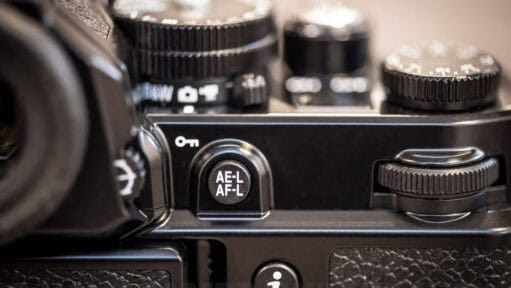
Configuring Back-Button Focus on the Nikon Zf

Back-button focus is one of the most useful ways to configure a camera, allowing you to lock focus and reframe without the camera hunting every time you press the shutter. But because of its minimalist, retro design, the Nikon Zf is missing a dedicated AF-ON button. Fortunately, getting this functionality back is just a quick two-step menu tweak. Here is exactly how to repurpose the Zf's AE-L/AF-L button for focus, and how to configure an alternative button so you don't lose the ability to lock your exposure.

. Photo by David Coleman - havecamerawilltravel.com

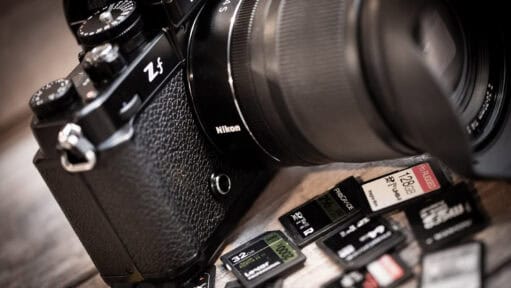
Nikon Zf Memory Cards: Top Picks & the Dual-Slot Trap

The Nikon Zf pairs a fast UHS-II SD slot with a slower UHS-I microSD slot, a mismatch that can quietly cripple your buffer or video recording if you pick the wrong cards. Here are the best cards for each slot and how to avoid the Backup Mode bottleneck.