
Ricoh’s WG-50 is a compact, waterproof camera that Ricoh launched in 2017 at the affordable end of its rugged lineup. It has been replaced several times over since — by the WG-60, WG-70, and WG-80, and the series now carries the Pentax name with the WG-90 — so if you’re looking at a WG-50 today, you’re most likely buying one used or picking up leftover stock cheap. It’s one of several waterproof cameras I’ve spent time with of a type I consider amphibious. That is, they’re designed to be as comfortable in the water as above it and are meant to be cameras you can take the places you want to go.
GoPro has gotten us accustomed to filming in the thick of the action, and other manufacturers have slowly but surely started building that kind of ruggedness into their more feature-rich and reasonably priced offerings. If GoPros and their alternatives are action cams that have made their name with extreme sports, cameras like the WG-50 and Olympus TG-5 might be called adventure cams and are aiming for versatility for travel and everyday adventure.
That, of course, means that they have to be much more rugged than digital cameras traditionally are.
Ricoh rates the WG-50 with several measures of its ruggedness: waterproof down to 45 feet / 14 meters; crushproof up to 220 pounds / 100kg; freezeproof down to 14°F / -10°C; and shockproof if dropped up to 5.2 feet / 1.6 meters. If you look very closely, you can see the tag “adventure proof” inscribed on the top of the camera, and that’s a good summation of what cameras like the WG-50 and Olympus’s TG-5 are aiming for — the kind of camera that can comfortably go where you’re going.
Ricoh is a brand that tries to think outside the box. Their tag, after all, is “imagine. change.” From their GR series, long-time favorites of professional shooters, to their Theta 360° cameras to their WG-M2 action cam, they try to do things a bit differently. Sometimes that results in hits. I’m a big fan of the GR II and Theta S, for instance. But sometimes it can result in misses. Their WG-M2 action cam falls into that miss category for me.
The WG-50 continues that tradition in approaching things a bit differently. While it generally works much like its competitors, it also has a few unusual features that stand out, such as the built-in macro lighting. And as you can see pretty quickly, it tries to set itself apart in its looks. In broad strokes, it hews pretty closely to the conventional compact camera layout, but the design looks like it’s inspired by a Transformers movie, with ostentatious rivets and armor-plating look.
As a package, it’s small enough to fit fairly comfortably in a pocket. It’s narrow, and the lens is tucked back into the body and doesn’t stick out.
Waterproof rating and depth limit
A key feature of this camera, of course, is that it’s waterproof — Ricoh rates it to 45 feet (14 meters) for up to two hours at a time. So it’s worth looking in more detail at what exactly that means.
The WG-50 is rated to be waterproof down to a depth of 45 feet (14 meters). That’s good for water activities near the surface, and even quite a lot of recreational Scuba diving, but there’s also a lot of recreational Scuba diving that can drop below 45 feet, at least temporarily. So if you’re looking to take it to the beach, boating, or snorkeling, there’s no problem. But if you plan on taking it diving, you’ll need to factor in this limit on the camera.
One detail that’s easy to miss: the depth rating comes with a time limit. Ricoh’s spec is 14 meters for up to two hours of continuous operation, not indefinitely. For a day of snorkeling, where you’re in and out of the water, that’s not a practical constraint, but it’s a reminder that the seals aren’t a permanent free pass. And the rating only holds if the battery and port door is properly latched and the seal is clean — sand or grit caught in the door channel is what undoes waterproofing on cameras like this.

Technically, Ricoh rates the WG-50 as equivalent to JIS Class 8 waterproof and JIS Class 6 dustproof capabilities. Those are Japanese ratings (the letters JIS stand for Japan Industrial Standards) that are less commonly used elsewhere than IP (International Protection) ratings. JIS-8 is for gear that is submersible, with it falling to the manufacturer to specify just how submersible (in this case, 45 feet). I haven’t taken it anywhere near that deep, but it has been working well for me at much shallower depths.
Ricoh WG-50 review | shooting photos
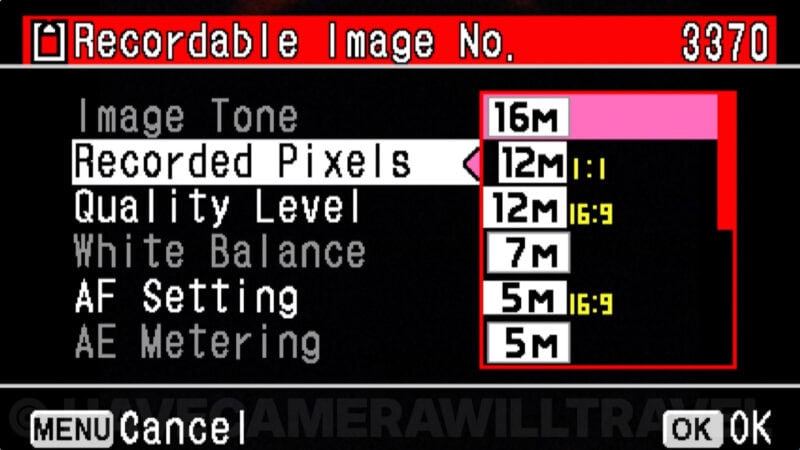
The WG-50 shoots up to 16-megapixel images. You can also choose smaller image sizes if you prefer to maximize storage space. It only shoots JPG — there’s no option for shooting RAW.
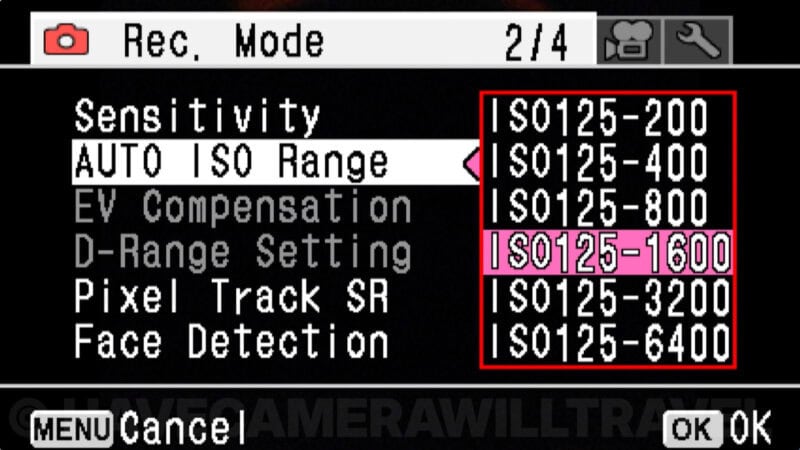
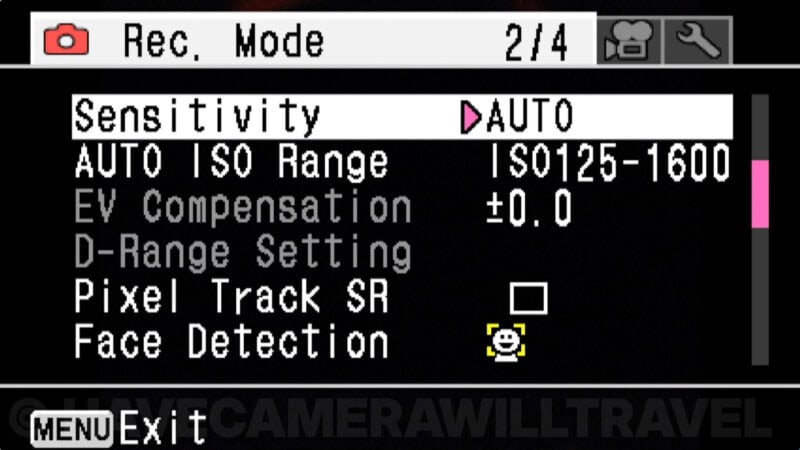
There’s a fairly standard array of features, including multiple focus types, face detection, auto ISO and manual ISO settings, and high-speed continuous shooting (up to 8 frames per second for about 10 frames).
There are several shooting modes, from Auto to HDR to macro to underwater. Most of the time I found it easiest to leave it in the Auto mode — it did a reasonably good job of switching between the modes itself as necessary.
I was particularly intrigued by the underwater mode. Basically, it tries to compensate for the reduced red and orange light you get underwater. But it’s something that only works well if you’re going a reasonable distance underwater, such as diving or snorkeling, and it’s not something you’ll want to forget to turn off. Here’s a practical example of what it does, with the first in normal shooting mode and the second with the underwater mode switched.


Overall, I’ve found the image quality to be quite good in brightly lit scenes. And that is, after all, the kind of bread-and-butter shots of a camera like this. The images have that distinctive look you get from many compact cameras from the combination of a small lens and tiny sensor, so you won’t mistake them for images out of a mirrorless camera or DSLR. But under the right light, you can get good results.
Things go rapidly downhill at the higher ISOs. At a first quick glance, the images look surprisingly noise-free even at the highest ISO. But if you look again, you can see why: there’s some very aggressive noise reduction being applied that, in my opinion, can go way too far in creating its own ugly side effects.
You can see some examples of what I mean here. Take a look at the shot below with the elephant as a good example — it looks like there’s Vaseline smeared over the lens.


Below are a few example photos I’ve shot with the WG-50. I’ll post more sample images separately.


Ricoh WG-50 review | shooting videos
The WG-50 also shoots video, although it has a fairly limited range of options for it. You can choose 1080p30 or 720p60 or 720p30. You can choose whether or not to enable shake reduction, and you can enable an option to suppress wind noise. The video quality isn’t bad, but it’s also not great. If you’re shooting primarily video, you’ll probably be better off looking at something like a GoPro. But the WG-50 is quite capable for occasional video shooting.
Ricoh WG-50 review | zoom
The WG-50 has two zoom modes. I’m most concerned here with the optical zoom, which to me is by far the most important. The other zoom mode, digital zoom, is just glorified cropping. It provides some impressive numbers for marketing, but it doesn’t add more detail as you zoom in, and it’s all handled by software. You can turn the digital zoom on or off, and the amount of digital zoom that’s available depends on the image size you’ve set it to capture. You might also see mention in the docs about “Intelligent Zoom.” That’s not a separate mode — it’s just combining the optical and digital zoom modes.
So in the examples of the zoom range here, I’m focusing on the optical zoom range.
The optical zoom range is rated at 5x. Converted to 35mm equivalent terms, with the lens that’s on this camera, that’s from 28mm to 140mm.
Here’s a visual example of what that looks like in practice:


Here’s another example:


Ricoh WG-50 review | menu & controls
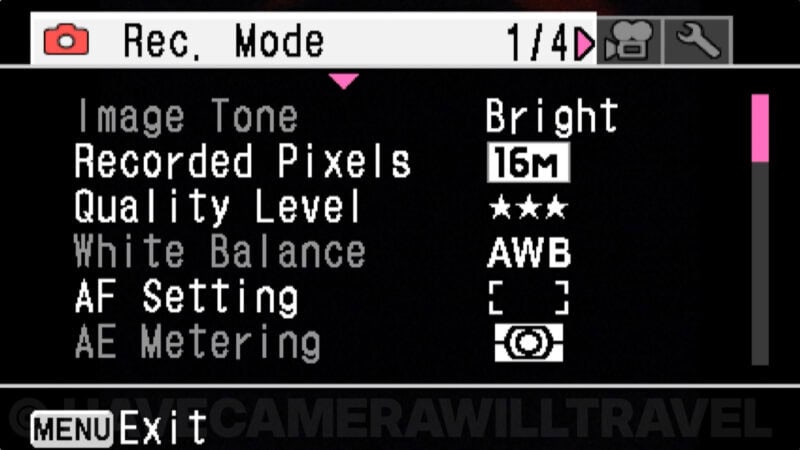
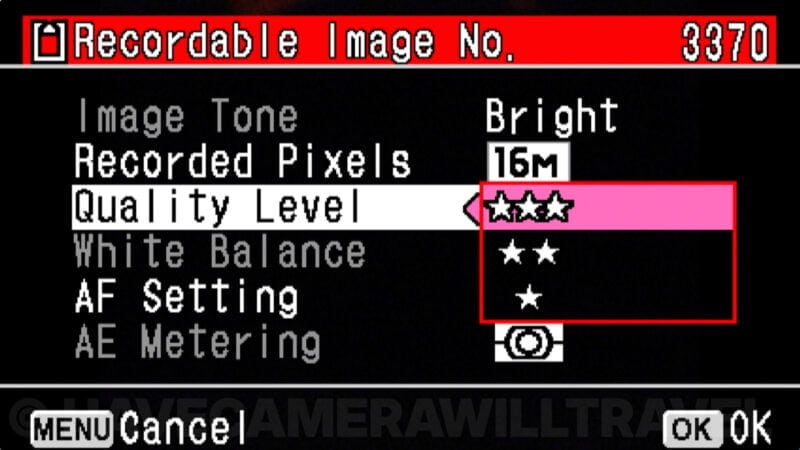
I’ve tried several Ricoh digital cameras over the years, and I’ve never found their menu systems to be a strength. The menu on the WG-50 just confirms this. You can find the options and settings you need, but it’s not especially intuitive, pretty, or even particularly logical to use. But it gets the job done.
The settings are divided up among three tabs: general settings, movie settings, and photo settings.


An example of one of the areas where I think some of the basic menu functionality could be improved is that to move between the different tabs you have to scroll all the way to the top of that list. While I can see the logic behind it, I find that more cumbersome than it needs to be.
The screen on the back is a 2.7-inch LCD screen. It’s not a touchscreen. The display is quite bright — and you can adjust the brightness if you’re shooting in bright light or, for that matter, dark conditions, but the quality of the display isn’t all that good and doesn’t give an especially accurate idea of the final image quality.
Here are a few screen grabs from the menu system:
Ricoh WG-50 review | macro mode
When taking close-up macros, the WG-50 has a neat trick up its sleeve. Since it has a macro mode, it can, of course, focus close. But if you’ve ever tried to take photos of something up very close, you’ll probably have run into the problem of lighting. The camera casts its own shadow that can prevent you from getting a good picture.

The WG-50 helps with this by having a built-in ring-light around the lens. It’s made up of 6 LED lights that surround the lens (those six white dots you see). If you turn on the macro lighting (back menu > Rec. Mode > Macro Light), those turn on. They’re constant lights — not flashes — and they don’t provide much light. But it might be enough to improve the image when you’re shooting a macro subject up very close. They don’t emit enough light to work beyond a few inches away; there’s a separate built-in flash for more traditional on-camera flash.
Ricoh WG-50 review | input and output ports
It has a mini-HDMI and a micro-USB port.
HDMI Output. You can specify the resolution of the HDMI output (under Setting > HDMI Out). Available choices are Auto, 1080i, 720p, 576p, or 480p.
USB Output. You can specify whether the USB port is set up for MSC or PTP. In most cases, you probably want MSC.
There’s no Wi-Fi or Bluetooth on the WG-50, and no GPS either. So those two ports, or pulling the SD card and using a card reader, are the only ways to get images off the camera. If you’re used to newer cameras that push photos straight to a phone app, that’s worth knowing before you take it traveling.

Accessories for the Ricoh WG-50
Ricoh makes some accessories for the WG-50, and there are also some other things that will come in handy.
Memory Card. First, a memory card. By default, it doesn’t come with one, although there are some bundles that retailers put together that include an SD card. So there’s a good chance you’ll have to pick one up separately. The WG-50 is compatible with SD, SDXC, and SDHC cards, from 4GB up through at least 128GB (and beyond). It’s not especially demanding on the speed of the memory card, so you don’t necessarily need the latest and greatest and fastest card available. Something like the SanDisk Extreme is a good combination of reliability, speed, and value for money.
It’s worth noting that if you look at the official specs page it says that the WG-50 takes microSD cards. That’s wrong. It takes the larger SD-sized cards and is compatible with SD, SDHC, and SDXC cards. You can, technically, put a microSD card into an SD-sized adapter, but most of the time that’s not the most logical way to go.
The WG-50 also has a somewhat unusual approach to deleting images and formatting a memory card, so I’ve put together a more detailed guide on that.
Batteries. The standard packaging includes one rechargeable battery. It’s not a huge battery, and you can expect to get somewhere around 300 still photos, give or take, out of a fully charged battery. But there are a bunch of things that impact that battery life, from how much you’re using the back screen, whether you’re mixing in video shooting, and even the outside temperature (lithium batteries perform poorly in very cold temperatures). So a spare battery or two can come in very handy.
For extra batteries, you’re looking for model D-LI92 or equivalent. Pentax/Ricoh makes their own, but you can also pick up aftermarket ones that are priced much more affordably.
Case. The WG-50 comes with a strap and a carabiner clip, but it doesn’t come with a case. Pentax makes one (model no. O-CC135) for this range of cameras, but there’s nothing especially distinctive about it other than being overpriced. There are many other compact camera cases that will work just as well, or better, and are much cheaper.
Remote Shutter Release. Ricoh has three difference wireless remote shutter releases for this camera. Probably the most useful pairing is their waterproof remote.
Questions, quirks, and notes
Macro mode
When you switch to macro mode, the available resolution drops down to 2MP, and the aspect ratio switches to 16:9.
High ISO noise reduction
At high ISOs, an extraordinarily high amount of noise reduction can be applied that can end up being far too aggressive and result in poor-quality images in other ways. Here’s an example (click on it to open a full-size version):

Does it float?
No. If you drop it in the water, it’ll sink quickly. In diving terms, it’s negatively buoyant. You’ll need a separate float for it if you want it to stay on top of the water when you let go.
Screen blackout
One of my least favorite things about the WG-50 is how slow it is between shots. When you take a photo, the screen blacks out for what seems far too long for an adventure camera. It makes it feel very sluggish. You can minimize it by turning off the Instant Review option (Settings > Rec. Mode > 3/4 > Instant Review), but you can’t eliminate it completely.
Does it have RAW mode?
No. The only image format available is JPG. You can capture in different sizes of JPG up to 16MP, and you can choose from three JPG quality settings.
Mounting on a tripod
There is a standard 1/4-20 tripod thread socket on the bottom. There are two things to note about it, though. The first is that it’s on the far right (as you’re holding the camera to shoot). The other is that it’s a plastic thread. That’s probably fine for such a light camera in many settings, but it’s not especially strong if you’re using it in difficult conditions, especially with the extra leverage involved with having the socket on one end of the camera.
Using a wrist strap
On the right side is a place to thread a wide strap, but it doesn’t have one of those small attachment points for lightweight wrist straps. You’ll have to thread it through the larger strap attachment instead.

Back screen
The back screen scratches fairly easily, especially with the kind of uses you’re probably putting a waterproof camera to. A few scratches aren’t going to change the functionality of the camera, but if it’s something that bothers you, you’ll probably want to get a screen protector.
I haven’t tried any specific ones, and I’m not aware of any made specifically for this camera, but you should be able to trim a general one to the right size. In the meantime, the back screen on my camera has gathered some rather prominent scratches on it.
Instruction manual
You can find a PDF version of the WG-50 instruction manual here.
Wrap up
The Ricoh WG-50 is an intriguing option for a go-anywhere, highly portable camera to take along on your next travel or vacation adventure. It handles the basics well enough, and it’ll stand up to the kind of treatment you’re likely to dish out while on the go. Its image quality is good in daylight conditions but much less impressive in low-light conditions.
If you take cost out of the calculation, I think the Olympus TG-5 is a better camera, but it also cost considerably more when the two were new, and factoring that in made the WG-50 the more competitive option. Both have since been discontinued, so if you’re choosing between them now, compare the actual asking prices you’re seeing rather than the old list prices.
In the spectrum of Ricoh’s hits and misses, this one, for me, falls somewhere in the middle. There are certainly some aspects I’d change or improve, but ultimately I’ve been able to get some photos I’m happy with out of it.



Hi can you recommend a underwater selfie stick for snorkelling for the wig-50
Thanks
Pretty much any selfie stick will work well enough, but I’m a fan of floating selfie sticks for something like that. I’ve got a roundup of my favorites here. While that post is aimed primarily at GoPros, it’s a simple and cheap little adapter to make it work with the WG-50 (or any other small camera), and some of them sticks come with it included.
Just been reading through reviews of the WG-50 as I’m looking for a stills camera to handle the rigours of skiing, kayaking, hiking and rock climbing. Your’s is definitely the most positive review of the WG-50 I’ve seen, many recommend the much cheaper Fujifilm XP-120 as being a better camera at a lower price, have you had any experience with this camera to offer your own views on this comparison?
I’ve not really used that one extensively yet, but hope to soon. I’ve taken quick looks at it when traveling with others with them and they seem like good cameras. With the WG-50, there are certainly a number of things I’d change or improve, and it’s not usually the one I find myself reaching for when I need a waterproof camera (with an Olympus TG-5 and GoPros on hand, I’ll usually reach for those instead), but ultimately I’ve been able to get some photos I’m happy with when using it.
Useful info, I’ve got gopros that I use for filming but can’t get by with for stills photography, the TG-5 is just a bit far out of my price range to justify