
Quick Summary
- Nikon hides the shutter count in the EXIF metadata of every photo you take; it isn’t accessible through the camera’s physical menu.
- To find the count, you must use an unedited photo straight from the memory card (editing apps often strip this specific data out).
- Mac Users: You can find the count instantly using the built-in Preview app.
- Windows Users: The fastest free method is to upload an unedited JPG to a site like CameraShutterCount.com.
- Apps like Lightroom will not show you this specific maker-note data.
If you’re buying or selling a used Nikon DSLR, or just trying to figure out if your reliable workhorse is nearing the end of its lifespan, you need to know the shutter count. This number represents exactly how many times the physical, mechanical shutter blades have fired.
Because mechanical parts eventually wear out, the shutter count is the photography equivalent of a car’s mileage. And that’s why many online stores that sell used gear now include the shutter count prominently in the display listing.
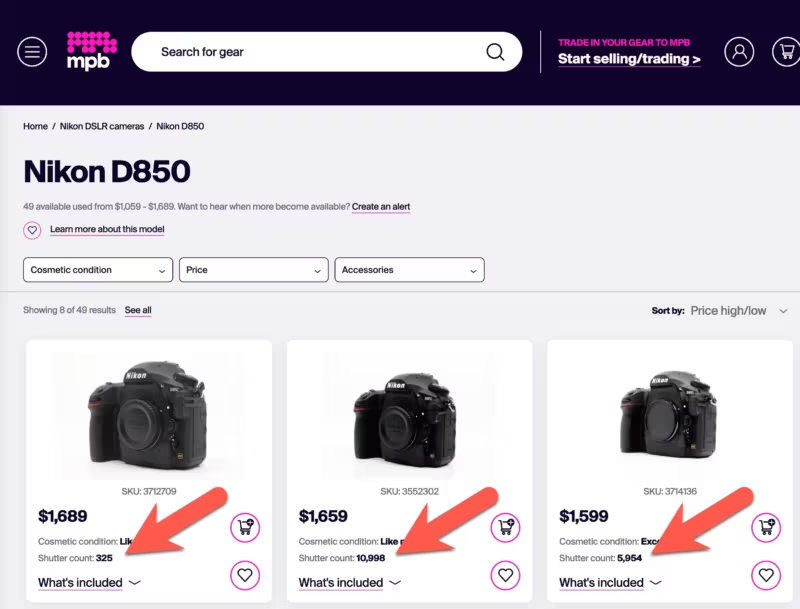
A Nikon D810 with 10,000 actuations is going to command a much higher resale value than one with 250,000.
That’s also a reason to check the number yourself rather than take a seller’s word for it. If you’re buying from a private seller, ask them to shoot a frame and send you the unedited JPG straight off the card — running it through one of the methods below takes about a minute.
There are dozens of ways to dig this number up, but I’m skipping the complex command-line coding and paid software. If you just want a quick, accurate answer for your Nikon DSLR, here are the easiest free methods.
The golden rule: Use an unedited image
Before you start, you have to know where Nikon hides this information. You won’t find the shutter count anywhere in the camera’s menu system. Instead, Nikon embeds the exact shutter count into the EXIF metadata of every single photo the camera takes.
Because it’s hidden in the “Maker Notes” section of the metadata, there is one crucial rule to making this work: you must use an unedited image taken straight from the camera.
If you import a photo into Lightroom, edit it, and export a new JPG, the software will often strip out those proprietary Maker Notes to save file space. Your safest bet is to pop the SD or CF card out of your camera, plug it into your computer, and copy a single, unedited JPG right off the card.
One more thing about the file you pick: the number stored in it is the count as of the moment that frame was taken, not today’s total. A photo from three years ago will report the count from three years ago, which is a common way people end up with a number that looks reassuringly low. Shoot a fresh frame, copy it straight off the card, and check that one.
How to check your Nikon shutter count: Free methods for Mac & Windows
On Mac: The built-in Preview app
If you use a Mac, you don’t need to download anything. Apple’s built-in Preview app can read Nikon’s proprietary metadata perfectly.
- Open your unedited image in the Preview app.
- Go to
Tools > Show Inspector(or use the keyboard shortcutCMD + i). - In the small pop-up window, click the
itab (the circle with the “i” inside it). - Click on the Nikon tab.
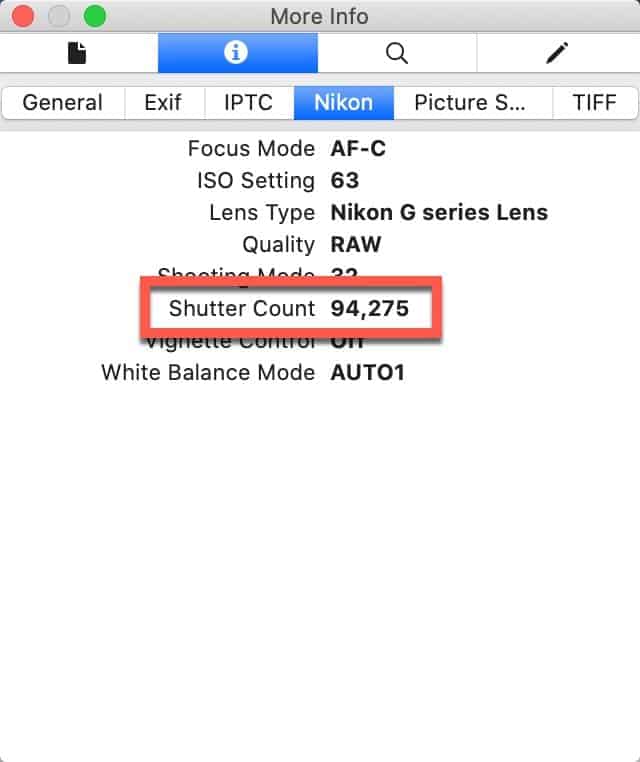
Scroll down near the bottom of that list, and you’ll see the exact Shutter Count. In the example above, my old D810 had fired 94,275 times.


On Windows: Free web services
Unlike macOS, Windows doesn’t natively parse Nikon’s Maker Notes in its default photo viewers. While you can download free third-party software like IrfanView or Opanda IExif, the absolute fastest way is just to use a free browser-based reader.
I highly recommend CameraShutterCount.com. It’s very straightforward and, crucially, it doesn’t have restrictive file size limits, so you can upload a heavy NEF file from a D850 if you don’t happen to have a JPG handy.
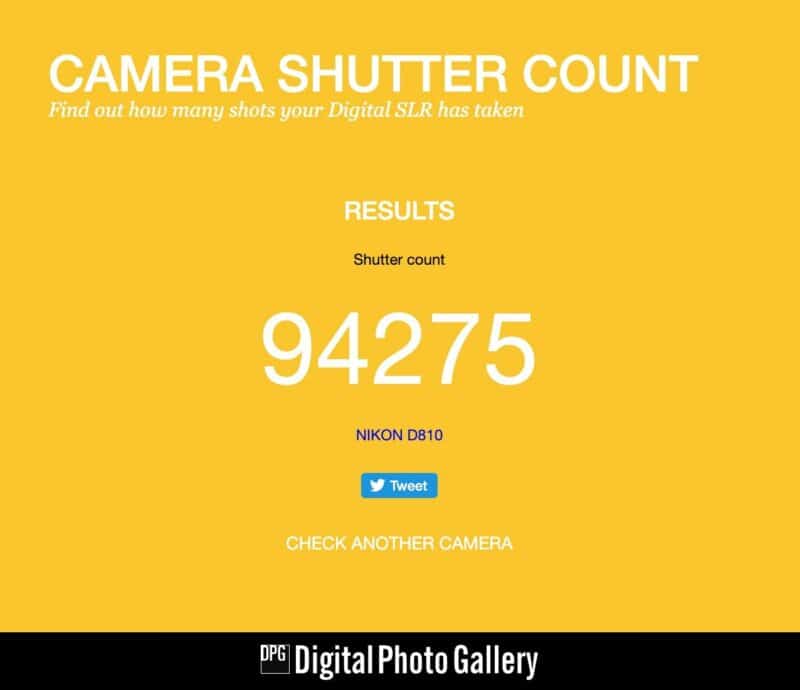
You simply choose the file from your memory card, hit upload, and the site spits out the exact number.
What doesn’t work: Adobe Lightroom
It catches a lot of photographers off guard, but you can’t find the shutter count inside Lightroom Classic. Even if you expand the Metadata panel to show “All EXIF,” the shutter count won’t be there. Adobe intentionally ignores the Maker Notes section of the file when importing, which is why you have to use the direct-from-card methods above.
On any platform: ExifTool
If you’re comfortable with the command line — or want a method that works the same on Mac, Windows, and Linux without uploading your photo anywhere — ExifTool reads the count directly. With an unedited photo straight from the card:
exiftool -ShutterCount myphoto.nefIt works on both Nikon DSLRs and Z-series bodies. I cover how to install ExifTool and check shutter counts with it — including the electronic-vs-mechanical shutter wrinkle on newer bodies — in a separate guide.
Nikon shutter life ratings: How many actuations is a lot?
Once you find your number, the immediate question is always: Is that a lot?
It depends entirely on the tier of the camera. Entry-level bodies use smaller, lighter shutter mechanisms, while flagship pro bodies use Kevlar-reinforced blades designed to withstand years of rapid-fire sports abuse.
While Nikon doesn’t guarantee a camera will die right at these numbers (many cameras easily double their life expectancy), here are the official “tested to” mechanical shutter ratings for their most popular DSLRs:
- Entry-Level (100,000 actuations): D3300, D3400, D3500, D5500, D5600
- Enthusiast (150,000 actuations): D7000, D7100, D7200, D7500, D600, D610, D750, D780
- Professional (200,000 actuations): D800, D810, D850, D500
- Flagship Sports (400,000+ actuations): D4, D5, D6
Think of these numbers like a 100,000-mile warranty on a car. Hitting the number doesn’t mean the engine explodes; it just means you are entering the territory where wear-and-tear repairs become statistically more likely.


