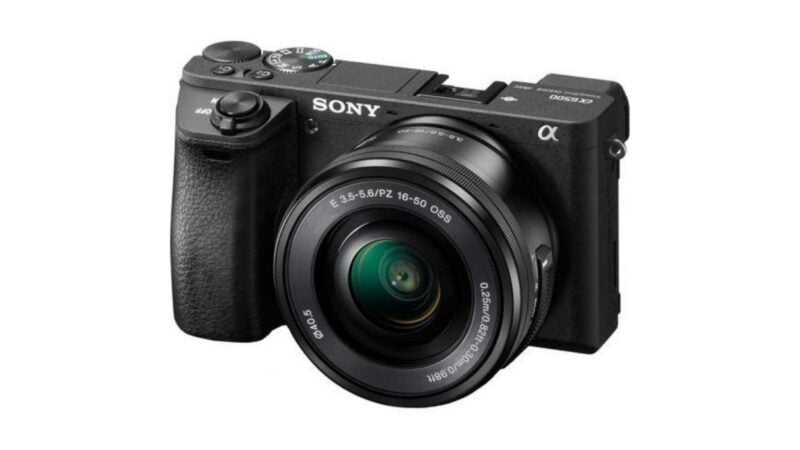
Sony a6500 SD Card Quick Recommendations
If you just want some quick recommendations, here you go.
These SD cards meet the needs of the a6500’s features, have a strong track record of reliability, are readily available, and are usually cost-effective. Any of these makes for a good choice for the a6500, and if you’re after more detail, you can find it below.
- Type: SDXC / SDHC
- Video Speed Class: V30
- UHS Bus Interface Type: UHS-I
- Maximum Read Speed: 230 MB/s
- Storage Capacities: 32GB, 64GB, 128GB, 256GB, 512GB
Check current price and availability at:
- Video Speed Class: V30
- UHS Bus Interface Type: UHS-I
- Maximum Read Speed: 150 MB/s
- Storage Capacities: 64GB, 128GB, 256GB
Check current price and availability at:
- Type: SDXC
- Video Speed Class: V30
- UHS Bus Interface Type: UHS-I
- Maximum Read Speed: Up to 180 MB/s
- Storage Capacities: 128GB, 256GB, 512GB, 1TB
Check current price and availability at:
Recommendations checked: August 2026
You can see some of the photos I’ve taken with the Sony a6500 in these posts:
– Sony a6500 Sample Images (general sample images under different conditions)
– Sony a6500 High ISO Sample Images (focusing on high-ISO images in lower light conditions)
Sony a6500 memory card compatibility & requirements
The a6500 has a single UHS-I SD card slot, and it’s compatible with SDXC, SDHC, and SD cards.
Because that slot is UHS-I only, a UHS-II card will still work in the a6500 — it just falls back to UHS-I speeds, so you’d be paying for bandwidth the camera can’t use. What does matter is the speed class. Sony specifies a UHS Speed Class 3 (U3) card for recording at 100 Mbps or more, which is what the a6500’s fastest XAVC S 4K mode uses. So a U3 (or V30) card is the target, and going faster than that buys you nothing in this camera.
I’m focusing on memory cards that will let you use all of the a6500’s features. It doesn’t make much sense to me to get a memory card that will only let you use some of the a6500’s features.
A memory card is an essential accessory for the Sony a6500. Without it, you’re not going to be able to take many photos or shoot much video. That’s because the Sony a6500 doesn’t have internal memory that is directly user-accessible. (It does technically have internal memory, but it’s used for storing settings and as a buffer for writing data to the memory card.)
The card slot itself isn’t on the side of the camera where you might expect it. It’s in the same compartment as the battery, on the bottom of the body, behind the same door. Opening it won’t drop the battery out, but it does mean that if you’re shooting with an Arca-style plate or an L-bracket, you may have to take the plate off before you can get to the card.
But the Sony a6500 doesn’t come with a memory card as standard. So it’s treated as an optional extra, even though there’s really not much optional about it.


There are some bundles that retailers put together that might include a memory card, but chances are it’s something you’re going to have to pick up separately. Or maybe you want something bigger with larger storage capacity — the cards that are included in bundles are often on the small side and might fill up quickly, especially if you’re on a trip. So which card should you get?
That’s where this post comes in — hopefully, to help you get out shooting sooner and taking full advantage of all the features of your camera rather than spending your time searching the web and trying to make sense of cryptic technical codes.
I’ve been buying and testing numerous SD cards for several years and have put many of the most popular SD cards on the market through their paces. You can find my main SD card tests here.
The Sony a6500 is a 24-megapixel camera in Sony’s Alpha line of APS-C interchangeable lens mirrorless cameras. Like the exceedingly popular a6000, and also the a6400, it combines powerful video and photo capabilities in a surprisingly small and mobile package. It’s a camera I really enjoy shooting with, and you can see some of the photos I’ve taken with it here.
There are several variations when referring to the Sony a6500. You can also see it referred to as the Sony α6500, Sony Alpha 6500, and Sony ILCE-6500. All refer to the same camera.
Sony a6500 SD card recommendations in detail
So which SD card should you get for your Sony a6500? Here’s a more detailed explanation.
The a6500’s instruction manual is pretty confusing when it comes to guidance on a memory card for this camera. That’s partly because it provides different guidance for the various video shooting settings, and partly because it includes Sony’s proprietary Memory Stick format.
I’m also focusing here on Secure Digital (or SD) cards.
The a6500 is also compatible with Sony’s own Memory Stick format cards, but I consider them less useful for three reasons:
- Firstly, they’re not widely available — they’ve just never taken off.
- Secondly, even the top Memory Stick (the Memory Stick PRO-HG Duo) doesn’t work for the highest bitrate video that the a6500 can record.
- And, thirdly, Memory Stick cards tend to be much more expensive gigabyte-for-gigabyte compared with SD cards.
By contrast, it’s quite easy to find SD cards that will work well in the Sony a6500 and allow you to use all of the a6500’s video modes. They’re faster, more widely available, better value, and there’s much more choice.
So what I’m aiming to do here is provide some practical recommendations on which SD cards to get for the Sony a6500 so you can spend less time searching online and more time out shooting. I’m not trying to list every SD card that works in the a6500 — there are others that will work just fine as well. I’m focusing here on ones that offer a good combination of meeting the requirements of all of the a6500’s features, are readily available at major retailers, are cost-effective, and come from major manufacturers with track records for good-quality cards. I’m also basing this on my own SD speed tests.
So here’s more detailed information on these cards, along with some others.
These cards are all rated V30 and work well in a very wide variety of cameras, with good versatility for shooting photos and 4K video.
My emphasis here is on cards that meet these criteria:
- They're fast enough for all the features of this camera.
- They're from a reputable and reliable brand, so you can count on them working well.
- They're readily available at major retailers, so you should be able to find them without much trouble.
- They're good value for money, so you're not paying too much for a card that is more than your camera can take full advantage of.
If you want to use a faster, fancier card, you can, but you won't see any extra benefit in doing so while you're operating the camera (but you might see some faster speeds when downloading the photos to a computer, depending on your computer and memory card reader combination). And, as always, I recommend buying from a major retailer to minimize the chances of getting burned with a counterfeit memory card.
SanDisk Extreme V30 UHS-I
- Type: SDXC / SDHC
- Video Speed Class: V30
- UHS Bus Interface Type: UHS-I
- Maximum Read Speed: 230 MB/s
- Storage Capacities: 32GB, 64GB, 128GB, 256GB, 512GB
Check current price and availability at:
SanDisk's Extreme range are good bets for many cameras, and that's true here too. SanDisk has faster ranges, like the Extreme Pro line, but this Extreme line is both quick enough for most cameras and usually less expensive than those faster cards.
One thing to note with SanDisk cards is that they recycle their model names. So you can find Extreme cards that are older and slower. You'll probably find those older versions work just fine — it really depends how far back you go. I've used many SanDisk Extreme cards over the years in many different cameras and have found them to be very reliable. They're also often good value, and you can sometimes find them sold in 2-packs (it's always good to have a spare on hand!).
Lexar High-Performance 800x PRO BLUE Series V30 UHS-I
- Video Speed Class: V30
- UHS Bus Interface Type: UHS-I
- Maximum Read Speed: 150 MB/s
- Storage Capacities: 64GB, 128GB, 256GB
Check current price and availability at:
The Lexar 800x Pro range is a relatively new model that replaces the old 633x cards that were mainstays of Lexar's SD cards for a long time. This newer V30 card is still a good combination of speed, reliability, and value, and you can often find them in multipacks to have spares on hand.
Delkin Devices ADVANTAGE V30 UHS-I SDXC (180 MB/s)
- Type: SDXC
- Video Speed Class: V30
- UHS Bus Interface Type: UHS-I
- Maximum Read Speed: Up to 180 MB/s
- Storage Capacities: 128GB, 256GB, 512GB, 1TB
Check current price and availability at:
Delkin Devices have recently come out with a range of new SD cards of varying speeds and specs. This is one of their mid-range cards that is rated for V30 video recording speeds. This newer version is rated for read speeds of up to 180 MB/s (the older version of the Advantage maxxed out at 90 MB/s).
Nextorage Classic V30 UHS-I SDXC Card
- Type: SDXC
- Video Speed Class: V30
- UHS Bus Interface Type: UHS-I
- Maximum Read Speed: Up to 200 MB/s
- Storage Capacities: 128GB, 256GB, 512GB
Check current price and availability at:
Japanese brand Nextorage makes excellent memory cards, although they're not always easy to find in stores in the US. But if you can find them, in my experience they're a very good bet. This is their basic (or "Classic") model, rated for V30.
Recommendations checked: August 2026
What size SD card to use in the Sony a6500?
The a6500 is compatible with SDHC and SDXC cards. That means you can use cards from 4GB all the way to the largest cards currently available, which are 512GB and 1TB cards.
There’s one catch worth knowing at the small end. SDHC cards (up to 32GB) use FAT32, and when you record XAVC S video to one, the camera breaks a long clip into separate 4GB files that you then have to rejoin later. SDXC cards, which start at 64GB, don’t have that limitation. It’s not a dealbreaker, but it’s another reason not to start below 64GB if you shoot video.
There’s really no right answer when it comes to what size, or storage capacity, to get — it’s mostly a matter of convenience so that you don’t keep running out of space. As is probably obvious, you can fit twice as many photos on a 64GB card as on a 32GB card. And with a 128GB card, you can fit four times as many photos as on a 32GB. And so on. And that’s especially handy when you’re traveling; even more so if you’re shooting any video. The most logical sizes for this camera in terms of convenience and price are probably the 128GB, 256GB, and 512GB sizes. But if you want to use a larger or smaller one, say 64GB or even 1TB, go right ahead — they’ll work just fine because of the way that the SDXC spec is designed.
Sony has put together some estimates of how many photos and how much video you can fit on SD cards ranging from 8GB to 64GB; you can find those on pages 45-48 of the manual. But my inclination would be to aim in the 128GB to 512GB range — you can find cost-effective options in those sizes quite easily.
Do you really need a good memory card?
A better memory card is not going to help you take better photos or improve image quality. But it can let you take advantage of all of the camera’s features. A card that’s not fast enough to keep up with the camera can cause issues like locking up, dropped video frames, and overheating.
There’s also the issue of reliability. There are plenty of junk memory cards on the market. Not only do they have flaky performance, but they’re also more likely to fail. And that means the risk of losing your photos and videos.
At the same time, you don’t want to pay extra for a high-performance SD card that’s overkill for the camera.
How to format SD cards in the Sony a6500
I have a more detailed guide on how to format an SD card in a Sony a6500 separately, but here’s a quick version.
It is best practice to always format memory cards in the camera that you’ll be using them in. That sets the card up with the filesystem, folder hierarchy, and, in some cameras, a database file, so that the card is just how the camera expects. That greatly reduces the risk of unexpected errors and unpleasant surprises.
Always be sure you’ve backed up everything you want from the card, because formatting it will wipe everything. (If you’ve formatted accidentally, it still might be possible to recover data from the memory card, but it’s not always guaranteed, and it can incur the expense of buying recovery software; more on that below.)
On the Sony a6500, you can find the format function under:
Setup (Yellow tab) > Format


