
I’m a big fan of back-button focus. If you’re not already using it, it’s basically where you separate the shutter button from autofocus.
Most digital cameras have the default setting of autofocusing with a half-press of the shutter button and taking the photo with a full press.
That can be easy and reliable for snapshot scenarios or when you’re using focus areas like Wide or Zone.
But it can create problems if you’re trying to reframe the photo, using shallow depth of field with large apertures, or using focus areas like Spot. It can also be a problem if you’re tracking a moving subject, such as with birding, wildlife photography, or sports photography.

How back-button focus solves a problem
So the idea is to remove the autofocus functionality from the shutter and assign it elsewhere.
Many higher-end cameras have a button for this purpose, and the Sony a6700 is among them. It has a dedicated AF-ON button on the back of the camera, and it’s perfectly positioned for you to use your thumb to control it (you can see it in the center of the image at the top of this page).
The way the Sony a6700 comes set up with its default, however, this AF-ON button works in addition to a half-press of the shutter button for automatic focusing. Meaning you can use both the AF-ON or shutter button for autofocus.
I don’t like that setup. I find that having both used for focusing creates a bit of a mess. I might focus on one part of the frame, reframe the shot, and then press the shutter. That will result in the focus moving and not where I want it. It’s especially noticeable when using fast lenses at large apertures, where the shallow depth of field becomes a major factor.
So I prefer to separate them, using only the AF-ON button for focusing and the shutter button only for taking the photo. And that’s what I’m focusing on here.
How to enable back-button focus on the Sony a6700
The setting you need is called AF w/ Shutter, and it’s in the Focus menu under AF/MF. I’m not yet sold on the folding-leaf design of the menu system of the Sony a6700, and the setting titles aren’t self-evident, so here’s where to find it to enable back-button focus functionality.
The logic here is that you don’t actually need to turn back-button focus on, because the AF-ON button is assigned with that functionality by default. Instead, what you want to do is remove the autofocus functionality from the shutter button.
First, go to the Focus menu. That’s the one with the purple icon with AF/MF on it. Then go across to:
Focus > 1 AF/MF
From the list below that, scroll down to:
Focus > 1 AF/MF > AF w/Shutter
What this setting does is control whether the shutter button also handles autofocus. The default setting is ON. You want to change it to OFF.
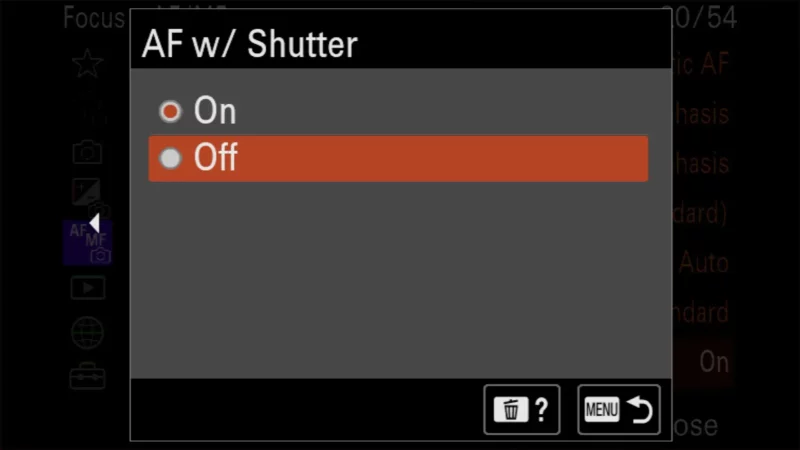
What you’ll be left with is the shutter button only being a shutter to take the shot. And the AF-ON button will be the exclusive button for autofocusing.
One thing worth knowing is that the AF-ON button doesn’t have a focusing behavior of its own — it uses whatever Focus Mode you’ve set. With Single-shot AF, a press focuses once and holds it, which is the old focus-and-recompose trick without the shutter button fighting you. With Continuous AF, the camera keeps focusing for as long as you hold the button down, and focus stops the moment you let go. That’s why back-button focus doubles as a focus lock: there’s no separate AF-Lock to hunt for.
One other aspect of the AF-ON button is that when shooting video, it can be used to autofocus even when using manual-focus mode.
There’s a second setting in the same AF/MF menu that can quietly undo some of this: Pre-AF. When it’s on, the camera keeps adjusting focus on its own before you touch any button, so the focus distance you set with the AF-ON button can drift before you press the shutter. If you want the focus to stay exactly where you put it — pre-focusing on a spot and waiting for a subject to walk into it, for example — set Pre-AF to Off as well. It only applies to stills, and only with an E-mount lens fitted.
You can see some of the photos I’ve taken with the Sony a6700 in these posts:
– Sony a6700 Sample Images / Image Quality Tests (general collection of sample images under a variety of conditions)
– Sony a6700 High ISO Sample Images (focusing on high-ISO images taken under low-light conditions)
– Sony a6700 High ISO Test Images (similar to above, but focused on sequences of images throughout ISO range for side-by-side comparison)
I also have a bunch of other posts on shooting with the Sony a6700.


