
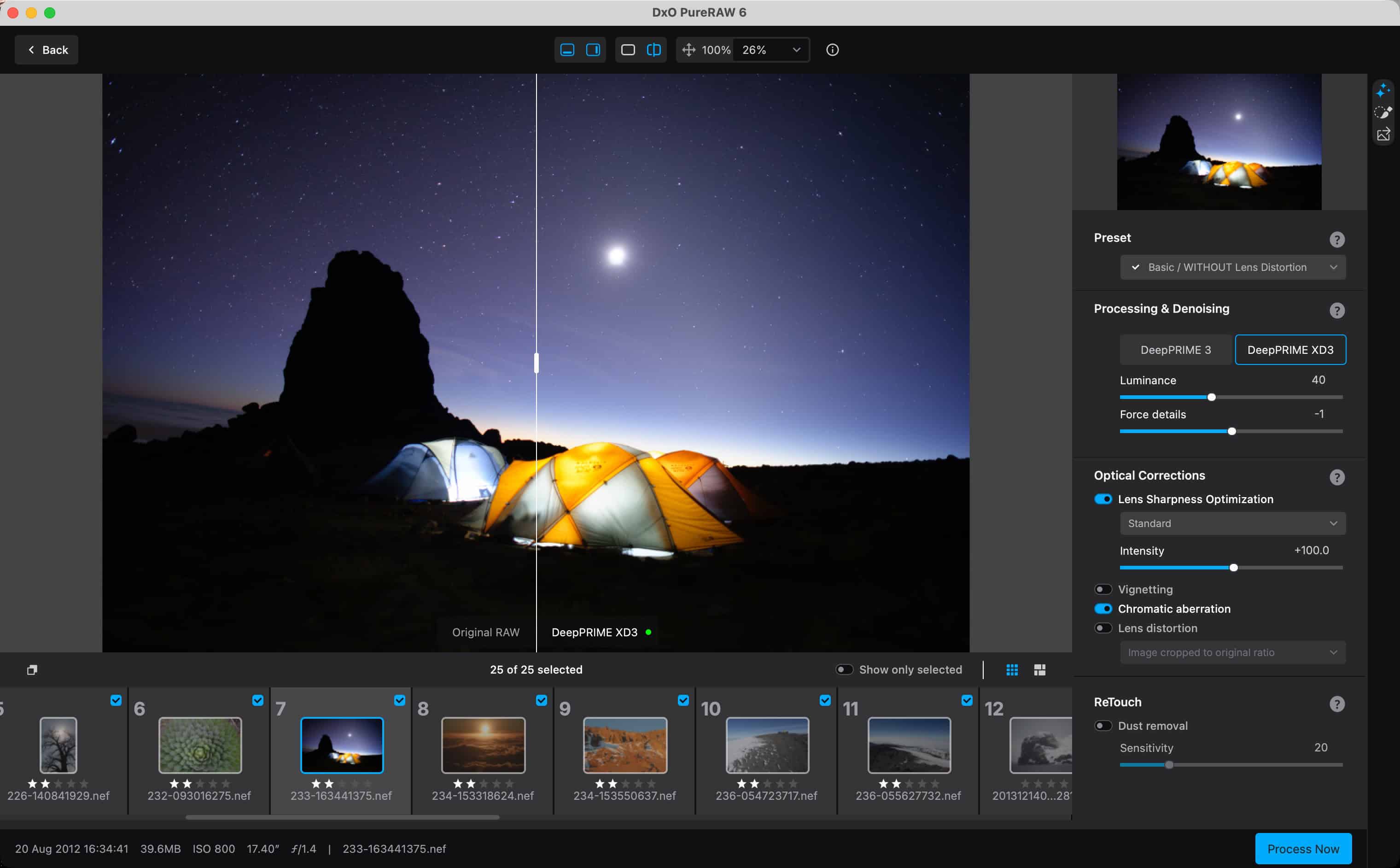
The short version: DxO PureRAW 6 is a pre-processor for RAW files. You run your RAW files through it before (or from inside) Lightroom, it rebuilds them with DxO’s AI demosaicing/denoising and lab-measured lens corrections, and hands back a DNG that is cleaner, sharper, and optically corrected — which you then edit exactly as before.
It’s $139.99 new or $89.99 as an upgrade, for Mac and Windows.
I’ve been a paying customer since 2021, and version 6 is the best yet, and the first I’d call a no-brainer for anyone shooting above base ISO or with older cameras.
The rest of this review covers what it does, what’s new in 6, where it beats Lightroom’s own Denoise, what it doesn’t do well — and, because I’ve now run it against six specific cameras (more coming soon!) with standardized before/after comparisons, what it actually does to your camera’s files.
Related: for Lightroom’s own tool, see my step-by-step guide to Lightroom noise reduction and Denoise.
What PureRAW does (and doesn’t)
DxO is the French company behind the DxOMark lens and sensor tests, PhotoLab, and — to my lasting gratitude — the rescued Nik Collection (which I’ve been using for years, long before Google and then DxO got into the story).
PureRAW packages the two things DxO does best into one step: a demosaicing/denoising engine (DeepPRIME) and optical corrections built from physically measuring cameras and lenses in their lab. It is not a RAW editor and not a Lightroom replacement. It fixes the things that are best fixed before editing begins:
- Demosaicing and noise reduction (the DeepPRIME 3 and DeepPRIME XD3 engines)
- Lens softness, distortion, chromatic aberration, and vignetting, from the specific camera + lens combination in each file
- Moiré and, new in version 6, sensor dust spots
- Output as a DNG (or JPEG) that any RAW editor can open
You choose which corrections to apply; it isn’t all-or-nothing. The output DNG is a linear DNG — already demosaiced — so the corrections are baked in: you can’t dial them back afterward in Lightroom, any more than you could un-bake a JPEG. But you can re-run, obviously, because it doesn’t touch your original master RAW files. Everything else (exposure, color, local edits) works exactly as it does on the original.
Why this beats old-school noise reduction
If you haven’t used one of this generation of RAW enhancement tools, it’s worth knowing they are fundamentally different from pixel-based noise reduction (the Noise Ninja era).
Your camera doesn’t capture a finished color image; it records millions of single-color samples, and demosaicing is the math that turns those into colored pixels. Old noise reduction worked after that step — it looked at the finished, noisy picture and smudged the noise away, which is why old high-ISO files look like plastic.
DeepPRIME (and Lightroom’s own newer generation of Denoise) attacks noise during demosaicing, deciding what’s noise and what’s texture while the file is still raw data.
The results can sometimes seem like magic: cleaner, sharper, more natural images, and a new lease on life for high-ISO shots and files from older cameras.
What’s new in PureRAW 6
Version 6 arrived in March 2026, less than a year after 5. Cutting through the press release, four things changed that matter:
- DeepPRIME XD3 for everyone. “XD” is eXtra Detail; XD3 is the third and smartest generation of the engine. In 5 it was limited (and beta on Fujifilm X-Trans); in 6 it’s final and available for Bayer and X-Trans sensors alike. Earlier XD versions could be too aggressive at very high ISO and I’d dial them back; XD3 I’ve found far more reliable.
- Much smaller files. The new high-fidelity DNG compression is the big one in practice. Linear DNGs used to come out two or three times the size of the camera RAW; in 6 they’re dramatically smaller (DxO claims up to 4×). Still larger than the original, but batching is finally manageable without maxing out drives.
- Faster batches. Batch parallelization prepares the next image while the current one renders; on a large folder it’s noticeably quicker.
- Automated dust removal. An AI pass that finds and removes sensor dust across a whole batch. Useful if you shoot stopped down; I mostly don’t, so I’ve barely used it.
Why not just use Lightroom’s built-in denoise?
Adobe’s AI Denoise in Lightroom is genuinely good, and for a handful of images it may be all you need. I still run my high-ISO files through PureRAW first, for two reasons. First, file size and catalog bloat: Lightroom’s Denoise writes enormous linear DNGs straight into your catalog; PureRAW’s output can live wherever you point it (an external drive, say), and with 6’s compression it’s much smaller to begin with. Second, and more important, the optics: DxO physically measures cameras and lenses in the lab, and its correction modules fix edge softness, distortion, and vignetting better than the generic profiles in Lightroom. Denoise is half the story; the optical half is PureRAW’s underrated advantage — the wide-open-corner frames in the camera tests below show it.
What it actually does to your camera’s files: Six cameras tested
Reviews of this kind of software tend to show one dramatic high-ISO rescue and call it a day. The honest answer to “is it worth it for my camera?” depends on your sensor’s era and size, so I’ve been running a standardized test on specific cameras: the same frame set each time (base ISO detail, mid ISO, the practical high-ISO ceiling, a wide-open corner), the same PureRAW settings, before = the RAW through Lightroom defaults, after = the PureRAW DNG through identical settings, shown as full-frame sliders and 100% crops, with the actual RAW + DNG pairs available to download. The one-line findings so far:
| Camera | Sensor | What PureRAW 6 did |
|---|---|---|
| Nikon D3500 | 2016 entry-level DSLR; 24 MP Bayer | One of the cheapest ways to close the image-quality gap to a newer camera: clean, sharp files from ISO 100 to 25600 that the camera never produced on its own. |
| Fujifilm X100V | 26 MP X-Trans | XD3’s X-Trans handling matured in v6; the X100V’s high-ISO files come back much cleaner, a real alternative to chasing an X100VI. |
| Sony a6000 | 2014 APS-C, 24 MP | The most dramatic transformation in the set: a 12-year-old camera’s high-ISO files turned genuinely usable. |
| Sony RX100 VII | 1-inch sensor, 20 MP | Small sensors get noisy fast, and that’s exactly what PureRAW fixes best; big gains from ISO 1600 up. |
| Ricoh GR II | 2015 APS-C, 16 MP | Noticeably cleaner and sharper files at the ISOs where the GR II struggles; a cheaper upgrade than a GR III. |
| Fujifilm X100VI | 40 MP X-Trans | Newer, cleaner sensor, so the gains are subtler at base ISO and clearest in the high-ISO and corner-sharpness frames. |
The pattern is consistent: the older and smaller the sensor, the bigger the transformation; on modern full-frame bodies at base ISO the gains are subtle and mostly optical. More cameras are being added to the series — if yours isn’t here yet, the closest sensor era above is a fair guide.
How it fits a Lightroom workflow
This is where PureRAW has improved most since my original 2021 review, when it was a standalone app with no round trip and I struggled to find a place for it. Today it installs a Lightroom Classic plugin: select images in Lightroom, send them to PureRAW (File → Plug-in Extras, or the right-click menu), process, and the DNGs come back into the catalog stacked with the originals, metadata intact. There are also Photoshop dynamic filters, and the standalone app still exists for processing before import. For big batches I pre-process at ingest; for everything else I pick the keepers in Lightroom and send only those — which keeps the file-size cost to the images that earn it.
Where it falls short
- Speed. Much better in 6, but DeepPRIME XD3 on 40–60 MP files is still a make-coffee operation for a large batch, and the in-app time estimates run high.
- File size. Smaller than before, still bigger than your RAW. Budget for it.
- It’s baked in. You can’t later reduce the amount of correction in Lightroom; if you want to tune it, reprocess.
- Occasional over-smoothing. At extreme ISO (the 100,000+ territory) XD3 can produce a slightly synthetic texture. Those files weren’t usable before, so it’s still a net win, but check at 100%.
- Stability. The lock-ups I complained about in 2021 are far rarer now, but not extinct.
Common questions
Is PureRAW worth it if I have Lightroom Denoise?
If you shoot a lot above base ISO, or with older cameras and lenses, yes — the optical corrections are the part Lightroom doesn’t match, and the smaller, relocatable files matter at volume. For the occasional rescue, Lightroom’s Denoise may be enough.
But something I don’t like about Lightroom’s implementation is that it incorporates the actual output data into the Lightroom catalog itself. I found that when I applied it to a *lot* of images, I got a runaway filesize problem with the Lightroom catalog suddenly consuming an enormous amount of disk space on my Mac’s main drive. PureRAW still consumes disk space in the DNG files it creates, but they’re separate files, not baked into the catalog data itself, so you can easily park them on an external drive.
Does it work with Capture One, DxO PhotoLab, or other editors?
Yes. It outputs standard DNGs, so any RAW editor can open the results; the tight round-trip integration is Lightroom Classic and Photoshop.
Which cameras and lenses are supported?
DxO maintains a large database of camera/lens modules; coverage is broad but check their list for unusual bodies or third-party lenses. If a lens isn’t profiled you still get the denoising, just not the optical corrections.
Do I need version 6 if I have 5?
If you’re on 3 or 4, upgrading is an easy yes: XD3 for all cameras, the compression, and the speed. From 5 it’s a closer call; the output is notably better to my eye and the smaller files are a relief in batches, but 5 is still very good for occasional use.
Can you undo or adjust the corrections afterward?
No. The corrections are baked into the DNG that PureRAW hands back. Lightroom’s sliders don’t show them, so there’s nothing to dial back — you can keep editing the file as normal, but you can’t reduce the amount of correction or switch it off. In that respect, it’s functionally equivalent to the corrections having been hardcoded into a JPG. If you want a different treatment, go back to the original RAW — the round trip leaves it stacked right next to the processed version — and process it again.


Where to find it
PureRAW 6 is available for Mac and Windows directly from DxO, with a free trial that processes full-size files.
If the results on your own RAW files look like the camera tests above, you’ll know within ten images whether it’s for you.
Notes & References:
- Google didn’t create Nik Collection. It was originally created by Nik Software. Then Google bought it and abandoned it. [↩︎]


