
There are two types of cables for GoPros.
The cable that comes with the camera is a USB cable. That’s used for charging as well as data transfer. Over the years, a few different USB plugs have been used. You can see which GoPro model uses which type of USB connector in my GoPro Charging Cable Guide.
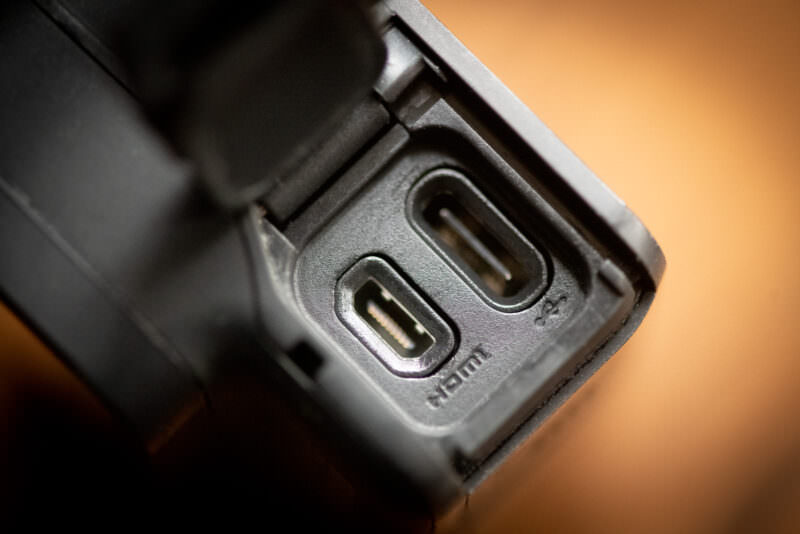
The second type of cable is an HDMI cable. GoPro cameras don’t come with an HDMI cable as standard, and not all GoPro models have an HDMI port (you can see which models do, and which types of HDMI plug they use, in the chart below).
The HDMI port is used to output a video feed from the camera (also known as a video out signal).
So if you are connecting your GoPro to a TV or monitor, or to an external recorder, you’d use an HDMI cable.1 Webcam use is different: the HERO9 Black through HERO13 Black manuals say to connect the camera to your computer with a USB-C cable. More in using your GoPro as a webcam for Zoom meetings.
But not all GoPro models have the same HDMI capabilities or use the same connectors. Some have an HDMI port built-in. Some require an optional accessory to add an HDMI port. And some aren’t compatible with HDMI. The MISSION 1 series takes a different route: it sends HDMI out through its USB-C port.
Which is where this post comes in.
To cut to the chase, here’s the master table. You can find more detailed information further down this page.
HDMI cable compatibility chart
| Camera Model | HDMI Cable Connector Type | Media Mod Required |
|---|---|---|
| MISSION 1 series (MISSION 1, MISSION 1 PRO) | USB-C to HDMI cable or adapter; Micro HDMI (Type D) on its Media Mod | No (optional) |
| HERO13 Black | Micro HDMI (Type D) | Yes |
| HERO12 Black | Micro HDMI (Type D) | Yes |
| HERO11 Black | Micro HDMI (Type D) | Yes |
| HERO10 Black | Micro HDMI (Type D) | Yes |
| HERO9 Black | Micro HDMI (Type D) | Yes |
| HERO8 Black | Micro HDMI (Type D) | Yes (Specific Model) |
| HERO7 Black | Micro HDMI (Type D) | No |
| HERO (2018) | Micro HDMI (Type D) | No |
| HERO6 Black | Micro HDMI (Type D) | No |
| HERO5 Black | Micro HDMI (Type D) | No |
| HERO4 Black | Micro HDMI (Type D) | No |
| HERO4 Silver | Micro HDMI (Type D) | No |
| HERO3+ Black | Micro HDMI (Type D) | No |
| HERO3+ Silver | Micro HDMI (Type D) | No |
| HERO3 Black | Micro HDMI (Type D) | No |
| HERO3 Silver | Micro HDMI (Type D) | No |
| HERO3 White | Micro HDMI (Type D) | No |
| HD HERO2 | Mini HDMI (Type C) | No |
Micro HDMI (Type D) cable for GoPro cameras
Just as with USB, there are different types of HDMI connectors and HDMI cables.
The one you want for most GoPro cameras is known as a micro-HDMI connector. It’s also known as a Type D HDMI connector.2

GoPro cameras that require a Media Mod accessory to add HDMI compatibility
Since the HERO8 Black, GoPro cameras haven’t had an HDMI port built into the body. On the HERO8 Black through HERO13 Black, you add one with a Media Mod. The MISSION 1 series is different: it sends HDMI out through its USB-C port (see below).

Have Camera Will Travel Newsletter
Practical field notes, hands-on gear tests, and the fun of exploring the world with a camera in hand.

With these models, you first need to fit the camera with the Media Mod. Then the HDMI cable goes into the Media Mod’s HDMI port.
All of the Media Mods use an HDMI cable with a Micro HDMI (Type D) connector.
These are the models that require a Media Mod to add HDMI capabilities:
- HERO13/12/11/10/9 Black | Media Mod Accessory
- HERO8 Black | HERO8 Media Mod Accessory. It’s different from the Media Mod for later models and now harder to find. Make sure the listing says it’s compatible with the HERO8 Black.
Heads up that there’s more than one model of Media Mod. The HERO8 Black uses its own design that won’t fit newer cameras. The HERO9 through HERO13 share a design. The MISSION 1 series has its own Media Mod. Make sure you get the one made for your camera.
GoPro camera models that have an HDMI port built-in
These models don’t require an extra accessory to add an HDMI port; it’s built into the camera as a basic feature.
With these, you can just connect the HDMI cable directly to the camera itself.
With one exception, these all use an HDMI cable with a Micro HDMI (Type D) connector.
- HERO7 Black
- HERO (2018)
- HERO6 Black
- HERO5 Black
- HERO4 Black
- HERO4 Silver
- HERO3+ Black
- HERO3+ Silver
- HERO3 Black
- HERO3 Silver
- HERO3 White
- HD HERO2 (uses mini-HDMI (Type C) connector / also has 2.5mm Composite Port)
GoPro cameras that send HDMI out over USB-C
The MISSION 1 series has no HDMI port. Instead, you connect the camera’s USB-C port to a TV or monitor with a USB-C to HDMI cable or adapter (sold separately). The HDMI Video Output preference sets the live feed to 1080p or 4K. GoPro’s manual warns of a delay in live 4K output when HyperSmooth is on. The optional Media Mod for MISSION 1 Series cameras also has a micro-HDMI port that supports up to 4K output.
GoPro camera models that are not compatible with HDMI
These GoPro models don’t have an HDMI port, and one can’t be added:
- HERO (2024)
- MAX2
- LIT HERO
- MAX
- HERO11 Black Mini
- HERO10 Black Bones
- Fusion
- HERO7 Silver
- HERO7 White
- HERO (2014)
- HERO+ LCD
- HERO+
- HERO5 Session
- HERO4 Session
- HERO Session
- HD HERO (has RCA video out port)
- HERO960 (has RCA video out port)
- SD HERO
Things worth knowing
- GoPro cameras don’t come with an HDMI cable as standard. It’s possible that some retailers might include one as part of a special accessories bundle, but that’s not standard. They do come with a USB cable (the USB cable is used for charging and data transfer).
- Some GoPro cameras can connect directly to a TV or projector using an HDMI cable. Some of the newest models require a Media Mod accessory (optional extra). But not all GoPros have HDMI ports (see the lists above). Some of the very old models used different methods for connecting to a TV, either an analog RCA connection or a 2.5mm Composite Port.
- Most of the GoPro cameras that have HDMI capabilities use a micro-HDMI (Type D) connector. An exception is the HD HERO2, a very old model now, which uses a mini-HDMI (Type C) connector. The MISSION 1 series sends HDMI out through its USB-C port unless you add its Media Mod.
- You can’t charge the camera’s battery with an HDMI cable. The HDMI cable carries the video and audio signal, and it can’t be used for charging. Charging goes through the USB cable.
- The longer an HDMI cable is, the greater the risk that signal loss due to attenuation will start impacting the image and sound quality. With a standard passive HDMI cable, a good rule of thumb is to limit the length to around 20 to 25 feet (6 to 7 meters), at most.
- If you need to send the signal a longer distance, there are options:
- Use an Active Optical HDMI cable (aka Active Fiber Optic HDMI cable). These are often marketed for video projection systems.
- Use an HDMI extender. These convert the HDMI signal so it can run over a Cat6 Ethernet cable.
- If you need to send the signal a longer distance, there are options:
Notes & References:
- Some GoPro cameras also have the ability to use USB when connecting your GoPro to a computer as a webcam, but for that the camera has to have firmware that supports that feature. [↩︎]
- Type A is a standard or full-size HDMI connector. Type C is also known as a mini-HDMI connector. A spec for Type B connectors was created as a dual-link connector, but it has not been used in products. [↩︎]


