If you’ve just formatted a memory card that still had photos on it, the usual next step is to go looking for recovery software — and then discover that most of the “free” options want money before they’ll actually hand your photos back.
I’ve covered those tools in detail, and some of them are genuinely good.
But there’s now another way that uses no recovery software at all: asking an AI assistant to do the recovery with you.
It’s not that there’s no software at all involved — there is — but it’s a different kind of approach. And if you’re already using the Claude Code or OpenAI Codex apps, this is an interesting way to put them to work.
To be clear, this requires a paid subscription to one of those AI tools, so it only makes sense if you’re already paying for that and using it for other tasks.
If you’re not, the free photo recovery tools are still probably better options for this and what I’d recommend.
I recently did exactly that — recovered a camera-formatted SD card start to finish — and it got back 52 of the 53 files on the card, verified as exact copies of the originals (the 53rd was unrecoverable for other reasons). While I was re-testing some of the main data recovery apps, it to me that maybe they might not be as essential anymore. So I tried it with Claude Code. And the results were impressive.1
Here’s how it works and when it’s worth doing.
The kind of AI this needs (and the kind it doesn’t)
First, an important distinction. The chat-in-a-browser AI most people know — typing questions into ChatGPT or Claude on a website — can’t do this. A web chat can’t see your card reader.
What you need is an AI assistant that can run things on your own computer, with your permission. Both of the big AI companies now offer this: Anthropic’s Claude has desktop apps and a tool called Claude Code, and OpenAI has an equivalent called Codex. They were built for programmers, but you don’t need to be one — the whole point is that you type what you want in ordinary English, and the assistant handles the technical part, asking your permission as it goes. If you can install an app and type “my SD card is in the reader, help me recover the photos I deleted,” you have the required skills.
But the key detail here is that these run on your computer, not in a web browser. And that means they can, if you choose to allow them, directly access storage attached to your computer. Such as a memory card in a memory card reader, for example.
Why this works at all
Recovery software isn’t magic. When you format a card or delete photos, the pictures themselves usually aren’t erased — the card just forgets where they were, and marks the space as available. Recovery tools read the raw contents of the card from one end to the other looking for the telltale beginnings of photo files.
That’s true of the ordinary format in your camera’s menu, which really just clears the card’s index of where everything lives. Some cameras — Canon bodies in particular — also offer a low-level format, and that one writes over every recordable sector on the card. If that’s the one you ran, there’s nothing left for any method, AI-assisted or not, to find.
Every JPG starts with the same few bytes; so does every Nikon NEF, Canon CR3, or Sony ARW. Find the start, read to the end, and you have your photo back.
That searching technique is decades old, well understood, and not owned by anyone. An AI assistant with access to your computer can do the same thing using free, standard tools — and it can do some genuinely useful things the packaged software doesn’t.
What recovering a formatted SD card looks like in practice
Here’s the actual sequence from my test, described the way you’d experience it.
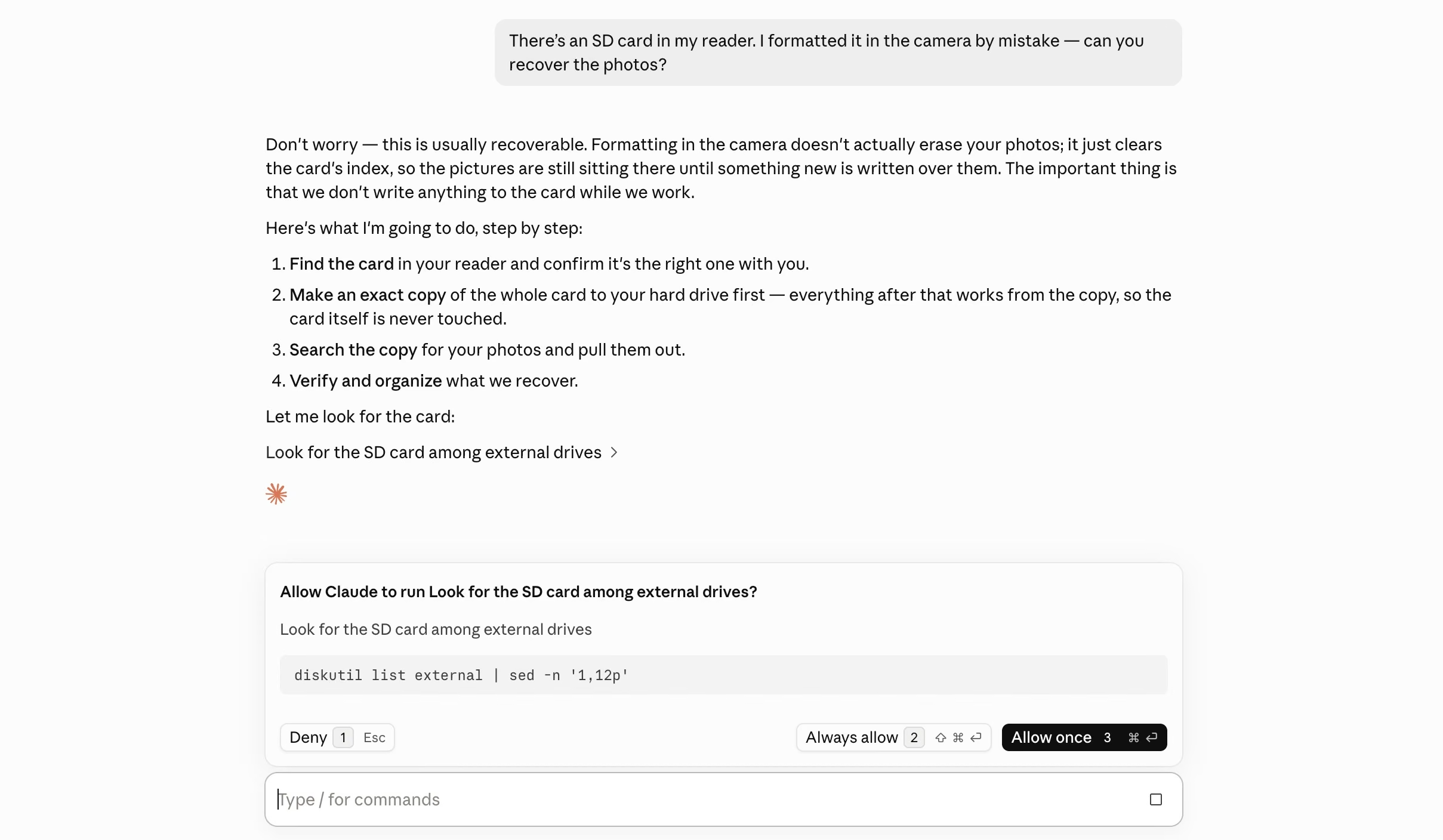
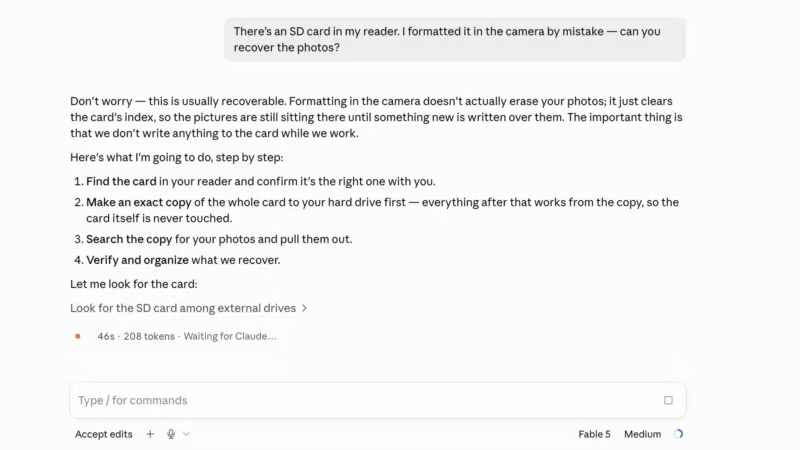
My side of the conversation was ordinary sentences; the assistant did the rest and asked permission before each step that touched anything.
- “There’s an SD card in my reader. I formatted it in the camera by mistake — can you recover the photos?” The assistant identified the card, confirmed with me which device it was, and — this is the important part — made a complete copy of the card first, so that everything afterward worked from the copy and the card itself was never written to. That’s the same first move a professional would make.
- The search. It scanned the copy for the signatures of photo and video files — in my case using PhotoRec, a well-established free recovery engine, though the same search can be done with a short script. On my 32 GB card this took seconds, and it turned up everything: every RAW file, every JPG, every video.
- The part no packaged software did: putting names back. Files recovered from a formatted card come back nameless — the software equivalent of “photo1, photo2.” In my tests of the commercial tools, that’s where the free versions left me: a wall of files called things like 1220638.NEF with no way to tell which was which. But every photo carries its own information inside it — the camera model, the exact moment it was shot. The assistant read that from each recovered file and renamed them all into dated, meaningful filenames, sorted into folders by camera. What comes out looks like your archive, not like a recovery dump.
- Proof, not vibes. Because I still had copies of some originals, the assistant compared the recovered files against them byte by byte. Fifty-two of fifty-three came back as exact, bit-for-bit copies. The one loss was a single RAW file that the card had already partly overwritten with its new, empty filing system — which no software could have recovered either.
Things worth knowing
This works, but I’ve approached it mainly as an experiment, and it’s not what I’d recommend for most users. And given the nature of LLM AI tools, there’s always some risk of inconsistent results.
Among the other things worth knowing:
- You’re giving an AI access to your computer. These tools ask permission before they act, and you can watch every step — but that trust decision is yours to make. And there are very good reasons to be cautious about it; some of those horror stories about AI agents messing things up are true. If it makes you uncomfortable, use the packaged software instead. That’s a perfectly good reason.
- The first rule is still the first rule. Stop using the card the moment you realize something’s wrong. Every new photo written to it can overwrite one you wanted back. That’s true no matter which recovery route you take.
- A dying card is a different problem. If the card is making your computer freeze, showing errors, or wasn’t recognized at all, don’t experiment on it — every read attempt matters and might corrupt the card further. If the data is that important — say, from a paying client shoot — that’s the moment for a professional recovery service. But when there’s card corruption involved, that’s escalated to a repair job, not a simple data recovery service.
- Fragmented video is the hard case. Long video files sometimes get stored in scattered pieces, and stitching those back together is where the specialist paid tools genuinely earn their money. My three test videos came back fine, but a card full of long clips is a tougher job.
- You need working space. A full copy of a card takes as much room as the card itself — my 32 GB card briefly needed 32 GB of drive space, and I can confirm from experience that it’s worth checking your free space before you start.
Where that leaves the recovery apps
I count this as a successful experiment, but it’s not going to become my standard method anytime soon.
I’m going to be sticking with the packaged data recovery apps for now, and they’re still what I’d recommend for most people. If you want a friendly window with thumbnails and a big Recover button, Disk Drill is polished, shows you previews of what’s recoverable before you pay, and did superbly in my testing. If you’re comfortable with slightly geekier territory but want to stay free, PhotoRec on its own remains excellent.
But the AI-assistant route is an interesting new addition. Not for everyone, for sure. And to be approached with healthy caution.
But if you’re already using Claude Code or Codex, it now sits in an interesting spot: it costs nothing on top of the subscription you’re already paying for, it recovers without limits, and it’s the only approach I’ve used that hands back an organized, named, verified set of photos rather than a folder of anonymous files.
If you were already curious about what these assistants can do beyond answering questions in a chat window and generating new slop, rescuing your own photos is a pretty good project to try.
More in this series — memory card recovery: What to do when you’ve lost photos (start here) · Free recovery software compared · PhotoRec on Mac, step by step · Disk Drill walkthrough · Stellar Photo Recovery walkthrough · SD Card Formatter · Quick vs full format
Notes & References:
- I used Fable, but that’s overkill for this task. I didn’t test other models, and there’s probably not much point in doing that anyway given that these things change almost day to day, but it’s a pretty straightforward task that doesn’t really require a frontier thinking model. [↩︎]


