
The Fujifilm X100VI (and its predecessor, the X100V) are premium compacts that have exploded in popularity well beyond their original street photography niche.
But neither camera ships with a memory card in the box, so whether you managed to snag the 40-megapixel X100VI or you are still shooting with the legendary X100V, you have to supply your own storage.
Putting the wrong SD card into these cameras can slow you down or stop a recording mid-clip, especially if you shoot video or lean on continuous bursts. The short answer is that both cameras take a single UHS-I SD card, and a V30 (U3) SDXC card of 64GB or larger covers everything either one can do. Here is a practical look at exactly what these cameras require, the physical limitations of their hardware, and how to avoid overpaying for peak speeds the camera body cannot actually use.
A Quick Note on the X100VI vs. X100V
While the X100VI features a massive resolution bump to 40MP and adds in-body image stabilization (IBIS), the physical memory card hardware remained completely unchanged from the older X100V. Both cameras feature a single UHS-I SD card slot and peak at a 200 Mbps video bitrate. Therefore, all the SD card requirements, speed limits, and money-saving advice in this guide apply exactly the same to both cameras.
Quick recommendations
If you just want some quick recommendations, here you go. Both cameras need a UHS-I SDXC card rated V30 (or U3), and I’d go 64GB or larger — nothing more exotic than that. Based on my independent SD card speed tests, any of these makes for a great choice.
These SD cards meet the exact needs of the X100 series, have a strong track record of reliability, and are readily available. Crucially, they do not force you to overpay for speed you cannot use.
- Type: SDXC / SDHC
- Video Speed Class: V30
- UHS Bus Interface Type: UHS-I
- Maximum Read Speed: 230 MB/s
- Storage Capacities: 32GB, 64GB, 128GB, 256GB, 512GB
Check current price and availability at:
- Video Speed Class: V30
- UHS Bus Interface Type: UHS-I
- Maximum Read Speed: 150 MB/s
- Storage Capacities: 64GB, 128GB, 256GB
Check current price and availability at:
- Type: SDXC
- Video Speed Class: V30
- UHS Bus Interface Type: UHS-I
- Maximum Read Speed: Up to 180 MB/s
- Storage Capacities: 128GB, 256GB, 512GB, 1TB
Check current price and availability at:
Recommendations checked: August 2026
SD card compatibility & requirements: What memory card the X100VI takes
Despite their old-school styling, both cameras have very modern data pipelines. The X100VI shoots 6.2K/30p and 4K/60p video, while the X100V shoots 4K/30p. However, regardless of resolution, both cameras max out at a video bitrate of 200 Mbps.


Because 200 Megabits per second equals exactly 25 Megabytes per second, a high-quality U3 or V30 card (which guarantees a sustained 30 MB/s write speed) is all the camera strictly requires to prevent video recordings from abruptly stopping.
If you primarily shoot still images — which, let’s face it, is what most of us do with an X100 body — a reliable V30 card handles the file sizes perfectly well.
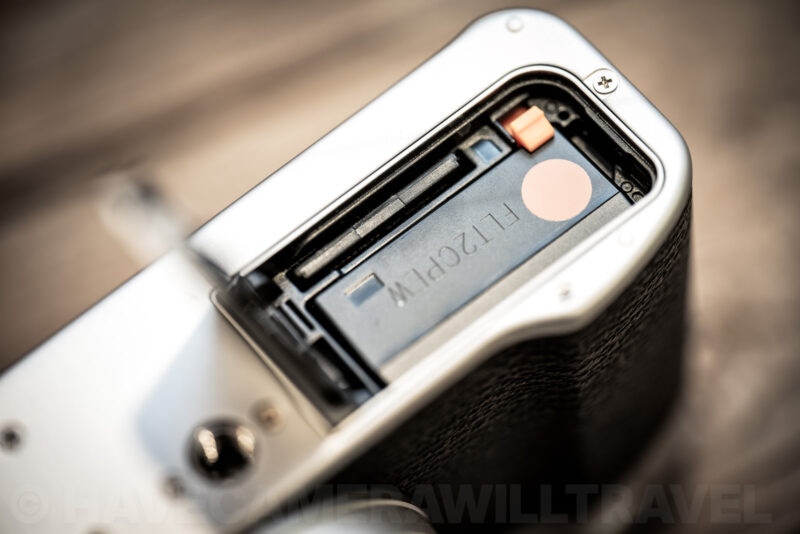
One physical thing worth knowing: on both cameras the card shares a compartment with the battery, behind the door on the bottom plate. It’s a snug fit, with the card sitting right up against the battery, so swapping cards in a hurry takes a bit of care. And because there’s only the one slot, there’s no in-camera backup to a second card — a spare card in your pocket is as close to redundancy as these bodies get.
Pre-Shot ES Mode
There is one specific feature where having a good quality card matters: Pre-Shot ES.
This is a clever feature for street photography that uses the electronic shutter to start buffering images while you have the shutter button half-pressed. When you fully press the shutter, it saves the images from the moments before you clicked.
It’s a fantastic tool for catching unpredictable moments, but it generates a sudden burst of data. While an ultra-expensive UHS-II card won’t clear the buffer any faster (because of the camera’s UHS-I slot limit), using a high-quality V30 card ensures that the buffer flushes exactly as fast as the camera’s internal hardware allows.

Fujifilm’s official list & how to save money
Fujifilm maintains a list of memory cards they officially vouch for with the X100VI. While I applaud manufacturers providing resources, in this specific case, the list is largely unhelpful for the average shooter.
It appears to be copied from their flagship X-T5 recommendations. Every card on their official list is an expensive UHS-II card (V60 or V90). But the X100VI and X100V only have a UHS-I slot.
Because the UHS bus system is backward compatible, those premium cards will technically work. However, the camera lacks the secondary row of physical pins required to interface with the UHS-II speeds. When you put a $200 V90 card into the X100VI, it immediately throttles down to baseline UHS-I speeds.
You end up paying premium prices for high-end features the camera cannot use. For example, a 256GB V90 card can easily cost over $250, while a 256GB SanDisk Extreme V30 UHS-I card usually sells for under $30. That is real money.
There is only one valid reason to buy a UHS-II card for the X100 series: desktop transfer speed. If you shoot heavily and dump hundreds of 40MP RAW files to your computer daily, a UHS-II card (paired with a UHS-II desktop reader) will offload files to your computer up to 3x faster, saving you time in post-production. If that time saved at the computer is worth the premium to you, I’ve included a few cost-effective V60 options in the detailed list below.
What size SD card should you use?
Both cameras are compatible with SDHC and SDXC cards, meaning you can use anything from 4GB up to massive 1TB cards without issue.
There is a vital practical reason for choosing a 64GB or larger memory card. The camera automatically detects the card’s filesystem to handle video. If you use a 32GB card (SDHC / FAT32), the camera is forced to break your video into annoying 4GB chunks. If you use a 64GB or larger card (SDXC / exFAT), it saves the video as a single, unbroken file.
Here is a simple calculator that shows how much video you can fit on different-sized cards at the camera’s maximum 200 Mbps bitrate.
For still photos, the 40MP sensor of the X100VI generates significantly larger files than the 26MP X100V. For the X100VI, a 128GB or 256GB card is generally the sweet spot for travel.
Some rough numbers help here. Uncompressed 40MP RAW files from the X100VI run around 80MB each, full-size JPEGs land closer to 18MB, and switching RAW Recording to lossless compressed cuts the RAW files to roughly 40MB with no loss in image quality. So a 128GB card holds somewhere in the region of 1,500 uncompressed RAW files, or about double that if you shoot lossless compressed. If you’re weighing up 128GB against 256GB, that setting makes more difference than the card does.
The golden rule: Formatting
It is always best practice to format memory cards directly in the camera rather than on a computer. This ensures the file system and folder hierarchy are built exactly to Fujifilm’s specifications, reducing the chance of errors in the field.
Instead of digging through the menus (Setup > User Setting > Format), there is an excellent quick shortcut built into both cameras:
- Press and hold the Drive/Delete (Trash Can) button for three seconds.
- While continuing to hold it, press the center of the Rear Command Dial.
- The Format confirmation screen will immediately pop up.
One thing worth knowing before you confirm: protecting images does not save them from a format. Fujifilm’s manual is explicit that all data on the card, including protected pictures, is deleted when you format. The PROTECT function only stops you deleting individual frames in playback.
Remember that formatting wipes the directory clean. If you format a card by accident, immediately pull it out of the camera. As long as you don’t write new files over the flash memory, you can usually recover your deleted photos later using desktop software.
If your cards start acting sluggish after months of heavy use, the internal memory sectors may be fragmented. In that specific case, you’ll need to connect the card to your computer to run a deep full format rather than an in-camera quick format.
Recommendations in detail
Here is a detailed list of cards that work flawlessly in these cameras. I’ve included the most cost-effective U3/V30 cards to maximize your storage value, alongside a few V60/V90 options if you specifically want faster offload speeds to your computer.
These cards are all rated V30 and work well in a very wide variety of cameras, with good versatility for shooting photos and 4K video.
My emphasis here is on cards that meet these criteria:
- They're fast enough for all the features of this camera.
- They're from a reputable and reliable brand, so you can count on them working well.
- They're readily available at major retailers, so you should be able to find them without much trouble.
- They're good value for money, so you're not paying too much for a card that is more than your camera can take full advantage of.
If you want to use a faster, fancier card, you can, but you won't see any extra benefit in doing so while you're operating the camera (but you might see some faster speeds when downloading the photos to a computer, depending on your computer and memory card reader combination). And, as always, I recommend buying from a major retailer to minimize the chances of getting burned with a counterfeit memory card.
SanDisk Extreme V30 UHS-I
- Type: SDXC / SDHC
- Video Speed Class: V30
- UHS Bus Interface Type: UHS-I
- Maximum Read Speed: 230 MB/s
- Storage Capacities: 32GB, 64GB, 128GB, 256GB, 512GB
Check current price and availability at:
SanDisk's Extreme range are good bets for many cameras, and that's true here too. SanDisk has faster ranges, like the Extreme Pro line, but this Extreme line is both quick enough for most cameras and usually less expensive than those faster cards.
One thing to note with SanDisk cards is that they recycle their model names. So you can find Extreme cards that are older and slower. You'll probably find those older versions work just fine — it really depends how far back you go. I've used many SanDisk Extreme cards over the years in many different cameras and have found them to be very reliable. They're also often good value, and you can sometimes find them sold in 2-packs (it's always good to have a spare on hand!).
Lexar High-Performance 800x PRO BLUE Series V30 UHS-I
- Video Speed Class: V30
- UHS Bus Interface Type: UHS-I
- Maximum Read Speed: 150 MB/s
- Storage Capacities: 64GB, 128GB, 256GB
Check current price and availability at:
The Lexar 800x Pro range is a relatively new model that replaces the old 633x cards that were mainstays of Lexar's SD cards for a long time. This newer V30 card is still a good combination of speed, reliability, and value, and you can often find them in multipacks to have spares on hand.
Delkin Devices ADVANTAGE V30 UHS-I SDXC (180 MB/s)
- Type: SDXC
- Video Speed Class: V30
- UHS Bus Interface Type: UHS-I
- Maximum Read Speed: Up to 180 MB/s
- Storage Capacities: 128GB, 256GB, 512GB, 1TB
Check current price and availability at:
Delkin Devices have recently come out with a range of new SD cards of varying speeds and specs. This is one of their mid-range cards that is rated for V30 video recording speeds. This newer version is rated for read speeds of up to 180 MB/s (the older version of the Advantage maxxed out at 90 MB/s).
Nextorage Classic V30 UHS-I SDXC Card
- Type: SDXC
- Video Speed Class: V30
- UHS Bus Interface Type: UHS-I
- Maximum Read Speed: Up to 200 MB/s
- Storage Capacities: 128GB, 256GB, 512GB
Check current price and availability at:
Japanese brand Nextorage makes excellent memory cards, although they're not always easy to find in stores in the US. But if you can find them, in my experience they're a very good bet. This is their basic (or "Classic") model, rated for V30.
Recommendations checked: August 2026
Fujifilm’s official list & why it’s confusing
Fujifilm maintains a list of memory cards they officially vouch for with the X100VI. While I normally applaud manufacturers for providing these resources, looking at this specific list creates unnecessary confusion and probably leads a lot of photographers to buy unnecessarily expensive memory cards.
Every single card on their official list is a premium, high-speed UHS-II card (V60 or V90). But the X100VI and X100V only have a UHS-I slot. The cameras physically lack the secondary row of pins required to interface with UHS-II speeds.
Because the SD card standard requires backward compatibility, putting a UHS-II card into an X100VI won’t break anything — it simply forces the card to throttle down to UHS-I speeds. But recommending only premium UHS-II cards for a UHS-I camera is unnecessarily confusing and somewhat misleading.
There’s a related trap on the cheaper end of the shelf. Some UHS-I cards are marketed with read speeds of 170MB/s or 200MB/s, which is well past the roughly 104MB/s ceiling of the UHS-I bus. Those numbers come from a proprietary fast mode that only certain card readers support, not from the card being faster in the camera. In an X100VI or X100V, a 200MB/s UHS-I card and a 100MB/s UHS-I card are both limited by the same bus.
The A1 and A2 badges on the front of a card are another thing not worth paying extra for here. Those ratings describe how quickly a card handles small random reads and writes when it’s used as storage inside a phone or tablet, and A2’s speed advantage relies on command queuing that the host device has to support. A camera writes big sequential files and doesn’t use any of that, so an A2 card gives you nothing in an X100VI or X100V that an A1 card, or a card with no application rating at all, doesn’t already give you.
If you follow their list blindly, you end up paying premium prices for high-end features the camera cannot use. A 256GB V90 card can easily cost over $250, while an excellent 256GB V30 UHS-I card is usually under $30. You get absolutely zero in-camera performance benefit from the more expensive card.
The only reason to buy a UHS-II card
Is there any reason to buy a card from Fujifilm’s list? Yes, but only one: desktop transfer speed.
While the camera cannot write to the card any faster than UHS-I limits, your desktop card reader can read it at UHS-II speeds (but, again, only if your card reader is UHS-II). The 40MP uncompressed RAW files from the X100VI are massive. If you are a high-volume shooter, offloading a full 128GB card of RAW files will take about 20 minutes with a standard UHS-I card, but only about 6 or 7 minutes with a UHS-II card paired with a fast reader.
If that time saved at the computer is worth the price premium to you, then buying a card from Fujifilm’s official list makes sense. If you just want to save money and get maximum capacity for everyday shooting, ignore their list and buy a high-quality V30 UHS-I card instead.
For what it’s worth, here’s the official list:
- Delkin Black V90 UHS-II
- Delkin Power V90 UHS-II
- Exascend Catalyst V60 UHS-II
- Exascend Essential V90 UHS-II
- Homan V90 UHS-II
- Lexar Professional 1667x V60 UHS-II
- Lexar Professional 1800x V60 UHS-II
- Nextorage NX-F2PRO V90 UHS-II
- Nextorage NX-F2SE V60 UHS-II
- OWC Atlas Pro V60 UHS-II
- OWC Atlas Ultra V90 UHS-II
- ProGrade Digital COBALT 300R V90 UHS-II
- ProGrade Digital Gold 250R V60 UHS-II
- SanDisk Extreme Pro (SDSDXDK) V90 UHS-II
- Sony SF-E V60 UHS-II
- Sony TOUGH SF-G V90 UHS-II
- Suneast Ultimate Pro V90 UHS-II
- Wise SD-S V60 UHS-II
- Wise SD-N V90 UHS-II



Thank you! I just purchased a Fujifilm X100vi and was overwhelmed by the choices when figuring out which memory card to purchase. Your post was clear, concise, and super helpful!
Glad you found it helpful! Enjoy the X100VI–it’s a really fun camera to shoot with!