
If you’re using the Fujifilm X app on your smartphone to interact with your X100VI, you can significantly improve the wireless transfer speeds. The camera’s Wi-Fi is set to 2.4GHz out of the box, and switching it to 5GHz is the one change that makes transfers to the app much faster.
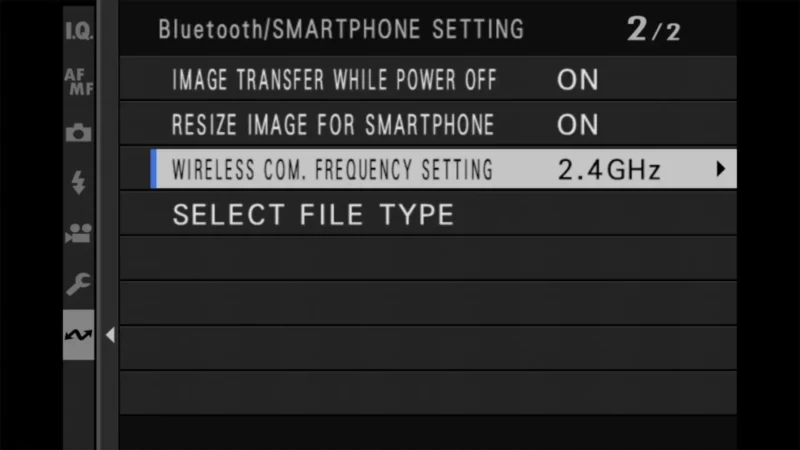
The Setting: Wireless Com. Frequency Setting
Menu Location: Network/USB Setting > Bluetooth/Smartphone Setting
Default Option: 2.4GHz (Slower, better range, max compatibility)
Recommended Option: 5GHz (Much faster, shorter range)
Why Change It: Significantly speeds up image transfers to the XApp
Warning: 5GHz has shorter range and outdoor restrictions in some regions
The situation in which this becomes most important is when you’re downloading images and videos from your camera to your phone.
That involves a relatively high amount of data, and that’s multiplied by the number of images you’re downloading. So you can get some major timesaving gains by making this switch — it really is a lot faster. So long as your smartphone uses 5GHz, and nearly all modern smartphones do, it’s a no-brainer setting change.
Go to:
Network/USB Setting > Bluetooth/SMARTPHONE SETTING > Wirelss Com. Frequency Setting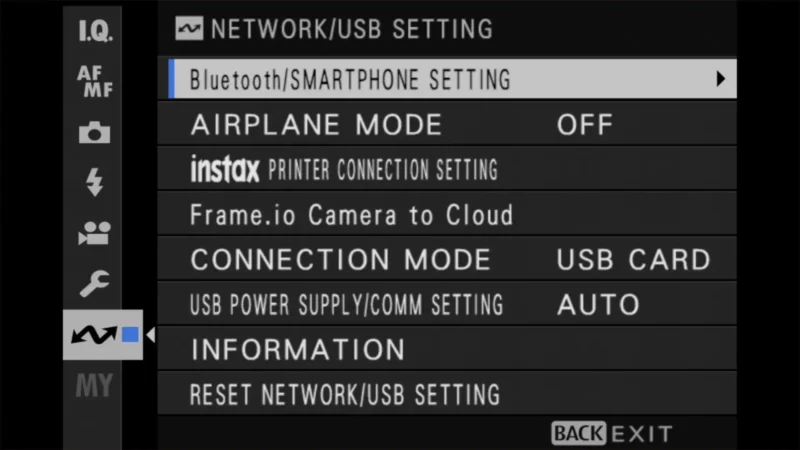
The default setting is 2.4GHz.
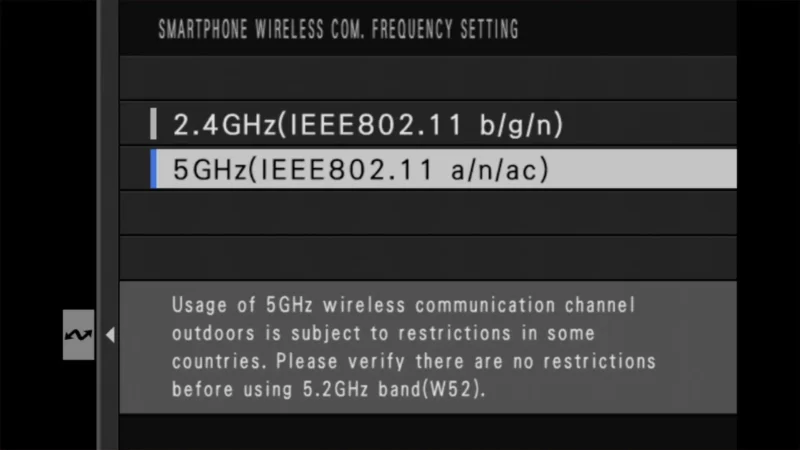
Change that to 5GHz.
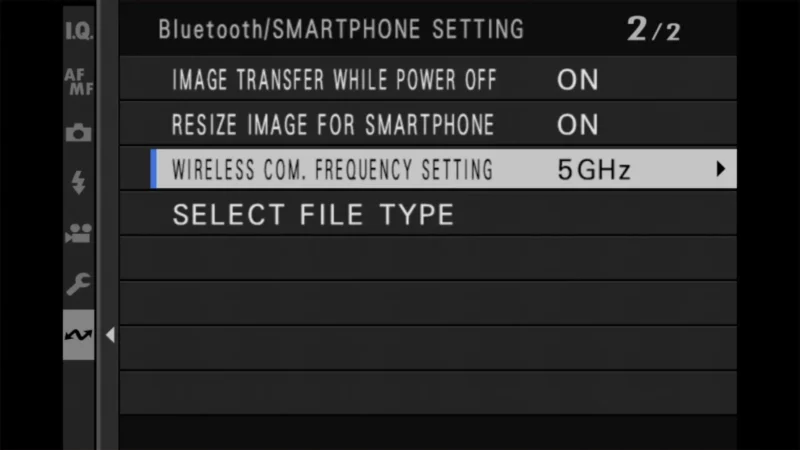
That setting will then be persistent. That is, it’s not just for an individual wifi session but will remain the setting until you change it again.
There’s a second setting in that same Bluetooth/Smartphone Setting submenu that affects transfer speed just as much: Resize Image for Smartphone. With it on, the camera compresses pictures to about 3 megapixels on the way to your phone, which is quick and fine for sharing, but it isn’t the full-resolution file. Turn it off if you want the original-size image on your phone, and expect transfers to take longer again — that’s where the 5GHz switch earns its keep.
Things worth knowing
- Most, perhaps all, modern smartphones are compatible with 5GHz.
- Because the connection is directly between your phone and the camera, your router and wifi network aren’t relevant here, so there’s no need for your router to be compatible with 5GHz (although most these days are).
- The X100VI uses two types of wireless networks, each for different types of operations. For general operational uses, such as camera controls, it uses Bluetooth. Wifi is used for more data-intensive operations, such as downloading (and uploading) images and video files, as well as transferring firmware update files.
- The older, slower 2.4GHz is better for compatibility with other devices, but that’s not really relevant for this use since it’s a direct connection between phone and camera. But there is another area where 2.4Ghz is better, and that’s in the strength of the signal over distance. For most users, this isn’t likely to be an issue for this use, but if you happen to be trying to transfer data over a larger distance between phone and camera, and it keeps flaking out, the 2.4GHz frequency might give you a stronger signal. (Note: This applies to image transfer and ‘Live View’ remote shooting. Simple Bluetooth shutter release is unaffected, but if you use your phone as a viewfinder, 5GHz will reduce your effective range.)
- When you highlight the 5 GHz setting, you’ll get a warning: “Usage of 5GHz wireless communication channel outdoors is subject to restrictions in some countries. Please verify there are no restrictions before using 5.2GHz band (W52).” I have tried to find a reliable source for information on where such restrictions might be in place, but I’ve had limited success. The simplest-to-understand table I could find is this one, but I’m not in a position to vouch for the information’s accuracy or that it’s up-to-date. Given the potential bad outcomes that might come with violating local laws, I’d encourage your own research relevant to your specific location, especially if you’re traveling in a sensitive area.
For the record, the X100VI’s Wi-Fi is 802.11a/b/g/n/ac, which is what gives it both the 2.4GHz and 5GHz bands, and its Bluetooth is version 4.2 LE. So the frequency setting only affects the Wi-Fi side of things — the Bluetooth link is unchanged by it, and Bluetooth on its own doesn’t move image files no matter how you have things set up.
One thing worth clearing up: the 5GHz here is a Wi-Fi band, not 5G cellular. The two are unrelated. You don’t need a 5G phone, a 5G plan, or any cell coverage at all for this, because the camera and the phone are talking directly to each other rather than going out over the internet.
If your phone struggles to join the network after this change, try toggling your phone’s Wi-Fi off and on again to force it to scan for the new 5GHz signal.


