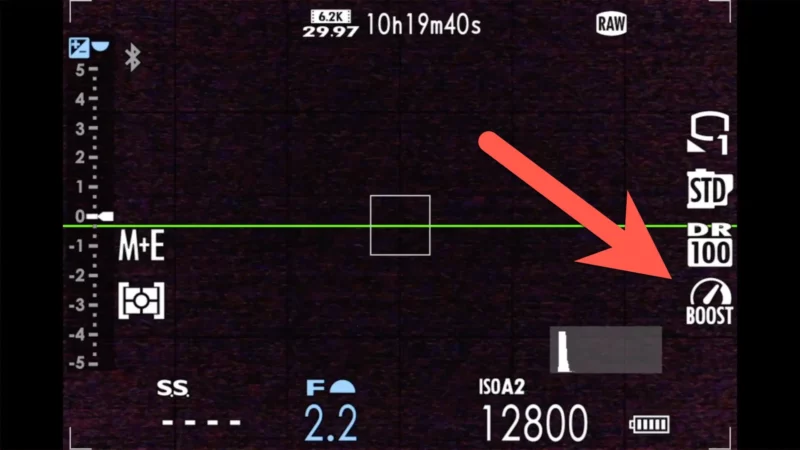
The Fujifilm X100VI has a Boost performance mode. It took me a while to take much notice of this. But I’m glad I eventually did.
It increases the performance and responsiveness of some camera operations. It doesn’t directly affect image quality. But it can enhance a small number of key tools you rely on when shooting.
It’s useful when you need faster refresh rates of the electronic viewfinder and back screen, improved autofocus speed, and brighter displays when shooting in low-light conditions.
Which sounds good, doesn’t it? So why not just use it all the time? It’s because there is a cost: it increases how quickly you’ll burn through battery power. And even under ideal conditions, the X100VI isn’t exactly great when it comes to battery life.
Menu Location:
Setup > Power Management > Performance
Boost Setting 1: Low Light Priority (Best for dark environments)
Boost Setting 2: Resolution Priority (Best for landscapes/portraits)
Boost Setting 3: Frame Rate Priority (100fps – Best for action/street)
Trade-off: Costs roughly 40 shots per charge (CIPA: ~270 frames with the EVF in Boost vs ~310 in Normal)
Quick Tip: Add “Performance” to your Q Menu for fast access
How to enable Boost mode
You can find this in the camera’s menu system under:
SET UP > Power Management > Performance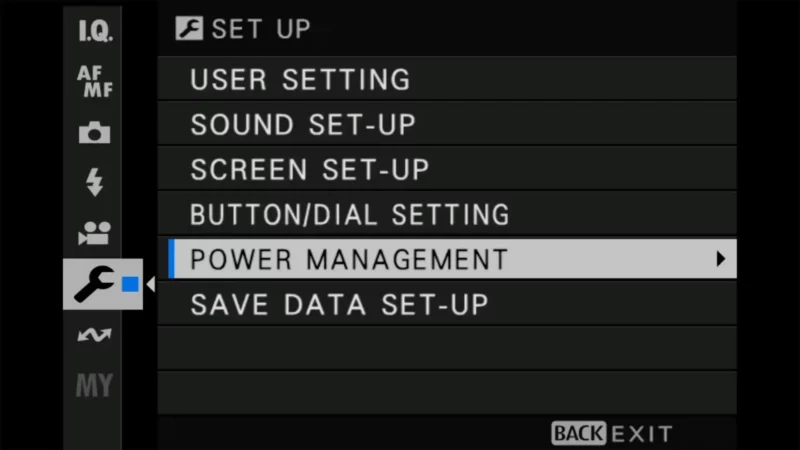
The default setting is Normal (pretty obviously!).
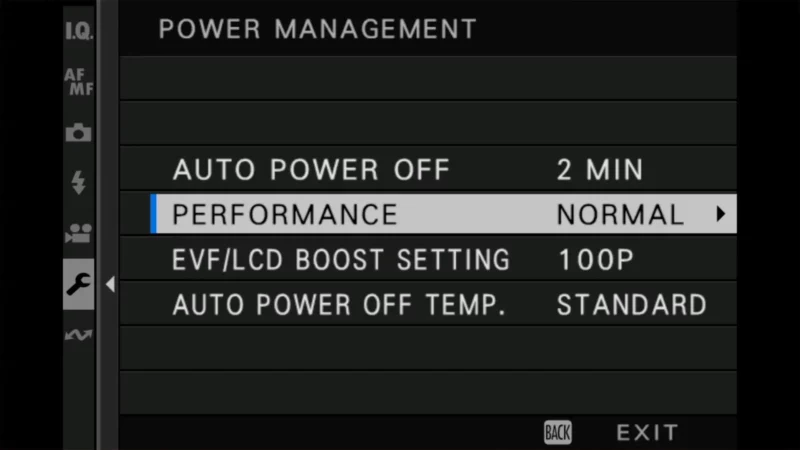
You can also set it to Boost or Economy. I set mine to Boost. If you want to maximize battery life and are willing to give up a little of the handling performance of things like autofocus, choose Economy.
One thing to know before you settle on Economy: it dims the live view and drops its frame rate after a few seconds of inactivity. It looks like something is wrong the first time you see it, but it isn’t. That throttling also stops when the camera is running on external USB-C power.
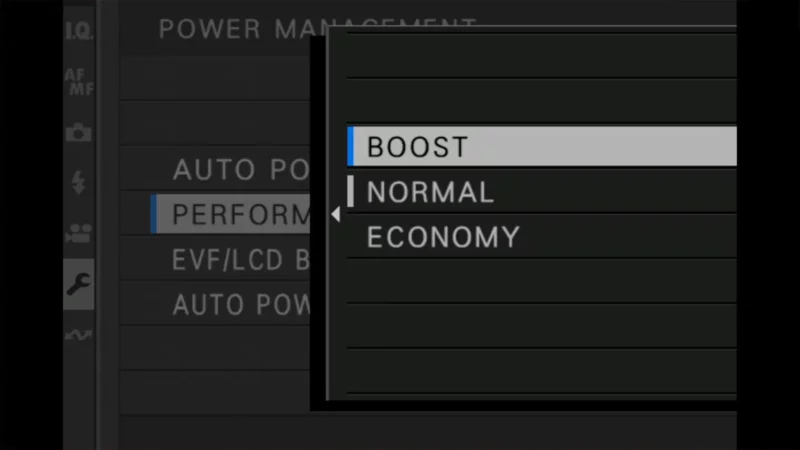
Types of Boost mode options
There are a number of sub-settings where you can choose the type of performance boost that you want. They’re not inside the Performance menu — they sit in a separate item just below it, at Setup > Power Management > EVF/LCD Boost Setting.
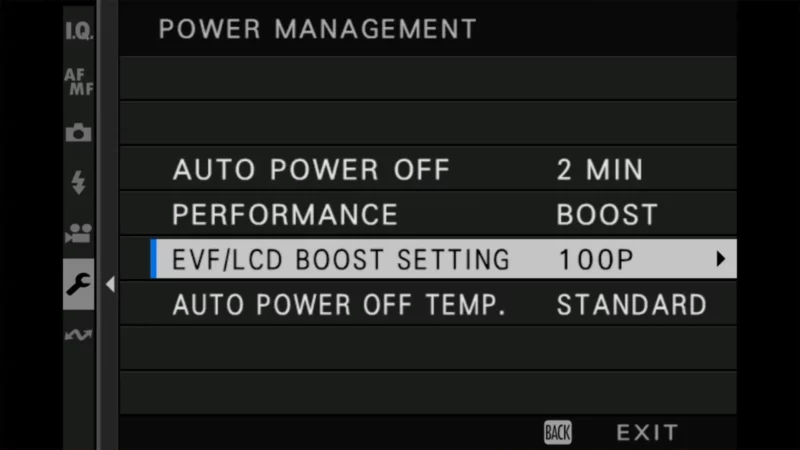
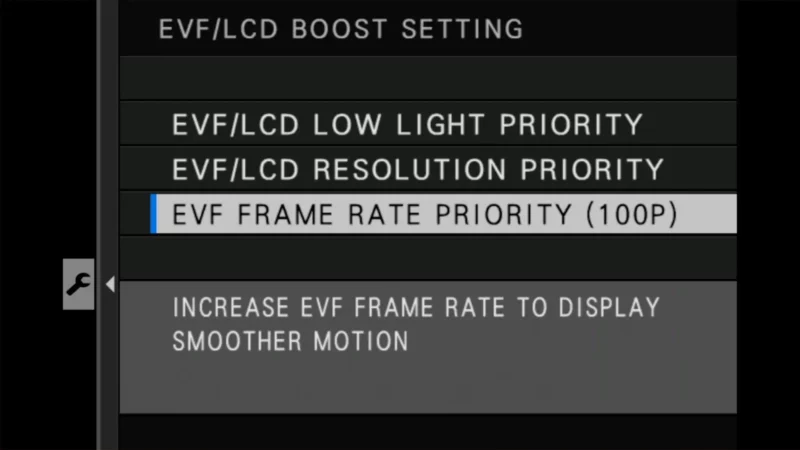
EVF/LCD Low Light Priority
Optimizes the live view for very dark scenes by lowering the frame rate to improve brightness and reduce noise.
Useful for low-light situations and long-exposure compositions when using a tripod. It’s less useful with handheld photography because it reduces the refresh rate of the screen.
EVF/LCD Resolution Priority
Prioritizes higher resolution in the viewfinder and LCD for a more detailed preview.
Best for static scenes, such as portraits and landscapes, where precise details in the preview matter.
Despite the name, Resolution Priority has nothing to do with the resolution of your photos. It only sharpens up the live preview in the viewfinder and on the back screen. Your files come off the card at the same 40MP whichever Boost setting you pick.
EVF Frame Rate Priority (100 fps)
Increases the EVF frame rate to 100 frames per second for smoother motion in the live view.
Ideal for tracking fast-moving subjects, action shots, and panning during sports or wildlife photography.
Practical use cases
- Action Photography: Use Frame Rate Priority for sports or wildlife to track motion smoothly. This will give you a clearer view of fast-moving subjects through the electronic viewfinder and on the back screen.
- Portraits and still life: Use Resolution Priority for a detailed and accurate preview of your subject that helps with details and critical focus.
- Low-light scenes: Use Low Light Priority when shooting in the dark to brighten the viewfinder image and reduce noise.
Add Performance to the Q Menu
One of the many useful things about the X100VI is, of course, the amount of flexibility that you have in customizing how buttons are assigned with functions. And this is a good case in point.
If you find yourself shooting in varied settings that would call for switching the performance mode often, it’s convenient to assign the Boost Mode activation to the Q (Quick) Menu as a quick way to toggle it.
Benefits & trade-offs of Boost mode
Benefits
- Faster autofocus performance (especially with Frame Rate Priority)
- Smoother live view and EVF refresh rates.
- Better visibility in low-light conditions.
Trade-offs
Those benefits do come at a cost, however. The biggest one is that you’ll chew through battery life even quicker.


Fujifilm’s own CIPA ratings put some numbers on that. In Boost you get about 270 shots per charge through the electronic viewfinder, against roughly 310 in Normal and 360 in Economy. Through the optical finder it’s about 400 in Boost versus 450 in Normal. So Boost is costing you something in the region of 40 to 50 frames per charge — not disastrous by itself, but it lands on top of a battery that’s already short.
- Increased battery consumption.
- In Low Light Priority mode, the frame rate drops, making it less suitable for action shots.
- The X100VI is small and has no fan, so it traps heat. Boost mode (especially Frame Rate priority) generates more heat.
Note: Boost mode pushes the processor harder, which can generate more heat. If you get a yellow temperature warning icon while shooting 4K video or shooting in hot weather, try turning Boost mode off.
Things worth knowing
- If you’re going to use Boost mode, it’s worth carrying a spare battery. If you’re going to use Boost mode, it’s worth carrying a spare battery. The model number for the X100VI is NP-W126S (make sure it has the “S” on the end which denotes the newer version which is the one you want for the X100VI), and you can check compatible options in this Fujifilm battery compatibility chart.
The safest bet is the official Fujifilm-branded version, but you pay a premium price for that. There are also good aftermarket brands that can offer a significant cost saving, albeit with more risk, but it’s best to stick to the larger, better-known brands because there are also lower-quality aftermarket versions for sale. - There’s also an icon on the display screen to show that it’s enabled.