
Yes, you can use a UHS-II microSD card in a GoPro camera. It’ll work just fine. But that doesn’t mean it’s the best choice.
That’s because there are other closely related aspects to consider.
Will you get any benefit from using a UHS-II over a UHS-I microSD card in a GoPro?
Not while you’re shooting. A UHS-II card won’t make the camera record any better or faster. Where it can help is afterward, when you copy files off the card with a UHS-II reader (more on that below).

Have Camera Will Travel Newsletter
Practical field notes, hands-on gear tests, and the fun of exploring the world with a camera in hand.

But that seems a bit counterintuitive, right? Because GoPros need fast microSD cards to work well. And the fastest microSD cards are UHS-II. That includes all V60 and V90 cards.
When you look at my speed test results, you’ll see that the fastest microSD cards are all UHS-II cards. And you might think that therefore they’re the best picks for GoPro cameras. But there’s a reason that none of the UHS-II cards feature in my recommendations for the best SD card for GoPro cameras.
So here’s the thing about UHS-II: it will only work as UHS-II if both the memory card and the host device support UHS-II. If one or the other is UHS-I, it effectively renders the system UHS-I.
The UHS-II technology is designed in such a way that it rolls back gracefully. What that means is that if you put a UHS-II card into a UHS-I device, it will work just fine. You just won’t get the extra speed benefits that a fully UHS-II system can bring–it would be just like putting a UHS-I card in.
Why NOT to use a UHS-II card in a GoPro
A UHS-II microSD isn’t a bad choice for a GoPro. It’ll work just fine. And there’s nothing wrong with doing it, if that’s what you want to do. You’re not going to break anything. I do it all the time.
But while you can use a UHS-II card in a GoPro, the main reason not to–or at least the main reason not to buy one for this purpose–is price.
UHS-II are usually more expensive than UHS-I cards (there are exceptions, and that doesn’t account for retailer special deals). So you’re paying a premium for a faster card that your camera can’t take full advantage of.
Of course, if you already have the UHS-II on hand, that’s a moot point. In that case, by all means, use it.
Are there any benefits to using a UHS-II card in a GoPro?
A UHS-II card won’t give you any extra speed benefits when using the GoPro. It won’t help you take better photos or improve image quality.
But the in-camera shooting is only one part of the workflow, and there still might be an argument in favor of using a UHS-II card. It really depends on your particular gear and workflow.
And that is when downloading footage or photos to your computer or backing up to an on-location backup device.
If your memory card reader or backup device is UHS-II, you’ll probably see faster download speeds. And that might speed up the editing and processing part of your workflow.
Do any GoPro cameras use a UHS-II interface?
Not so far. At least up to the HERO12 Black. It’ll probably be adopted at some point, but we’re not there yet.
It seems very likely that some future GoPro will use a UHS-II interface, especially once the shooting resolutions start breaking into 8K territory. That does seem like a natural evolution that will come at some point, even if it’s a few models down the road.
UHS-II vs UHS-I
The UHS standard was created by the SD Association, the organization that controls the Secure Digital format and technology.
When talking about SD cards, there are various types of speed. There are transfer speeds, and there are rating systems to go along with those. There’s a Video Speed Class rating that refers to the sequential write speed of a card and denotes its suitability for particular types of video recording in cameras. There’s also an Application Performance Class (A1 or A2). It sets a minimum for random reads and writes (how many small 4 KB chunks the card can handle per second) plus a minimum sustained speed. The SD Association created it for running apps from a card. But it matters for GoPro buyers now: the HERO13 Black, HERO (2024), MAX2, LIT HERO and MISSION 1 series manuals all ask for a card rated A2 as well as V30.
UHS-I and UHS-II aren’t speed ratings. They’re interfaces: the connection the card uses to talk to the camera or card reader. UHS stands for Ultra High Speed.1
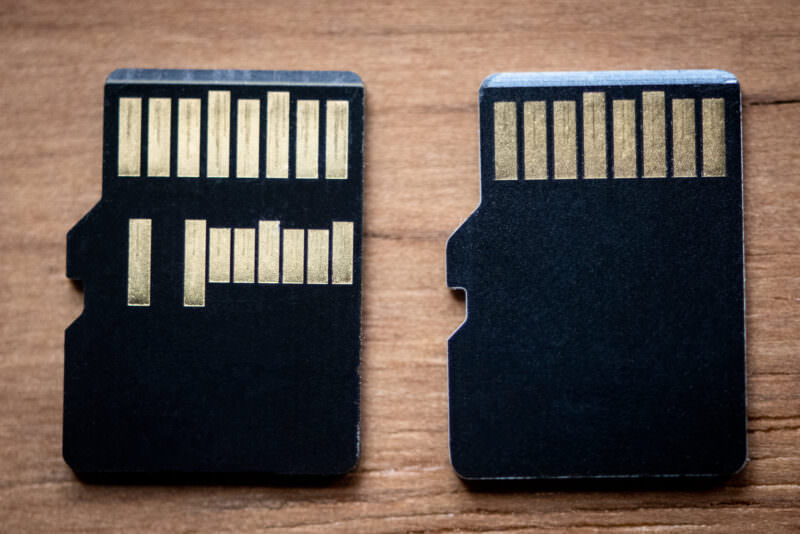
The difference is how fast that connection can go. The SD Association lists UHS-I at up to 104 MB/s. UHS-II adds a second row of pins and a second data lane. That lets it reach 156 MB/s with data flowing both ways at once, or 312 MB/s with both lanes working in one direction. The second row of pins is also how you tell the cards apart (see below).
How do you tell the difference between UHS-I & UHS-II?
There are two simple ways to tell the difference between a UHS-I and UHS-II microSD card.
One is on the packaging. It might have UHS-I or UHS-II printed on it. More likely is that it’ll have just a “I” or “II”.
The other way is to look at the back of the card. UHS-I cards have a single row of contacts. UHS-II cards have two rows, as in the photo below. (There’s more on telling them apart in my guide to UHS-I vs UHS-II cards.)
Notes & References:
- There are also two more specs on the horizon — UHS-III and SD Express — but neither of those is in use yet in consumer devices. [↩︎]


