
I started these microSD card speed tests back in 2016. Since then, I’ve regularly bought and tested new cards and updated the results posted here. There are no freebies or sponsored tests.
As you can see in the table below, I’ve tested dozens of microSD cards since then (and counting).
My focus here isn’t on fast just for bragging rights or the sake of it being fast.
It’s on fast for very practical reasons: being able to use the full capabilities of your cameras and devices without running into errors or lockups.
My focus here is on memory cards for action cams and other cameras, and for that reason, the speed I’m most concerned with is sequential write speed.1
Related: not sure what the V30/V60/V90 and U3 symbols on a card actually mean? See my guide to SD card speed classes.
Fastest microSD cards – the quick list
If you just want to cut to the chase, these are the current fastest microSD cards I’ve come across so far in my speed tests. (You can find the raw test results and more in-depth information below.)
They’re ranked by tested sequential write speed results. That’s the measure that is most relevant to using them in cameras, especially recording 4K, 5K, 8K, and high-bitrate video, as well as fast photo burst modes.
- Delkin Devices Power V90
- Verbatim Pro+ II V90 (discontinued)
- ADATA Premier ONE V90 (discontinued)
- Kingston Canvas React Plus V90 (discontinued)
- Silicon Power Superior Pro V90 (discontinued)
- ProGrade Digital V60
- SanDisk Extreme Pro V30
Why don’t new cards seem to be getting faster?
Unlike SD cards and other formats like CFExpress, microSD cards seem to have leveled off in terms of newer, faster cards. There just haven’t been that many very fast microSD cards coming out. And several of the fastest models have been discontinued without any replacement V90 in the manufacturers’ lineups.
Some of it might be the costs of development of very fast cards in the ultra-compact microSD format.
![Fastest microSD Cards Tested: Real-World Speed Rankings [2026]](https://havecamerawilltravel.com/action/wp-content/uploads/sites/8/2025/11/19-800x600.jpg)
Have Camera Will Travel Newsletter
Practical field notes, hands-on gear tests, and the fun of exploring the world with a camera in hand.

But my speculation is that it’s mostly to do with a leveling off of demand for faster cards because the devices they’re being used in are hitting a performance wall.
What I mean by that is that one of the main markets for fast microSD cards is with small cameras that record high-bitrate video. Specifically, action cameras and some of the related devices, like drones and 360-degree cameras.
But those very small cameras come with a major catch in that precisely because they’re so small, they’re very hard to keep cool internally and are prone to overheating. So the camera manufacturers have been a bit stuck in trying to increase their cameras’ video bitrate capabilities, because that would lead to problems with the cameras overheating even more quickly than they already do. And users are not going to be particularly happy with a camera that overheats and shuts down quickly. (Ahem.)
But none of this is something I’ve had confirmed by manufacturers. So maybe there’s something else to it. But that’s my current working theory for why we haven’t been seeing more faster microSD cards hitting the market in the past couple of years.
microSD card speed test results
Below is the full list of my microSD speed test results.
These are sorted by default by descending sequential write speed — the value that’s most relevant to using the cards in high-resolution cameras — but you can click on the column headers to sort by other criteria or use the search bar to filter by brand or model number. You can also scroll the table right to get the other columns.
| Brand | Model Number | Speed Class | UHS | Tested Write / Seq | Tested Read / Seq | Rated Write MB/s |
|---|---|---|---|---|---|---|
| Delkin | Power (DDMSDG200064) | V90 | II | 258.9 | 273.2 | 250 |
| Lexar Professional | 1800x (LSDMI64GCRBNA1800R) | U3 | II | 256.3 | 276.9 | 245 |
| Verbatim | Pro+ II | V90 | II | 243.8 | 185.0 | 245 |
| ADATA | Premier ONE (AUSDX128GUII3CL10-CA1) | V90 | II | 219.8 | 278.6 | 155 |
| Kingston | Canvas React Plus (MLPMR2) | V90 | II | 200.5 | 268.4 | |
| Lexar Professional | 1800X (LSDMI128CBNA1800A) | V90 | II | 146.3 | 262.0 | |
| Silicon Power | Superior Pro | V90 | II | 140.0 | 251.0 | 160 |
| ProGrade Digital | PGMSD128GBJBH | V60 | II | 125.3 | 205.4 | 80 |
| SanDisk | Extreme PRO (SDSQXPJ) | U3 | II | 117.0 | 269.8 | 100 |
| FreeTail | Evoke Pro (FTSD) | V60 | II | 116.1 | 272.1 | |
| Angelbird | AV PRO V60 | V60 | II | 109.8 | 292.1 | 160 |
| ProGrade Digital | V60 Gold (PGMSD) | V60 | II | 107.4 | 287.6 | 130 |
| Lexar Professional | LMSGOLD | V60 | II | 105.2 | 285.6 | 100 |
| SanDisk | EXTREME (SDSQXAV) | V30 | I | 96.0 | 86.6 | 130 |
| Manfrotto | MANPROMSD | V30 | I | 91.3 | 97.9 | 90 |
| SanDisk | Extreme (SDSQXA1) | V30 | I | 88.8 | 94.6 | 90 |
| SanDisk | Extreme Pro (SDSQXCZ) | V30 | I | 88.8 | 93.6 | 90 |
| SanDisk | Extreme Pro (SDSQXCY) | V30 | I | 88.3 | 94.3 | 90 |
| SanDisk | Extreme Pro (SDSQXCG) | V30 | I | 88.3 | 93.9 | 90 |
| SanDisk | Extreme Plus (SDSQXBZ ) | V30 | I | 88.3 | 93.8 | 90 |
| Samsung | Pro Select (MB-MF) | U3 | I | 88.1 | 98.3 | 90 |
| SanDisk | Extreme Plus (SDSQXSG) | U3 | I | 87.8 | 86.0 | 90 |
| SanDisk | Extreme Pro (SDSDQXP) | U3 | I | 87.6 | 85.2 | 90 |
| SanDisk | Extreme PLUS (SDSQXBG) | U3 | I | 87.4 | 91.5 | 90 |
| Samsung | EVO Select (MB-ME) | U3 | I | 87.2 | 98.7 | 90 |
| Samsung | EVO (MB-MP) | U3 | I | 87.2 | 91.5 | |
| SanDisk | Extreme PLUS (SDSQXWG) | V30 | I | 87.2 | 91.0 | 90 |
| Samsung | EVO Select (Blue / MB-ME) | V30 | I | 87.0 | 96.3 | – |
| Samsung | PRO Plus | V30 | I | 86.5 | 97.7 | 120 |
| Amazon Basics | LSMICRO128GU3 | V30 | I | 86.5 | 97.5 | |
| Lexar Professional | 1066x (Silver) | V30 | I | 86.1 | 97.8 | 120 |
| Samsung | Pro+ (MB-MD) | U3 | I | 85.0 | 92.7 | 90 |
| Lexar | 667x Video | V30 | I | 84.1 | 97.3 | 90 |
| Delkin | Advantage (DDMSDW66064G) | V30 | I | 83.2 | 98.9 | 75 |
| Delkin | Select (DDMSDR500128) | V30 | I | 82.4 | 97.6 | 75 |
| Samsung | Pro (MB-MG) | U1 | I | 80.3 | 90.5 | 80 |
| Delkin | DDMSD66064GB | U3 | I | 74.9 | 87.7 | 50 |
| Delkin | 1900X (DMSD1900128V) | U3 | II | 73.8 | 205.0 | 100 |
| Transcend | Ultimate 633x (TS32GUSDU3) | U3 | I | 73.7 | 91.1 | 85 |
| Delkin | DDMSDB190064 | V60 | II | 73.4 | 94.8 | |
| SanDisk | Extreme (SDSQXAF) | U3 | I | 71.7 | 92.3 | |
| Patriot | PEF64GEP31MCX | V30 | I | 71.5 | 97.3 | 80 |
| Patriot | LX / PSF64GMCSDXC10 | U1 | I | 71.0 | 92.8 | |
| Samsung | EVO Plus (MB-MC) | U3 | I | 70.8 | 91.7 | 60 |
| SanDisk | Extreme (SDSQXNEA) | U3 | I | 70.6 | 91.2 | 40 |
| Lexar Professional | 1800x (LSDMI128CRBNA1800R) | U3 | II | 70.4 | 205.6 | 115 |
| PNY | Elite-X (P-SDU32U390EX-GE) | U3 | I | 67.8 | 91.7 | – |
| SanDisk | Extreme (SDSQXA2) | V30 | I | 67.3 | 94.9 | 60 |
| SanDisk | Extreme (SDSQXVFA) | V30 | I | 64.9 | 90.0 | 60 |
| Arcanite | AKV30A1128 | U1 | I | 64.0 | 97.6 | |
| Amplim | V30 Black | V30 | I | 63.7 | 97.6 | |
| Delkin | DDMSDB190064 | U3 | II | 63.2 | 202.6 | 100 |
| Silicon Power | Superior (SU256GBSTXDA2V20AC ) | V30 | I | 60.5 | 97.8 | |
| Gigastone | Extreme 633x | U3 | I | 59.9 | 95.1 | |
| Lexar Professional | 633x (LSDMI32GBBNL633R) | U1 | I | 59.8 | 90.0 | – |
| ADATA | AUSDX128GUI3V30SA2-RA1 | V30 | I | 59.5 | 98.0 | 80 |
| Netac | P500 | U3 | I | 51.7 | 94.7 | |
| PNY | PRO Elite (P-SDU32GU395PRO-GE) | U3 | I | 55.3 | 88.1 | 90 |
| Topesel | TF-128G | V30 | I | 52.0 | 95.6 | 45 |
| Arcanite | AKV30A2128 | V30 | I | 51.3 | 97.5 | |
| SanDisk | Ultra Plus (SDSQUSC) | C10 | I | 50.3 | 92.2 | – |
| Kootion | Pro | V30 | I | 47.6 | 96.4 | 45 |
| Transcend | TS256GUSD300S | V30 | I | 46.8 | 98.9 | 45 |
| PNY | P-SDU32GU390G-GE | U3 | I | 45.1 | 89.3 | – |
| Strontium | Nitro | U1 | I | 41.0 | 95.7 | |
| Lexar | LSDMI32GCBNL1000R | U3 | II | 40.3 | 148.7 | – |
| Polaroid | PLDMEPMSD64GB | U3 | I | 39.9 | 91.1 | 90 |
| Lexar Professional | 1000x (LSDMI128CBNL1000R) | U3 | II | 39.3 | 141.3 | – |
| Kingston | SDCA10 | U1 | I | 35.3 | 88.1 | 45 |
| Samsung | Pro Endurance (MB-MJ) | U1 | I | 35.2 | 95.1 | 30 |
| SanDisk | Ultra (SDSQUAR) | C10 | I | 33.4 | 92.8 | |
| BraveEagle | U1 | U1 | I | 28.9 | 95.9 | |
| Lexar Professional | 633x (LSDMI64GBB1NL633R) | U1 | I | 28.3 | 88.9 | 20 |
| Samsung | EVO+ (MB-MC) | U1 | I | 26.5 | 77.6 | – |
| SanDisk | Ultra (SDSDQUAN) | C10 | I | 23.6 | 91.3 | – |
| Micro Center | U1 | U1 | I | 20.9 | 96.9 | |
| Samsung | MB-MG | U1 | I | 20.9 | 75.1 | 20 |
| Sony | SR64UYA/TQMN | U1 | I | 20.8 | 39.6 | – |
| Toshiba | Exceria (M302-EA) | U3 | I | 20.0 | 65.3 | |
| PNY | Elite (P-SDU32U185EL-GE) | U1 | I | 17.5 | 91.6 | – |
| Toshiba | Exceria (M301R0320U2) | U1 | I | 13.7 | 45.5 | – |
| Alisinset | Ultra X002M27BQ1 | U3 | I | 12.4 | 17.0 | |
| Kodak | Kodak V30 | V30 | I | 5.3 | 17.1 | 80 |
Obviously, this doesn’t include every microSD card available. It’s a growing list that I try to update regularly as new cards are released and become readily available. I buy all of these cards myself — there are no sponsored tests or freebies. If you have one you think should be added to the list, let me know in the comments, and I’ll do my best to track it down and test it.
Fastest microSD cards in depth
Here are the details on the fastest microSD cards that top my tests.
Notes: You might notice some discrepancies between this quick list and the speed results chart below. That’s because I’ve removed cards from here that are discontinued and no longer readily available. The rated read and write speeds here are those provided by the manufacturers and should be read preceded by an implicit “up to.”
1. Delkin devices Power V90 microSD card

Delkin Devices isn’t as well known as some of the other brands that appear on this page, but they’ve been making flash memory cards for many years. I’ve used several of their cards over the years and have always found them to be excellent. Headquartered in San Diego, they’ve typically focused on the higher end of the market. They’ve recently overhauled their memory card lineups into distinct categories, which, from a customer perspective, makes it much easier to see which cards are best for what. The Power line is for their fastest cards.
Check current prices and availability at: Amazon | B&H Photo
2. Verbatim Pro+ II V90 microSD card

Verbatim has a very long and impressive history in all manner of data storage media. They haven’t put the same amount of consumer marketing oomph behind their memory cards that they used to do with floppy disks and CD-Rs. But they know what they’re doing, and this is a very fast microSD card.
It’s rated to V90 and has a UHS-II interface. It comes with a microSD-to-SD adapter, but it is only UHS-I, which seems odd. I haven’t found this card widely available at many retailers. If you do find it, make sure it is the Pro+ II version (it will be printed on the card, and it’s UHS-II). There’s a big jump in performance from the regular Pro+ V30 UHS-I version.
Check current prices and availability at: Amazon | Walmart
3. ADATA Premier ONE V90 microSD card

The ADATA brand is relatively new to memory cards — at least ones that are readily available — but this Taiwanese company has been in the flash storage business since 2001. They don’t have a particularly large retail presence, but they seem to be focusing on the fast end of the market. This particular card is very fast. I haven’t used ADATA cards enough in real-world shooting to form my own opinion as to their reliability, but I’ve heard good things from others.
Check current prices and availability at: Amazon | Walmart
4. Kingston Canvas React Plus V90 microSD card
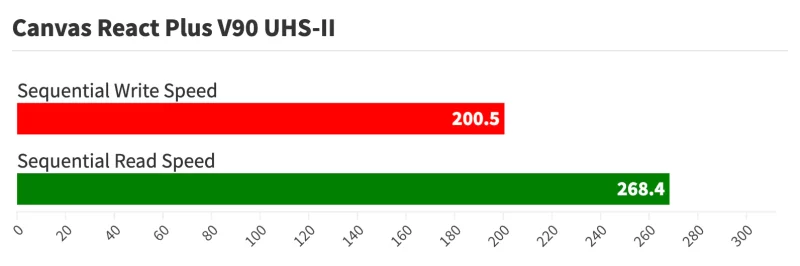
I’ve used Kingston memory cards on and off for many years. And while I’ve always found them to be reliable and cost-effective, they haven’t tended to aim toward the fastest end of the market. That’s changed with these Canvas React Plus cards, which are aimed at 4K and 8K video shooters.
It’s a UHS-II card and comes with a USB reader as well as a microSD-to-SD adapter cartridge (the adapter is, oddly, only UHS-I, so you’ll probably want to pick up a UHS-II memory card reader separately if you want to milk maximum speeds out of this when transferring data to and from a computer).
Check current prices and availability at: Amazon | B&H Photo
5. Silicon Power Superior Pro V90 microSD card

Silicon Power is a Taiwanese company that specializes in digital storage, with an emphasis on flash memory for consumer and industrial uses. Silicon Power memory cards that I’ve used in the past have tended to aim at the middle of the market. This is by far the fastest of their microSD cards I’ve tried.
It’s a UHS-II card that carries a V90 rating and comes in 64GB and 128GB storage capacities.
Check current prices and availability at: Amazon
6. ProGrade Digital V60 microSD card

ProGrade Digital is a relative newcomer to the memory card space, but it’s not just another no-name brand that’s popped up from nowhere. It has been created by a team with incredibly deep experience in the industry — some of the key people who had been part of Lexar’s success but launched out on their own when Lexar was bought by a Chinese company.
They’re focusing on the high end of the market with an emphasis on cards geared towards top-shelf cameras and professional use. I’ve been very impressed with their SD cards as well, which are among the fastest SD cards I’ve tested so far, and I regularly use their CFExpress and memory card readers.
Like the SD cards, I’ve found this UHS-II microSD to exceed their claimed speeds–and quite handily, at that (you can see the results in the table below).
It comes in 32GB, 64GB, and 128GB sizes.
Check current prices and availability at: Amazon | B&H Photo
7. SanDisk Extreme PRO V30 microSD
This latest version of the top-of-the-line Extreme Pro line is labeled both with V30 for 4K video recording and A2 rating for app speed. It’s rated for 90 MB/s sequential write speed and 170 MB/s sequential read speed.
SanDisk comes out with new models quite frequently, and there’s not always a lot of performance improvement between them (which is why there are so many from SanDisk near the top of the table below). This latest version claims a boosted read speed over the previous model, but the reality is that the past few iterations of the Extreme Pro have had much the same write speed, so if you can’t find this latest version, you can be confident in getting a recent previous version.
Check current prices and availability at: Amazon | B&H Photo | Walmart
8. Manfrotto V30 microSD card
Wondering what Manfrotto is doing in the memory card game? Me too. I’ve even asked their reps but haven’t gotten a real answer.
Manfrotto, an Italian company, has long been known for tripods and mounts, light modifiers, and studio clamps and fittings. But memory cards? Not so much. My hunch is that their parent company wanted to add memory cards, looked in their stable of brands (including Syrp, Gitzo, Lowepro, and Joby), and figured that Manfrotto made the best fit.
In the past few years, Manfrotto has added SD, CompactFlash, CFexpress B, and microSDXC cards. I’ve used their SD cards more extensively, and they’ve been solid performers. I have no reason to doubt that the microSD cards wouldn’t also perform well, and this one certainly did well in my speed testing.
Check current prices and availability at: Amazon
9. SanDisk Extreme V30 microSD card
SanDisk releases new models often, but they don’t refresh all of their lines simultaneously. That sometimes results in newer cards in lower lines leapfrogging older models in higher lines. That’s what has happened here. The Extreme line is not SanDisk’s top line — that’s the Extreme Pro — but this new model has slightly improved speeds.
This card is rated for V30 video recording performance with rated speeds of up to 90 MB/s sequential write speed and 160 MB/s read speed.
Check current prices and availability at: Amazon | B&H Photo
10. Samsung EVO U3 microSD card
Samsung isn’t known for action cameras (although they do have some interesting compact cameras and even 360° cameras), but they’re one of the very big players in the smartphone and mobile devices market, many of which use microSD cards.
They’ve also got a lot of experience in flash memory and electronics in general. So it stands to reason that they’d make top-notch microSD cards — and they do. They have multiple models, and the distinctions between them aren’t always clear. This one is the EVO, and its model number is MB-MP, but you can also find models like the EVO Select and EVO Plus, which also work well with high performance.
Check current prices and availability at: Amazon | B&H Photo
Why do you need a fast microSD card, anyway?
A fast microSD card won’t help you take better photos or videos. And it won’t improve image quality. But it can help you take full advantage of all of your camera’s features.
The newest cameras that are coming out have capabilities that can demand a lot from the memory card. Cameras like GoPros, Insta360s, DJIs, or the Sony RX0 II can record at very high bitrates, and there are other cameras and devices that use even higher bitrates. These all require a fast memory card to keep up with the amount of data the camera is sending to it. If the card’s not fast enough, you can end up with issues like the recording stopping, the camera freezing up, or the camera overheating.
Because there are various ways of interacting with a microSD card, there are different types of speed.
When transferring data off a memory card when you’re downloading to your computer, the sequential read speed matters. If you’re using it with a device running apps, you’ll be mostly concerned with its random write and read speeds.
For recording video from a camera, the one that matters is the sequential write speed. That tells you how fast you can get data on to the card. It’s often not as clear as it could be, because the marketing departments for these manufacturers often use the sequential read speed in large, bold type on the packaging because that number is often higher and looks more impressive. But the read speed tells you how fast you can get data off the card, and that’s much less relevant when choosing a memory card that can keep up with the camera’s recording capabilities. So in ranking the cards here, I’m focusing on the sequential write speeds and basing them on my own tests.
But it’s not always true that the fastest card is necessarily the best card for what you need. Price and availability matter too. And then there’s the important issue of whether your camera can take full advantage of the card’s speed. There’s generally no harm in putting a very fast card in a slower camera because the specifications are designed to fall back gracefully and maintain compatibility. But the performance you get will be limited by the slowest point in the chain.
To take advantage of what UHS-II cards can do, for instance, you’ll need a camera or reader that’s compatible with UHS-II. If it’s not, the card will still work — they’re designed to be backward compatible in nearly all cases — but you won’t get the highest speeds the card is capable of. One place you might see some benefit, though, is when you go to download the photos from the card to your computer using a card reader — but again, only if your card reader has a UHS-II interface.
About these real-world microSD speed tests
In real-world use, a range of technical factors in the camera and its transfer hardware and software can prevent you from hitting the speed numbers on the card’s packaging. I’m focusing on real-world uses, not scientific lab results that can’t be replicated in practical use.
In conducting these tests, my objective is to test the performance that we can realistically expect using off-the-shelf hardware in normal use
There are two things I am not trying to do:
- I’m not trying to replicate the manufacturers’ benchmark lab tests.
- I’m not trying to play gotcha and test whether the speed ratings the manufacturers claim are accurate. There are, after all, several things that can affect the speeds you can get out of cards in practice.
What I am trying to do is find out which cards perform best in real-world conditions and how they compare relative to each other. Because those are the things that matter to me when I’m trying to decide which card to buy to use in my cameras.
In short, I’m looking for real-world practical speeds, not theoretical speeds.
So I’m using a real-world computer setup, not some high-end custom rig optimized to squeeze every last bit of bus transfer speed but not much good for actually processing photos and videos. There are dedicated hardware devices that exist only to test the speed of memory cards. Those are ridiculously expensive and not useful for any other purpose. Instead, I’m using readily available standard hardware that photographers might have on hand.
For the memory card reader, I’m using a ProGrade Digital USB3.2 Gen. 2.0 Dual-Slot microSD UHS-II reader. It’s connected with a ProGrade Digital USB 3.2 Gen 2 Super Speed+ certified cable via the Mac’s USB-C port. After extensive testing, I’ve found that this reader gives me the most reliable and consistent results, especially with the newer, faster UHS-II cards.2
For the software, I’m using the benchmarking tools in Digital Media Doctor by LC-Technology, the company behind SanDisk RescuePro. All cards are new and freshly formatted with the SD Association’s official SD Card Formatter app. Because it’s quite normal for results to vary a bit between tests, I’m running each set of tests five times and averaging the results. And I’m using a 5GB data stream for each test.
For the computer, I’m using an iMac Retina 5K 2019 with an internal SSD. There are faster, more powerful computers that might squeeze out higher transfer rates, but this provides a useful real-world platform that is widely used and available.3
And, finally, the cards themselves. I buy all of these myself through standard retail channels. I don’t accept freebie cards or conduct sponsored tests.
microSD card reliability
Something I don’t address in these tests is reliability. While flash memory is generally quite stable and resilient, in part, because there are no moving parts, memory cards can and do fail. When choosing which cards to use myself, speed is one factor, but I also generally favor cards from well-established brands because I trust their reliability more. And for normal use, those typically offer excellent performance. But I also like to keep at least one spare microSD card on hand — it’s hard to complete a shoot with a faulty memory card.
But if you’re choosing a memory card for what amounts to near-constant writing — such as with a dashcam or security cam that is constantly being overwritten — you might be better off in the long run with one of the specialized high-endurance cards that some brands offer, like these. They typically aren’t at the top of the speed charts, but they add extra peace of mind that the card should be able to tolerate very high numbers of write cycles.
What size microSD card to get?
microSD cards come in a range of sizes. With the fast cards we’re talking about here, most are in the 64GB, 128GB, 256GB, 400GB, 512GB, or 1TB ranges. And most cameras for which you’d need a fast microSD card can handle any of those sizes (although not all, so it’s worth checking with the camera’s documentation, especially with regard to larger cards like 1TB). Which size to get generally comes down to a matter of convenience of how often you want to be downloading the data off the card and clearing new space.
If you’re looking for a fast SD card to keep up with a camera that shoots high-bitrate video, I’ve put together a simple video bitrate vs memory card size calculator.
The notes / definitions
There’s a lot of jargon when it comes to memory cards. Here are some brief explanations that I hope provide some clarity.
Are microSD & SD cards the same?
The biggest difference between microSD and SD cards is their size. (And yes, I realize that might be obvious….)
MicroSD cards are physically smaller, so they’re often used in smaller devices like action cameras, phones, GPS navigators, and handheld gaming devices.
Beyond that, they share a lot of similarities in terms of technology. They’re both from specs developed and controlled by the SD Association. They both share technologies like UHS-I, UHS-II, and the various video speed class and application speed class ratings. In general, though, the development of the fastest microSD cards lags behind the fastest SD cards.
But because a device is designed for one or the other, they’re generally not interchangeable.
I say “generally” because there is a limited exception. It is possible to put a microSD card into a full-size SD card adapter and then use that in a device that uses full-size SD cards. That can be a particularly convenient option for downloading the data from the files to a computer, because it means that you can get away without a memory card reader with a dedicated microSD card slot. But I don’t recommend doing that for capture devices because I’ve seen it go wrong too many times. The adapters are a weak link. They might not be able to keep up with the transfer speeds required, they might not be able to dissipate the heat build-up from intensive data transfers, and it’s another potential point of failure. For those reasons, I recommend sticking with full-size SD cards in those devices that have full-size SD slots rather than using a microSD card in an adapter.
Speed ratings
When talking about the speed of the cards, I’m using MB/s (also written as MBps or megabytes per second), which is not to be confused with Mb/s (Mbps megabits per second) (the capital or lowercase “b” matters here). Megabits per second is the measure more commonly used by cameras and in recording video, referring to video bitrates.
There are 8 bits in a byte, so to get from megabits per second to megabytes per second, you multiply by 8. So 80MB/s is the same as 640Mb/s. I’ve posted a handy calculator for converting Mb/s to MB/s and vice versa.
There’s also a more cryptic X rating system that’s slowly fading away. I have more on that here.
microSDHC vs microSDXC
The codes microSDHC and microSDXC are useful as a practical way to determine what size card will work in your device. If your device specs say that it only works with microSDHC, then you’ll want a card that’s 32GB or smaller. If it says microSDXC, it’ll work with both.
These are standards put out by the SD Association. They refer, first, to storage capacity ranges. And these, in turn, affect the filesystem that’s used on the cards.
The most common that you’ll see available are microSDXC and microSDHC. The other two are SD and SDUC, but SD cards are older and harder to find, while SDUC is an emerging standard that hasn’t reached the wild yet.
microSDHC (Secure Digital High Capacity) is a design specification that refers to microSD cards that are between 4GB and 32GB in capacity and formatted with the FAT32 filesystem. FAT32 supports individual files up to a maximum of 4GB.
microSDXC (Secure Digital eXtended Capacity) refers to microSD cards with a capacity larger than 32GB and with a maximum theoretical limit of 2TB. They’re formatted in the exFAT filesystem.
SDUC The SD Association has also created a newer specification known as SDUC, for SD Ultra Capacity. It has its own host technology, protocols, and drivers, but in terms of card storage capacity, it’s designed to cover cards ranging from 2TB up to 128TB. SDUC cards will only work with devices that have SDUC compatibility specifically included, but you won’t find any of those cards in the wild just yet, so, for now, at least, you don’t really need to be concerned about accidentally getting one of those.
Technically, it’s possible to use a computer to format a microSD card to ignore the specs. So, for instance, it’s technically possible to format a 32GB microSD card with exFAT or a 128GB microSD card with FAT32. If using the microSD card in the computer, it should work fine, just like any other external flash storage. But if you start using it in a device or camera, you might run into trouble. That’s because doing this goes against the SD Association specifications, and cameras and devices are expecting it to conform to SD Association specs. So it can cause problems in some cameras, and they’ll be overwritten to the appropriate standard next time you format the card in the camera. In general, I don’t recommend it, especially if you’re using the cards in a camera or some other device that expects the card to follow the established standards. In nearly all cases, it’s not worth the risk of losing shots or footage because your camera is confused by the card’s filesystem. At least, it’s not worth doing without extensive testing to see that you’re getting the results you want in your particular equipment.
That said, if you really want to format your microSD card in your computer, I’ve put together a guide on how to format microSD cards on Mac as well as using to using the official SD card formatter.
UFS vs microSD
UFS (for Universal Flash Storage) cards look very similar to regular microSD cards, but the internal memory is a different technology that can read and write simultaneously. Regular microSD and SD cards use a technology called eMMC that can only read or write at one time, not both together.
UFS isn’t widely used yet, and it’s most useful in devices that can support simultaneous reading and writing, such as smartphones and gaming devices. And even there, it’s still mostly used for internal memory rather than memory cards. With cameras, they’re usually writing or reading, not both at once. That said, the faster transfer rates in each direction would obviously be useful in cameras.
The important catch is that you can’t use a UFS card in a regular device unless the device is specifically compatible with UFS. And, for now, that’s only a handful of smartphones and specialized devices, not cameras.
Speed classes
Just like SD cards, microSD cards are given a speed class rating that refers to their category for writing data, with each category describing a real-world video recording use. These apply to microSDHC and microSDXC cards. The speed ratings I’m focusing on here are known as the video speed classes. There’s also a rating system for using microSD cards in gaming devices and other more computer-like devices; it’s known as the application performance class.
Where things get a little complicated, though, is that these video recording speed ratings don’t necessarily reflect the absolute speed of the card. Put another way, a card that has a V30 rating isn’t necessarily faster than one that has a U3 rating. That’s because to display the rating on the card, the manufacturers have to have their cards certified for that rating. It also involves revising packaging and marketing materials, which is an expensive process. So not every manufacturer will go to that trouble and expense right away.
The upshot is that it’s not as simple as just looking at a card with a V30 or even V60 rating and knowing that it’s faster than one that only carries a U3 rating. It might be, but the rating system doesn’t work quite that way. You can see evidence of that in the speed test results on this page, with some cards with a lower speed rating being faster in testing than ones that display a higher speed rating on the packaging.
V90. The V-class is a new designation created to designate cards that are designed to work with the speeds required for high-bitrate 4K, 5K, 6K, and 8K video. The SD Association added some lower numbers to make them backward compatible with the older class designations (e.g., Class 10 and Class 6), but the most important ones are V30 and above.
Memory cards in the V90 class are rated to support a minimum sequential write speed of 90MB/sec. Their primary market is for cameras that shoot 8K video. For now, cameras that can shoot 8K are pretty rare (although more are becoming available), but the rating class provides room to grow.
V60 is applied to cards that support a minimum sequential write speed of 60MB/sec. They’re aimed primarily at cameras that record 4K video.
V30 is applied to cards that support a minimum sequential write speed of 30MB/sec. These are designed to support at least full HD video and some 4K video cameras that record 4K at lower bitrates.
U3 is designed to support 4K video recording at a sustained video capture rate of 30MB/s. This class overlaps with the newer V30 class.
U1 is designed to support real-time broadcasts and HD video (720p and 1080p) with a minimum serial write speed of 10 MB/sec. This overlaps with the newer V10 class.
Class 10 is designed to support 1080p recording at a minimum (but again, not at all framerates) with a minimum serial write speed of 10 MB/sec.
Classes 2, 4, and 6. Class 2 supports standard-definition video recording with a minimum serial write speed of 2 MB/sec. Classes 4 and 6 are designed to support 720p and 1080p video (but not all framerates) with a minimum serial write speed of 4 MB/s and 6 MB/s, respectively. Most newer cameras need cards faster than these, so memory cards in these speed classes aren’t as commonly available now.
What about microSD Express? (And why you probably don’t want one yet)
You might have started seeing a new type of card popping up called microSD Express. These cards boast eye-watering speeds — transfer rates hitting nearly 1,000 MB/s — by using the same PCIe and NVMe technology found in the SSD inside your laptop.
On paper, that sounds amazing. In practice, for most photographers and creators right now, buying one is likely a waste of money — and might actually slow you down.
But they come with a compatibility trap
The problem with microSD Express is how it handles backward compatibility. While these cards fit into any standard microSD slot, they rely on a specific extra row of pins to achieve those top-tier speeds.
If you put a microSD Express card into a device that doesn’t specifically support the Express standard — which currently includes almost every GoPro, DJI drone, and mirrorless camera on the market — the card won’t just run at “normal” fast speeds. It will typically fall back to basic UHS-I speeds.
That means if you buy an expensive microSD Express card for your high-end camera, it will likely perform slower than a standard UHS-II V60 or V90 card. You’re paying a premium for speed you can’t use, while losing the speed you actually need.
There is an exception: The Nintendo Switch 2
There is one major exception emerging: the Nintendo Switch 2. As the next generation of handheld gaming consoles arrives, devices like the Switch 2 are adopting microSD Express to handle massive game file loads quickly, much like an SSD.
My advice: Unless you are buying a card specifically for a device that explicitly lists “microSD Express” on its spec sheet (like the Switch 2), skip these cards for now. For cameras and drones, stick to the proven performance of UHS-II V60 or V90 cards.
I have more information on SD Express and microSD Express separately.
What is the a rating (e.g., A1 or A2)?
The A1 or A2 rating is a newer type of speed specification that’s relevant for running apps from the memory card, but it’s not relevant to cameras or drones.
The A rating is a separate specification, not one in the same sequence. So it’s possible for a card to have both A1 and V30 ratings, for example (and several do).
Up to this point, the primary market for memory cards has been for storing media like videos or photos. But increasingly, devices are able to run apps directly from a memory card. And that requires a different type of interaction with the space on the memory card — specifically, random read and write speeds and small chunks of data are placed wherever on the card there’s space for them.
So the new A specification (for App Performance) incorporates the random read/write speed. If you’re buying a memory card for a camera, it’s not especially relevant because what’s required on those is sequential speed. So if you’re recording video (or shooting photos), the speed classes you want to look for are the ones starting with V (e.g., V30 or V60) or U (U1 or U3). But if you’re buying a memory card for a gaming device or smartphone or some other kind of device that runs apps and uses SD or microSD memory cards, the A1 or A2 rating is designed as a guide for what cards are best suited to that kind of use.
UHS-I vs UHS-II
Newer microSDHC and microSDXC cards have a feature called ultra-high-speed bus, which refers to the interface. So far, there is UHS-I and UHS-II. There is also a newer UHS-III standard, but it hasn’t been adopted in consumer devices yet, so I’m ignoring it here since it’s not a practical reality yet.
UHS-II is the newer and potentially faster system, but adoption is still not widespread. And a UHS-II card isn’t necessarily guaranteed to be faster than every UHS-I card in practice, as you can see from the test results above. The UHS-I category refers to a type of interface that has a potential maximum speed of 104MB/sec.
The product labeling for cards with this technology will have either UHS-I or UHS-II, or sometimes just I or II. Technically, it should be Roman numerals, but you’ll sometimes see it listed with a number 1, like UHS-1, even by some manufacturers.
You can also tell them apart by looking at the cards themselves. UHS-I cards have a single row of pins on the back.
But it’s important to note that taking advantage of the potential speed increases of UHS-II requires that both the card and the host (e.g., card reader or camera) support it. For now, at least, there are very few action cams (if any) that have UHS-II interfaces, so you won’t get the potential speed boost of the UHS-II bus. But the good news is that it’s backward compatible. You can use a UHS-II card in a camera that only supports UHS-II, but it will fall back automatically to UHS-I compatibility. Put another way: if you use a UHS-II card in a card reader or device that’s only rated for UHS-I, you’ll only get a maximum potential of UHS-I transfer speed.
Mini SD/miniSD vs micro SD/microSD
You might come across mentions of mini SD cards. Most of the time, they’re actually referring to microSD — people sometimes use “mini SD” loosely to refer to the cards that are smaller than regular SD cards.
As a technical matter, there is such a thing as a miniSD card spec — it’s one of the three defined form factors that the SD Association has specced. But in practice, miniSD has been overtaken by the microSD form factor, and in nearly all cases — except the most highly specialized uses — what people mean when they’re looking for a mini SD card is actually a microSD card. You generally won’t find miniSD cards for sale in shops or online, and you’ll be hard-pressed to come across any devices that use them specifically.
General recommendations when buying & using microSD cards
- There are counterfeit memory cards out there. Buying from a reputable retailer helps minimize the risk of getting a fake.
- Memory cards are complicated electronic products. A small percentage of electronic products come off the production line faulty due to the manufacturing process. Manufacturing is generally way more reliable than it used to be, but it still happens. So it’s always good practice to test your card before using it in a mission-critical application. Better yet, have a spare (or spares) on hand as a backup. It’s a cheaper option than losing out on a shoot.
- Memory cards are not designed for long-term archival storage of photos and videos. It’s good practice to download the data as soon as possible and get it backed up securely.
- It’s always best practice to format memory cards in the camera you’re going to use them in, but if that’s not possible or not what you want to do, you can also format cards using a computer. But there are some things to know when formatting microSD cards to minimize the risks of your camera having problems with them. So I’ve put together guides on how to format microSD cards on Mac and how to use the free SD Card Formatter app for Windows or Mac.
Notes & References:
- Gaming devices and other computing devices usually need a different kind of speed where smaller packets of data are written in a much more random way. [↩︎]
- Previously, I was using a Lexar LRWM05U-7000 USB thumb reader. It’s one of the two options that come with the Lexar 1800x microSD cards. Although it’s UHS-II compatible, I found that I was getting inconsistent results from some of the newer, faster cards — especially UHS-II ones. After extensive testing of several different card readers and benchmarking software combinations, I found that I was getting much more consistent results out of the new ProGrade Digital reader. The top cards in this list, including all the UHS-II cards, have been retested using it. In addition, I’ve tweaked the testing routine to increase the datastream to 5GB for each test, as well as increasing the number of tests from 3 to 5 (with the average taken). In a few cases, it has resulted in some revised results for write speeds (generally upwards and more consistent with the manufacturer’s claimed speeds). [↩︎]
- Some of the earlier tests were done on an older computer, an iMac Retina 5K late-2014, with an internal SSD. [↩︎]


Damn! I appreciate your extreme levels of nerdery. That is a seriously detailed article and testing list. I made sure to use your link when buying my micro sd card because I definitely want you to get credited for your work. You absolutely helped me to make an informed decision when I made my purchase.
Glad you found it helpful!
Damn! I appreciate your extreme levels of nerdery. That is a seriously detailed article and testing list. I made sure to use your link when buying my micro sd card because I definitely want you to get credited for your work. You absolutely helped me to make an informed decision when I made my purchase.
Thank you for this excellent resource. You’ve helped me a lot with product selection. Real world performance data > manufacturer specs.
Thank you for this excellent resource. You’ve helped me a lot with product selection. Real world performance data > manufacturer specs.
This is very helpful and the benchmarks are what I was looking for. It would also be useful if you were to also test the read/write current draw of the cards. Flash memory cards that require higher write current tend to be less reliable and fail faster than memory cards that draw less.
I agree that would be useful, but unfortunately I don’t have the hardware to test that reliably at the moment.
This is very helpful and the benchmarks are what I was looking for. It would also be useful if you were to also test the read/write current draw of the cards. Flash memory cards that require higher write current tend to be less reliable and fail faster than memory cards that draw less.
Excellent work! The most complete page I’ve ever seen! Congratulations!
Thanks! Glad it’s helpful.
Excellent work! The most complete page I’ve ever seen! Congratulations!
Dear.. your reviews are too much better…but what good is it if we get ALWAYS those fake cards..??… so ..please tell us where you personally bought those cards and how much {give us their contact numbers} …..or better =..you test and certify them{those cards} and SELL TO US …if you cant sell to us…give someone who could certify those cards {run his own test} then sell to us . I bought a 256GB sandisk extreme pro 170MBps read and 90MBps write here in Philippines Shopee and found that the card read is 11MBps and write is 6MBps and FULL FORMATING TAKES 8HOURS ON DEll I7 E6410. Help us like how you wrote this reviews. Thanks a lot.
I buy most of my cards from Amazon US or B&H Photo or directly from the manufacturers. Yes, fake cards are a real problem, although I rarely run into issues with the bigger retailers and sticking to main store rather than third-party sellers or gray market.
Dear.. your reviews are too much better…but what good is it if we get ALWAYS those fake cards..??… so ..please tell us where you personally bought those cards and how much {give us their contact numbers} …..or better =..you test and certify them{those cards} and SELL TO US …if you cant sell to us…give someone who could certify those cards {run his own test} then sell to us . I bought a 256GB sandisk extreme pro 170MBps read and 90MBps write here in Philippines Shopee and found that the card read is 11MBps and write is 6MBps and FULL FORMATING TAKES 8HOURS ON DEll I7 E6410. Help us like how you wrote this reviews. Thanks a lot.
Thanks for the article . I want a 128gb memory card for my android walkman A105 to listen high resolution audio songs …which one will be the best ?
That type of use doesn’t require a super fast memory card, and pretty much any of them on the market today will be able to handle that easily. So there’s no need to go with an expensive one. Cards like the SanDisk Ultra, SanDisk Extreme, Samsung EVO, or Lexar 1000x are safe choices for that.
Thanks for the article . I want a 128gb memory card for my android walkman A105 to listen high resolution audio songs …which one will be the best ?
Hi , can you please recommend micro sd card for my Surface pro 6. I like to save and watch some 4K videos.
Many thanks
I haven’t used a Surface Pro 6, so haven’t personally tested any cards in it. But that kind of use–just viewing movies–isn’t especially demanding of the card, so you don’t need an especially fast one. Something like the SanDisk Ultra or Samsung EVO ranges should work well while being very cost effective. If you plan to use the memory card for extending the memory of apps processing with it, then a card with an A1 or A2 rating would be a good bet–something like the SanDisk EXTREME cards, for instance.
Many thanks David?
Hi , can you please recommend micro sd card for my Surface pro 6. I like to save and watch some 4K videos.
Many thanks
Silicon Power is a great option for the money you pay. I personally have been using their cards for a while without any problem. Glad to see these cheap more underground type of brands being featured. Do a list on SSDs, looking to upgrade my old HD here.
Silicon Power is a great option for the money you pay. I personally have been using their cards for a while without any problem. Glad to see these cheap more underground type of brands being featured. Do a list on SSDs, looking to upgrade my old HD here.
I haven’t used that device, but it sounds like it would benefit from a card with an A1 or A2 rating.
I haven’t used that device, but it sounds like it would benefit from a card with an A1 or A2 rating.
I’m thinking of getting a new 128gb Micro sd for my new3DS. My old one was a SanDisk Ultra U1, the grey and white card, the games run smoothly with some lags here and there. And was thinking if I need to get an A1 card as replacement or it doesn’t really matter. Thanks
I’m thinking of getting a new 128gb Micro sd for my new3DS. My old one was a SanDisk Ultra U1, the grey and white card, the games run smoothly with some lags here and there. And was thinking if I need to get an A1 card as replacement or it doesn’t really matter. Thanks
Tell me in samsung evo plus 64 gb u3 UHS 1 and sandisk ultra 64gb u1 Uhs 1 and A1, which is use best for redmi note pro mobile? For using mobile only for application and apps storage.
I have not tested those specific combinations of cards and device, but I’d be inclined to stick with ones that already carry the A1 or A2 rating on the card. That’s not a guarantee that they’re actually faster, but it provides some assurance that they’re suitable for that type of purpose.
Tell me in samsung evo plus 64 gb u3 UHS 1 and sandisk ultra 64gb u1 Uhs 1 and A1, which is use best for redmi note pro mobile? For using mobile only for application and apps storage.
Yes, that one’s a bit different. The technology has been around a few years and is designed as the next big thing, but it hasn’t really taken off just yet.
UFS (for Universal Flash Storage) cards look very similar to regular SD cards, but the internal memory is a different technology that can read and write simultaneously (unlike regular SD cards that can only do one or the other at one time (which uses eMMC)). That makes them most useful for computing devices such as smartphones and gaming devices. With cameras, they’re usually writing or reading, not both at once. That said, the faster transfer rates in each direction would obviously be useful in cameras.
The important catch is that you can’t use a UFS card in a regular device unless the device is specifically compatible with UFS. The only devices I know of so far that take UFS cards are a handful of smartphones. So testing it would be an apples-to-oranges comparison for this list.
Yes, that one’s a bit different. The technology has been around a few years and is designed as the next big thing, but it hasn’t really taken off just yet.
UFS (for Universal Flash Storage) cards look very similar to regular SD cards, but the internal memory is a different technology that can read and write simultaneously (unlike regular SD cards that can only do one or the other at one time (which uses eMMC)). That makes them most useful for computing devices such as smartphones and gaming devices. With cameras, they’re usually writing or reading, not both at once. That said, the faster transfer rates in each direction would obviously be useful in cameras.
The important catch is that you can’t use a UFS card in a regular device unless the device is specifically compatible with UFS. The only devices I know of so far that take UFS cards are a handful of smartphones. So testing it would be an apples-to-oranges comparison for this list.
There’s a new Samsung “UFS” MicroSD card out, would like to see how that stacks up since the specs are showing Read speeds up to 500MB/s and Write Speeds up to 200MB/s.
There’s a new Samsung “UFS” MicroSD card out, would like to see how that stacks up since the specs are showing Read speeds up to 500MB/s and Write Speeds up to 200MB/s.
Great job and very useful but an additional column, “size,” would be very welcome. No super fast card that’s too small for the job is of interest.
The smallest I use are 64GB. These days, most of the ones I’m testing are 128GB or 256Gb since those are now readily available. In some cases, I test multiple sizes of the same card. Most of the time the results are very similar across sizes. In a few cases there are notable differences between, say, the 64Gb and 128Gb versions of the same model card, in which case I note those (that doesn’t happen often).
I agree absolutely about size. Despite manufacturers’ promotional claims about how many hours of video can be saved on a small card, as a guide I use 12 GB per hour on average for FHD — less if little action and more if lots of action— and UHD requires close to 4x that. As a consequence, cards of less than 256 GB are of little use for UHD so being able to filter the results based on size would be helpful. The difference between the Lexar 64GB and 128 GB cards would have been confusing but for Lexar’s nomenclature which includes the size in the part number.
Thanks. I’ll look to add that field moving forward.
Great job and very useful but an additional column, “size,” would be very welcome. No super fast card that’s too small for the job is of interest.
Hi, I just bought a Scandisk ImageMate PRO UHS-1 card from Walmart. 128GB, read speeds up to 170 MB/S, U3, A2V30. I didn’t realize it at the time but this appears to be a Walmart-specific branded card as I can’t find them online anywhere else. Do you know anything about this card? The specs seem good but I find no professional reviews anywhere.
Thanks!
Hi Mark. I haven’t tried that specific card, but from the model number (SDSQXBZ), it appears to be a rebranded Extreme Plus. I’ll order one to test out. Imagemate is a name Sandisk have used before on some of their card readers and other related accessories.
I bought 4 of the ImageMate PRO 64GB Cards from Walmart. A2 V30 U3 Micro SDXC I
I tried using them with mt 4K UHD Sony PXW-Z150 Camcorder set at XAVC QFHD (3840 x 2160) @29.97p, 25p, 23.98p 100Mbps/60Mbps. They claim 4KUHD recording, but it failed. I have dropped frames and watching all the footage I took for a customer tonight it just pauses and jumps. Bottom line, don’t buy anything intended for professional use at Walmart. I am looking for a UHS-II SDXC card to use in my UHS-I slots that I can support the maximum write speed that UHS-I can output to the UHS-II. Do you have any recommendations since the UHS-II cards do not specify the UHS-I write speed capability?
Hi, I just bought a Scandisk ImageMate PRO UHS-1 card from Walmart. 128GB, read speeds up to 170 MB/S, U3, A2V30. I didn’t realize it at the time but this appears to be a Walmart-specific branded card as I can’t find them online anywhere else. Do you know anything about this card? The specs seem good but I find no professional reviews anywhere.
Thanks!
I got a 128gb sandisk 80MBps card. Formated it on my galaxy s5 and fill to 110gb…now the phone cant read it but my windows iconia reads and writes to it…what might happen. .please..??.
I got a 128gb sandisk 80MBps card. Formated it on my galaxy s5 and fill to 110gb…now the phone cant read it but my windows iconia reads and writes to it…what might happen. .please..??.
YOU FORGOT KINGSTON! They are a CLASS ACT! I am surprised you didn’t even say anything about them, Here: https://www.kingston.com/us/memory-cards
I’ve used Kingston cards for well over a decade and have tested some in the table above. They are good, reliable cards, but they don’t aim for the faster end of the market.
YOU FORGOT KINGSTON! They are a CLASS ACT! I am surprised you didn’t even say anything about them, Here: https://www.kingston.com/us/memory-cards
Great article. Found in a search while I’m looking for better cards.
I got an AData 64gb U3 V30 blah blah card. Slapped it into my GoPro hero 4 and my videos still artifacted at anything greater than 1080p60. This is the same behavior as the SanDisk U1 card I replaced. Well… Ran 3 sets of benches on 2 different machines and it got 25mb/s read and 17mb/s write tops… Ouch. Clearly a mislabeled card or I’m just unlucky. Serves me right trying to save 10 bucks.
Great article. Found in a search while I’m looking for better cards.
I got an AData 64gb U3 V30 blah blah card. Slapped it into my GoPro hero 4 and my videos still artifacted at anything greater than 1080p60. This is the same behavior as the SanDisk U1 card I replaced. Well… Ran 3 sets of benches on 2 different machines and it got 25mb/s read and 17mb/s write tops… Ouch. Clearly a mislabeled card or I’m just unlucky. Serves me right trying to save 10 bucks.
Hi, this article is quite informative, However I bought a 256GB SD card without a brand name been attached. Written on it States that the SD card is A1 V30 microSDXC class 10 microSDHC UHS-1 U3..
I don’t know which to believe about the SD card, and meanwhile the transfer speed is damn slow and also media files bearly work on it.
Is it that this SD card I bought with £10 is fake?
There are a lot of fake memory cards out there, and not having a brand name on it is a big red flag. While I can’t say for sure, it certainly sounds suspicious. The very slow transfer speed might be the most important clue–while there are faster cards than V30, a V30 card shouldn’t feel “damn slow.”
Hi, this article is quite informative, However I bought a 256GB SD card without a brand name been attached. Written on it States that the SD card is A1 V30 microSDXC class 10 microSDHC UHS-1 U3..
I don’t know which to believe about the SD card, and meanwhile the transfer speed is damn slow and also media files bearly work on it.
Is it that this SD card I bought with £10 is fake?
Re this comment:
“Lexar has been going through some corporate upheaval lately”
I live in Monaco, Europe.
I had bought (2) LEXAR 256 GB “1000” SD cards about 15 months ago.
One wokrd perfectly, the other never worked – ever.
I sent it bakc under a Warranty claim to Lexar’s offices in Europe and waited SIX months in all for what ended up being only a partial reimbursement – about 60% of what I paid: which had been a lot.
• RESULT: LEXAR may indeed produce good cards but I will never – NEVER – EVER spend one more cent with this company which did NOT stand behind its product and necessitated my having to spend a LOT of time and energy – on TWITTER and elsewhere – making a noise before they agreed to idemnify me AT ALL… • They didn’t even offer to REPLACVE the card… So as far as I am concernmed, LEXAR is aNON-ISSUE supplier..>! Never again…!
Sorry to hear that you’ve been having that trouble. I’ve very recently been running into a higher than normal rate of faulty Lexar cards too — I just had a 1667x SD card DOA this morning. I’ve also been hearing from some other photographers reporting issues too. It’s disappointing for a brand that been so good for so long.
Re this comment:
“Lexar has been going through some corporate upheaval lately”
I live in Monaco, Europe.
I had bought (2) LEXAR 256 GB “1000” SD cards about 15 months ago.
One wokrd perfectly, the other never worked – ever.
I sent it bakc under a Warranty claim to Lexar’s offices in Europe and waited SIX months in all for what ended up being only a partial reimbursement – about 60% of what I paid: which had been a lot.
• RESULT: LEXAR may indeed produce good cards but I will never – NEVER – EVER spend one more cent with this company which did NOT stand behind its product and necessitated my having to spend a LOT of time and energy – on TWITTER and elsewhere – making a noise before they agreed to idemnify me AT ALL… • They didn’t even offer to REPLACVE the card… So as far as I am concernmed, LEXAR is aNON-ISSUE supplier..>! Never again…!
The list is extremely helpful. I almost bought the Adata Premier ONE, but its extremely low random write performance would have been a problem for me.
Now I bought the Transcend 300S. Looks like a great card with amazing price to performance ratio.
I think it really deserves a place on this list. :)
Thanks for the tip. Will add the Transcend card to my testing queue.
The list is extremely helpful. I almost bought the Adata Premier ONE, but its extremely low random write performance would have been a problem for me.
Now I bought the Transcend 300S. Looks like a great card with amazing price to performance ratio.
I think it really deserves a place on this list. :)
we just purchased a water wolf underwater camera. which micro SD card do you recommend…..
we just purchased a water wolf underwater camera. which micro SD card do you recommend…..
What explanation has that last week the ProGrade Digital PGMSD128GBJBH memory gave these figures: V60 UHS-II 74.1 92.6 91.1 74.1 74.1 200 and this week of these others so different: V60 UHS-II 125.3 205.4 167.5 4.8 200 80 ?
When testing a new batch of cards in the last week I noticed I was getting inconsistent results, particularly with some of the faster UHS-II cards. I narrowed it down to the card reader, which while UHS-II and one I had previously found reliable, wasn’t giving consistent results now. After investigating and a lot of experimenting, I moved to a different, newer reader–the ProGrade Digital Gen 2.0 reader–and retested the top 10 or so cards, including all of the UHS-II ones. I also increased the datastream to 5GB for each test so as to better reflect a 4K video file. Some of the cards got better results, particularly on sequential write speed, including that one. And since you mention that card specifically, I also tested it in a Lexar Professional reader and didn’t see any favoritism by having a ProGrade card in a Prograde reader.
Hallo , To all your team, but you are missed one card with impresive speeds
:ADATA microSDXC Premier ONE 128GB C10/U3/V90 AUSDX128GUII3CL10-CA1
Class – Write/Read:Class 10
Max. read speed:275 MB/s
Max. write speed:155 MB/s
The price is aproximetly ~80USD
Thanks for the suggestion. That one is on my to-do list and results should be posted soon.
What explanation has that last week the ProGrade Digital PGMSD128GBJBH memory gave these figures: V60 UHS-II 74.1 92.6 91.1 74.1 74.1 200 and this week of these others so different: V60 UHS-II 125.3 205.4 167.5 4.8 200 80 ?
Hallo , To all your team, but you are missed one card with impresive speeds
:ADATA microSDXC Premier ONE 128GB C10/U3/V90 AUSDX128GUII3CL10-CA1
Class – Write/Read:Class 10
Max. read speed:275 MB/s
Max. write speed:155 MB/s
The price is aproximetly ~80USD
What’s a good Micro SD card to use in an Android Smartphone? I have an Emtec 64gb class 10, I got at Walgreens…..I formatted it in the phone as internal storage,….moving pics, and mp3 songs to SD card…..phone keeps giving me messages that the card is Very Slow…..and I might want to Upgrade,…What do U recommend?
A safe bet is something like the SanDisk Extreme range. They’re a good combination of speed, reliability, and price and carry the A2 rating, which is the speed rating specifically designed to help with choosing cards to use in smartphones and other devices like that. A2 is currently the fastest in that rating system. There are plenty of other cards that should also work well, but cards that carry the new A1 or A2 rating are safer bets. The Samsung Evo cards also offer good value, although Samsung so far hasn’t adopted the A rating system for its cards.
What’s a good Micro SD card to use in an Android Smartphone? I have an Emtec 64gb class 10, I got at Walgreens…..I formatted it in the phone as internal storage,….moving pics, and mp3 songs to SD card…..phone keeps giving me messages that the card is Very Slow…..and I might want to Upgrade,…What do U recommend?
I am using Samsung galaxy S8 plus, and i need a 64GB memory card. Which card is most suitable for me?
I am using Samsung galaxy S8 plus, and i need a 64GB memory card. Which card is most suitable for me?
What’s your suggestion if what I need is just to store large amount and lots (thousand) of data like photos and videos? It is enough to have just a c10 microad card? I want to read my photos and videos flawlessly on my gallery app.
If you’re just storing, the speed doesn’t really matter. Something like the SanDisk Ultra line or Lexar 633x line offer very large sizes, I’ve found to be reliable, and are relatively cost-effective. That said, I wouldn’t recommend relying on memory cards as the only copy. They’re pretty reliable, but they can still fail and aren’t really designed for long-term archiving.
What’s your suggestion if what I need is just to store large amount and lots (thousand) of data like photos and videos? It is enough to have just a c10 microad card? I want to read my photos and videos flawlessly on my gallery app.
I think my E-Mail Address got scrambled on my last post, sorry. den
I think my E-Mail Address got scrambled on my last post, sorry. den
Hi David,
Thank You very kindly for clarifying the EVO differences. So the early EVO models said U1 on the package and the current version(s) say U3 and that is the only way to tell them apart correct ?The most reliable way is with the model numbers. The most recent ones I’ve tested have model numbers that start with MB-MP. The model numbers aren’t always easy to find–they’re usually in very fine print on the back of the packaging but much of the time not visible on the card itself (or if it is, it’s in super-tiny text).
Dear David,
The one I bought ~6 weeks ago states on the package:
” Model code: MB – MP32GA / AM ” but it also says ” U1 “.
Can You gives us the Model code for the newer EVO U3 variant(s) ?
Thanks again for your time & efforts, den
It looks like they didn’t refresh the 32GB version–it’s still marked U1. The 64GB, 128GB, and 256GB versions (eg. here) are labeled U3.
Hi David,
Thank You very kindly for clarifying the EVO differences. So the early EVO models said U1 on the package and the current version(s) say U3 and that is the only way to tell them apart correct ?The most reliable way is with the model numbers. The most recent ones I’ve tested have model numbers that start with MB-MP. The model numbers aren’t always easy to find–they’re usually in very fine print on the back of the packaging but much of the time not visible on the card itself (or if it is, it’s in super-tiny text).
Dear David:
You have certainly provided us with a lot of Excellent information. However one item does not appear quite right. You list the Samsung EVO @ 87.2 MB/sec. Write and their EVO Select @ 70.3 MB/sec. Write.
Several other Sites rate the EVO at 19, 20 or 21 MB/sec. Write and the EVO Select at about 71 MB/sec.
Can You please explain why the big difference ?
I’ve just run the tests again on that card and am getting basically the same results as the original. Samsung does recycle their names, so you there are several generations of EVO cards. With the older U1 versions I was getting around that 20MB/s rate, but I’m getting the much faster results out of this newer U3 version.
Dear David:
You have certainly provided us with a lot of Excellent information. However one item does not appear quite right. You list the Samsung EVO @ 87.2 MB/sec. Write and their EVO Select @ 70.3 MB/sec. Write.
Several other Sites rate the EVO at 19, 20 or 21 MB/sec. Write and the EVO Select at about 71 MB/sec.
Can You please explain why the big difference ?
I have the Sony FDR x3000 which SF card do you rec? I used a Samsung EVO Plus U3 but it doesn’t do 1080 60ps. Do you think the Sandisk extreme plus V30 UHS 1 can pull it off?
I’m surprised that you’re running to issues with the EVO Plus even at 100 Mb/s bitrate, but I’ve found the Extreme Plus or Extreme Pro to be faster and should be plenty fast enough.
I have the Sony FDR x3000 which SF card do you rec? I used a Samsung EVO Plus U3 but it doesn’t do 1080 60ps. Do you think the Sandisk extreme plus V30 UHS 1 can pull it off?
A very well done article. If I am down loading music off line ( tidal) what type of card should I look for.
Thank you
Actually, for that kind of use you really don’t need an especially fast card. Sound files, even ones using Tidal’s high quality settings, just aren’t that big compared with the kinds of video bitrates these newer cards are built to handle. Even basic Class 10 cards should have no problems at all. Something like the SanDisk Ultra line is a good option, although there are plenty of others.
A very well done article. If I am down loading music off line ( tidal) what type of card should I look for.
Thank you
Have you tested any V60 or V90 cards? I have a Hero 7 and want to make sure I get the right card the first time to handle any 4k video it’s pushing.
Yes, I have. You might find this post on SD card recommendations for the HERO7 Black of interest. The Delkin is one of the few microSD cards so far with a V60 and it works great in the H7 Black.
Have you tested any V60 or V90 cards? I have a Hero 7 and want to make sure I get the right card the first time to handle any 4k video it’s pushing.
Very helpful! All information that I needed is in here.
Very helpful! All information that I needed is in here.
Thank you David for putting together and updating this excellent page with loads of useful information!
Going forward, it’d be good to add a date to some of the information and data.
Also, links to vendor spec pages would be nice, though I know they are moved a lot; I’m willing to help trying to keep those up to date.
Both good suggestions–thanks! Will see what I can do. The spec pages have a habit of being removed entirely from the vendor sites, and some block crawling from the Wayback Machine, but will see what I can set up.
Thank you David for putting together and updating this excellent page with loads of useful information!
Going forward, it’d be good to add a date to some of the information and data.
Also, links to vendor spec pages would be nice, though I know they are moved a lot; I’m willing to help trying to keep those up to date.
Hi David
I am from Chennai, India. Your analysis on memory cards is quite impressive and useful for layman like myself. In India we are also getting Strontium make ( Singapore based manufacturer) memory cards , model: Nitro 32GB A1 U1 Class 10 and Nitro 64GB A1 U3 Class 10. The online prices (Amazon India / Flipkart) of these Nitro cards are lower than Sandisk & Samsung. Can you comment on their quality and speed please
I haven’t tried them but will see if I can get hold of one to test.
Hi David
I am from Chennai, India. Your analysis on memory cards is quite impressive and useful for layman like myself. In India we are also getting Strontium make ( Singapore based manufacturer) memory cards , model: Nitro 32GB A1 U1 Class 10 and Nitro 64GB A1 U3 Class 10. The online prices (Amazon India / Flipkart) of these Nitro cards are lower than Sandisk & Samsung. Can you comment on their quality and speed please
Would you say the SanDIsk Extreme V30 is suitable for the GoPro Hero5 Black?
Yes, certainly. It’s one of the ones I specifically recommend for that camera here.
Would you say the SanDIsk Extreme V30 is suitable for the GoPro Hero5 Black?
What is the best MicroSD Card, with Nintendo Switch?
i have a SanDisk Ultra microSDXC UHS-I, U3, C10, A1.
What is the best MicroSD Card, with Nintendo Switch?
i have a SanDisk Ultra microSDXC UHS-I, U3, C10, A1.
Lexar 1800x
I got this from their team via email. Let me know if you have any questions.
microSDHC 32GB — up to 270MB/s read, 245MB/s write
microSDXC 64GB — up to 270MB/s read, 250MB/s write
microSDXC 128GB — up to 270MB/s read, 110MB/s write
Thanks. Added to test queue.
Lexar 1800x
I got this from their team via email. Let me know if you have any questions.
microSDHC 32GB — up to 270MB/s read, 245MB/s write
microSDXC 64GB — up to 270MB/s read, 250MB/s write
microSDXC 128GB — up to 270MB/s read, 110MB/s write
I’ll add it to the queue, but I’m curious where you’re seeing the different ratings for them. I don’t see anything on Lexar’s website to indicate different speed ratings–they both seem to be rated the same there. But it will also be useful to try to the very latest version with the V90 on the packaging to see if it’s purely a packaging change or if there have been any improvements under the hood, especially with the new owners taking over.
I’ll add it to the queue, but I’m curious where you’re seeing the different ratings for them. I don’t see anything on Lexar’s website to indicate different speed ratings–they both seem to be rated the same there. But it will also be useful to try to the very latest version with the V90 on the packaging to see if it’s purely a packaging change or if there have been any improvements under the hood, especially with the new owners taking over.
Care to add the Lexar 1800x 64GB card to the mix? I noticed you only tested the 128GB Lexar card which is rated significantly slower than the 64GB card.
Not really a fair comparison and if you pay attention, this article makes it seem like you favor Sandisk.
Care to add the Lexar 1800x 64GB card to the mix? I noticed you only tested the 128GB Lexar card which is rated significantly slower than the 64GB card.
Not really a fair comparison and if you pay attention, this article makes it seem like you favor Sandisk.
Narrowed down my choices for my Nikon D5300 to the Kingston Digital 64GB microSDXC UHS-I Speed Class 3 U3 90R/80W and the Samsung Evo plus 64GB which Is rated at 100MB/s & 60MB/s respectively. Which one would you choose? Or should I avoid these half price deals and get a 32GB Sandisk Extreme Pro for approximately the same price? Thanks in advance
For a D5300, any of those three are very good options. I’ve used a number of cards from all of these manufacturers and have always been happy with them. These three cards are faster than the camera itself needs and you won’t see any benefit from one over another in the performance in the camera. so it really comes down to your brand preferences and which you can get for a good deal.
Narrowed down my choices for my Nikon D5300 to the Kingston Digital 64GB microSDXC UHS-I Speed Class 3 U3 90R/80W and the Samsung Evo plus 64GB which Is rated at 100MB/s & 60MB/s respectively. Which one would you choose? Or should I avoid these half price deals and get a 32GB Sandisk Extreme Pro for approximately the same price? Thanks in advance
Curious as to why the regular Samsung Evo performed better than the rest of the Samsungs?. Would this make it a superior choice over the Evo plus and Evo select ?
Some of it is generational. Samsung reuses the model name (EVO), so there can be EVO cards of a newer generation than some previous EVO Plus and EVO Select.
Curious as to why the regular Samsung Evo performed better than the rest of the Samsungs?. Would this make it a superior choice over the Evo plus and Evo select ?
thanks, great article. I am looking for 200gb or 256gb to record 4k from my samsung s7.
thanks, great article. I am looking for 200gb or 256gb to record 4k from my samsung s7.
I am getting ready to purchase a Samsung Galaxy J7 V Smartphone in the near future. I want to purchase a 32 GB Micro SD Card for my new phone. I am considering one of the following: SanDisk Ultra Class 10, a SanDisk Regular Class 4, and a PNY Regular Class 4. Which one is best one for this particular and which one would you recommend to me?
Sandisk Ultra 64GB Micro SDXC UHS-I A1
I am getting ready to purchase a Samsung Galaxy J7 V Smartphone in the near future. I want to purchase a 32 GB Micro SD Card for my new phone. I am considering one of the following: SanDisk Ultra Class 10, a SanDisk Regular Class 4, and a PNY Regular Class 4. Which one is best one for this particular and which one would you recommend to me?
Sandisk Ultra 64GB Micro SDXC UHS-I A1
Thank you. This is a very useful article.
Thank you. This is a very useful article.
Hello,
Any thoughts on using the Micro SD cards for SLRs instead of using full sized SD card. I’m thinking if I buy only micro SD cards, I can use them for all my devices (GoPro, SLR, etc.), instead of buying micro for GoPro and full for SLR. Would I lose any speed, functionality, etc. using a micro SD with an adapter in the SLR?
It’s doable. The weak link is usually the SD cartridge adapter. Most of the standalone ones are relatively slow. Some of the higher-end microSD cards come with a faster adapter such as a UHS-II one, but not all of them. And while the adapters are relatively straightforward, it does add another potential point of failure into the mix.
Hello,
Any thoughts on using the Micro SD cards for SLRs instead of using full sized SD card. I’m thinking if I buy only micro SD cards, I can use them for all my devices (GoPro, SLR, etc.), instead of buying micro for GoPro and full for SLR. Would I lose any speed, functionality, etc. using a micro SD with an adapter in the SLR?
I’m thinking of buy the Sandisk Ultra 400GB Micro SDXC UHS-I Card with Adapter – SDSQUAR-400G-GN6MA for my phone, mainly for storing maps and the usual media, musc,photos,and videos. Do you see any pitfalls if I do purchase the card?
Not aside from the usual all-your-eggs-in-one-basket issue with large memory cards. So long as there are backups, I’m not sure how there could be a problem.
I’m thinking of buy the Sandisk Ultra 400GB Micro SDXC UHS-I Card with Adapter – SDSQUAR-400G-GN6MA for my phone, mainly for storing maps and the usual media, musc,photos,and videos. Do you see any pitfalls if I do purchase the card?
Hi David,
From my understand thru sales reps at the retail stores, MicroSD cards above 128GB performs similar read and write speed. Such as Sandisk Extreme / Extreme Pro / Extreme Plus 128GB performs relatively the same in read and write speed. Will you/ Do you have any test speed for 128GB MicroSD cards to confirm if this understanding is correct? If this understanding is correct, it might be worth while to get the most cost effective MicroSD such as Samsung Evo or Sandisk Extreme, etc. Thank you.
Yes, that’s been my experience from the ones I’ve tested. In some cases, the 128GB cards might be actually a different model to the smaller cards. The main one I’ve noticed that with is SanDisk, and it’s often a case of phasing in new models.
Hi David,
Thanks for your reply.
Will you be able to indicate the memory card size of those cards tested by you. It may become handy when we are looking to purchase these MicroSD cards.
Cheers.
Hi David,
From my understand thru sales reps at the retail stores, MicroSD cards above 128GB performs similar read and write speed. Such as Sandisk Extreme / Extreme Pro / Extreme Plus 128GB performs relatively the same in read and write speed. Will you/ Do you have any test speed for 128GB MicroSD cards to confirm if this understanding is correct? If this understanding is correct, it might be worth while to get the most cost effective MicroSD such as Samsung Evo or Sandisk Extreme, etc. Thank you.
I have used the Lexars 633x and 1000x on both the Paralenz and GoPro 6 and they have really worked well.
I have used the Lexars 633x and 1000x on both the Paralenz and GoPro 6 and they have really worked well.
You have provided a terrific resource by publishing your data!
On the back of it I spent 10 minutes selecting a card, rather than an entire evening poring through reviews on dozens of different sites.
Thank you, and please keep up the good work :)
– Rob
PS. Suggest a voluntary donation facility for grateful readers to help fund your research?
Glad it’s helpful!
You have provided a terrific resource by publishing your data!
On the back of it I spent 10 minutes selecting a card, rather than an entire evening poring through reviews on dozens of different sites.
Thank you, and please keep up the good work :)
– Rob
PS. Suggest a voluntary donation facility for grateful readers to help fund your research?
Brilliant Article.
Many thanks.
Brilliant Article.
Many thanks.
I saw you’re list of tests results.
This micro sd [SanDisk Ultra (SDSQUAR) UHS-I ] that you test is 64GB. my question: If you will test The 128GB type of this card, will the results be the same??
For practical purposes, yes. There are always minor variations, even with the same card, which is why I run the tests multiple times and take the average. But you shouldn’t see any practical difference in speed between the 64GB and 128GB cards in the same model.
I saw you’re list of tests results.
This micro sd [SanDisk Ultra (SDSQUAR) UHS-I ] that you test is 64GB. my question: If you will test The 128GB type of this card, will the results be the same??
If i use a microSD for my linux distribution, i should buy it for random write performance right?
Which one of the microSD feels the fastest in realworld if used as a small ssd?
It depends what you’re using it for. If you plan to run apps off it, then the random write speed is important. If you’re simply using it to archive data or even streaming data to it, it’s less important. And the type of reader you’re using also affects the real-world speeds you’ll get. Although I’m including the random write speed results, I’m mainly focused here on uses for photos and video so haven’t really tested using them in place of SSDs.
If i use a microSD for my linux distribution, i should buy it for random write performance right?
Which one of the microSD feels the fastest in realworld if used as a small ssd?
Yes. 1GB.
Does “BUT” in “TESTED READ / BUT” stand for Butterfly test, and “RAN” in “TESTED WRITE / RAN” for Random test ?
What file size was used for the “TESTED READ / BUT” and “TESTED WRITE / RAN” tests ?
That’s where the Samsung Pro+ (MB-MD) beats the Sandisk Extreme Pro (SDSQXCG).
Yes. 1GB.
Now I have to check the size of the files that came of my current microSD cards. I hope that most are 1GB or less.
Thanks!
Does “BUT” in “TESTED READ / BUT” stand for Butterfly test, and “RAN” in “TESTED WRITE / RAN” for Random test ?
What file size was used for the “TESTED READ / BUT” and “TESTED WRITE / RAN” tests ?
That’s where the Samsung Pro+ (MB-MD) beats the Sandisk Extreme Pro (SDSQXCG).
Hi David,
any chance to test Kingston SDCA3 and Kingston SDCG?
Thanks
Have added them to the queue.
Hi David,
any chance to test Kingston SDCA3 and Kingston SDCG?
Thanks
You guys should test the ADATA Premier One. It should be faster than the Extreme Pro.
Thanks for the tip–added to the queue. There are also some new Delkin cards that look to be quick.
You guys should test the ADATA Premier One. It should be faster than the Extreme Pro.
Thanks for the suggestion. Have added that SanDisk Ultra card to the queue.
Waiting for the SanDisk SDSQUAR test. Thanks.
Thanks for the suggestion. Have added that SanDisk Ultra card to the queue.
Waiting for the SanDisk SDSQUAR test. Thanks.
What are your thoughts for the best card for smartphones? I am getting a Galaxy Note 8 so I am looking at the memory cards that have the A1 rating. Thanks.
There are relatively few cards I’ve seen with it so far–mainly some of the SanDisk ones. But that doesn’t mean there aren’t cards that don’t yet carry that badge that are fast enough to do so. It’s not trivial for manufacturers to add the rating to existing cards, because, among other things, it means updating the packaging and production printing. Basically, what you’re looking for in the results table are cards with fast random write speeds.
What are your thoughts for the best card for smartphones? I am getting a Galaxy Note 8 so I am looking at the memory cards that have the A1 rating. Thanks.
There are relatively few cards I’ve seen with it so far–mainly some of the SanDisk ones. But that doesn’t mean there aren’t cards that don’t yet carry that badge that are fast enough to do so. It’s not trivial for manufacturers to add the rating to existing cards, because, among other things, it means updating the packaging and production printing. Basically, what you’re looking for in the results table are cards with fast random write speeds.
First of all, the table above is useful to the extent that there was no sponsorship to “adjust” the performance of the tested cards. I will start from the premise that the transfer speeds presented are honest.
However, taking into account that UHS-II cards also have a second row of electrical contacts (to increase the transfer speed), would have been of great help information about the capability of the card reader device in this table – so, UHS-I or UHS-II reader ?
There is a risk that one UHS-II microSD card inserted into a UHS-I reader to provide lower transfer speeds than a UHS-I microSD card inserted into a UHS-I reader…
PS: what about Toshiba 32 GB M501 Exceria Pro MicroSD Card (THN-M501G0320E7) ?
The results are real and unaltered. The information on the UHS-II reader I use for the tests is in the section above that starts “For the reader…”.
First of all, the table above is useful to the extent that there was no sponsorship to “adjust” the performance of the tested cards. I will start from the premise that the transfer speeds presented are honest.
However, taking into account that UHS-II cards also have a second row of electrical contacts (to increase the transfer speed), would have been of great help information about the capability of the card reader device in this table – so, UHS-I or UHS-II reader ?
There is a risk that one UHS-II microSD card inserted into a UHS-I reader to provide lower transfer speeds than a UHS-I microSD card inserted into a UHS-I reader…
PS: what about Toshiba 32 GB M501 Exceria Pro MicroSD Card (THN-M501G0320E7) ?
The results are real and unaltered. The information on the UHS-II reader I use for the tests is in the section above that starts “For the reader…”.
Okay, now I see them. Sorry, haven’t tried them and don’t know anything about them.
What about EMTEC cards?
I found a “Speedin” card on Amazon. Seems to work really well.
Any thoughts or insight to this brand?
I don’t know anything about them. When I search for them on Amazon I get a bunch of novelty flash thumb drives but can’t see the microSD card you mention.
Hmm..not sure about that; try searching “EMTEC Speedin.” Their cards have worked well for me in the past. Typically a cheaper alternative to Sandisk; but I don’t know if it’s an apples to apples comparison and worth the savings. Just wondered if you could offer any insight.
Thanks!
Okay, now I see them. Sorry, haven’t tried them and don’t know anything about them.
What about EMTEC cards?
I found a “Speedin” card on Amazon. Seems to work really well.
Any thoughts or insight to this brand?
Your article is really helpful. Thank you sir.
Your article is really helpful. Thank you sir.
Thank you. I bought a card via your affil link based on your reviews. I appreciated the comparisons. Thank you.
Thanks! And glad you found it useful.
Thank you. I bought a card via your affil link based on your reviews. I appreciated the comparisons. Thank you.
Hello,
I want to buy this card SDSQXPJ-064G-GN6M3
Would you be so kind to tell me your opinion vs Model SDSQXCG?
Those new Extreme Pro U3 UHS-II cards are excellent. You can’t really go wrong with them.
Hello,
I want to buy this card SDSQXPJ-064G-GN6M3
Would you be so kind to tell me your opinion vs Model SDSQXCG?
Pleas add this series to your list: SDSQUAR
I am looking to buy the 200GB version of this new car
Added to the queue. Should be able to test it quite soon, although the Ultra line tend not to have the fastest write speeds–and they’re not designed to be.
Pleas add this series to your list: SDSQUAR
I am looking to buy the 200GB version of this new car
They’re at the top of the queue. Stay tuned!
Please add Samsung evo U3 and samsung evo plus u3 :)
They’re at the top of the queue. Stay tuned!
Please add Samsung evo U3 and samsung evo plus u3 :)
Please add the toshiba exceria pro!
Thanks for the suggestion. Having some trouble tracking down one locally but will see what I can do.
Please add the toshiba exceria pro!
David:
Random-write seems to be a stress-test for most NAND controllers. Only those with competent, high-performance controllers can sustain high random-write speeds.
In your chart, I noticed that NONE of the UHS-II cards exhibited good random-write performance. Do you have any insight into this situation? (Is this an artifact of the adapter-chip inside the USB reader-writer being used to conduct the tests? Does this simply reflect the immaturity of the UHS-II-capable NAND controllers inside these new UHS-II cards?)
Thank you for making your performance tests available to us! It is a valuable service!!!
Great question, but I don’t know the answer. Maybe as the market for using memory cards in app devices ramps up the card manufacturers might put more emphasis on that aspect of the controllers.
David:
Random-write seems to be a stress-test for most NAND controllers. Only those with competent, high-performance controllers can sustain high random-write speeds.
In your chart, I noticed that NONE of the UHS-II cards exhibited good random-write performance. Do you have any insight into this situation? (Is this an artifact of the adapter-chip inside the USB reader-writer being used to conduct the tests? Does this simply reflect the immaturity of the UHS-II-capable NAND controllers inside these new UHS-II cards?)
Thank you for making your performance tests available to us! It is a valuable service!!!
I suppose the green Samsung “EVO Select” are just the same cards as the red ones simply called “EVO” and “EVO Plus” in Europe, as they seem to have the same specs and recently have gotten an upgrade from U1 to U3 (whatever that rating is worth). I don’t think I’ve ever seen the green ones for sale in Europe.
I suppose the green Samsung “EVO Select” are just the same cards as the red ones simply called “EVO” and “EVO Plus” in Europe, as they seem to have the same specs and recently have gotten an upgrade from U1 to U3 (whatever that rating is worth). I don’t think I’ve ever seen the green ones for sale in Europe.
Hello, I want to by sd card to use it as the internal storage of the phone motorola droid maxx 2.
would you be so kind to tell me what speed should it have to work properly ?
I don’t use that phone and don’t have first-hand experience with using microSD cards in it, but based on at least some tech docs here, it appears that UHS-I cards that are Class 10 or faster should work just fine. In practice, that’s going to be most of the standard microSD cards currently available. Avoid the ones that are Class 4 or 2, although those are rarer these days anyway. Something like the SanDisk Ultra or Lexar 633x should be a good combination of reliable, readily available, and cost effective. But, as I say, I haven’t personally used that phone.
Hello, I want to by sd card to use it as the internal storage of the phone motorola droid maxx 2.
would you be so kind to tell me what speed should it have to work properly ?
Thanks for the great information, I hope it gets updated at least once a year
I try my best to update as new cards are released.
Thanks for the great information, I hope it gets updated at least once a year
I just got a DJI Mavic Pro and noticed that i get a lot of lag in the videos using some older microSD cards. Which card do you recommend for shooting 4K video with a Mavic Pro?
While I haven’t tested them in that specific camera/drone, the same cards that are designed for 4K video and that work in the GoPro HERO5 Black should also work well in the Mavic Pro. In which case, the SanDisk Extreme cards or Lexar 100x, or faster cards, should work well. Here are some other specific recommendations.
I just got a DJI Mavic Pro and noticed that i get a lot of lag in the videos using some older microSD cards. Which card do you recommend for shooting 4K video with a Mavic Pro?
Hi David
i noticed that a store near me is selling a Sandisk Extrme Pro with a different serial than what you reviewed the full serial is SDSQXCG-064G-GN6MA is it an older model ? and if you can find one can you review it?
That appears to be a model number used by SanDisk in the European market and not readily available in North America. I would expect it to be similar speeds to the SDSDQXP model, which I’ve tested with the results above.
Hi David
i noticed that a store near me is selling a Sandisk Extrme Pro with a different serial than what you reviewed the full serial is SDSQXCG-064G-GN6MA is it an older model ? and if you can find one can you review it?
Ever come across Sandisk ULTRA A1 rated microSDXC card? SDSQUAM-* Would like to see that tested. Thanks!
No, that specific model isn’t readily available here. Here’s SanDisk’s documentation for it.
Ever come across Sandisk ULTRA A1 rated microSDXC card? SDSQUAM-* Would like to see that tested. Thanks!
Hi there,
Firstly thank you for providing such a valuable comparison table!
I’ve just bought a used Sony A77, and currently testing the picture and video quality against a Panasonic HC-X900M video camera.
The memory cards I’m currently using in the cameras are Sandisk Extreme 45MB/s SDHC class 10 32gb.
These cards do not have the capacity that is needed for my next project, so I’m looking at 128gb cards.
After reading through your article above, I began scouring the web for prices etc.
Whilst searching I came across a card manufacturer – Vaultor.
I’ve not heard of them before. Have you?
One of the things which interested me was that they seem to be a UK company?
Below is a link to an ebay listing with one of these cards.
https://www.ebay.co.uk/itm/VAULTOR-128GB-CLASS-10-UHS-3-U3-EXTREME-SPEED-SDXC-MEMORY-CARD-90MB-s-/271980143211
I just wondered if you have tested one of these cards?
Or if you may be doing so in the future?
Many thanks,
Austin
No, I’m afraid I’m not familiar with that brand, and they don’t seem to be readily available near me so probably won’t be in a position to test them anytime soon.
Hi there,
Firstly thank you for providing such a valuable comparison table!
I’ve just bought a used Sony A77, and currently testing the picture and video quality against a Panasonic HC-X900M video camera.
The memory cards I’m currently using in the cameras are Sandisk Extreme 45MB/s SDHC class 10 32gb.
These cards do not have the capacity that is needed for my next project, so I’m looking at 128gb cards.
After reading through your article above, I began scouring the web for prices etc.
Whilst searching I came across a card manufacturer – Vaultor.
I’ve not heard of them before. Have you?
One of the things which interested me was that they seem to be a UK company?
Below is a link to an ebay listing with one of these cards.
https://www.ebay.co.uk/itm/VAULTOR-128GB-CLASS-10-UHS-3-U3-EXTREME-SPEED-SDXC-MEMORY-CARD-90MB-s-/271980143211
I just wondered if you have tested one of these cards?
Or if you may be doing so in the future?
Many thanks,
Austin
Hi David,
Any chance you will be testing the newer Toshiba Toshiba Exceria M302 64GB Micro SD Memory Card 90 MB/s 4K – THN-M302R0640EA ?
I want to see how it compared for sequential I/O and random I/O with this Samsung EVO + model:
Thanks
Greg
Thanks for the suggestions. Have added them to the queue and should be posted in a week or so.
hi thanks, as I am looking for memory card for my new gopro, i came to your blog, but confused so please tell me will it work or not?
I’ve put together some specific recommendations for the HERO5 models. If you’re using a different model, I have some other recommendations here.
Hi David,
Any chance you will be testing the newer Toshiba Toshiba Exceria M302 64GB Micro SD Memory Card 90 MB/s 4K – THN-M302R0640EA ?
I want to see how it compared for sequential I/O and random I/O with this Samsung EVO + model:
Thanks
Greg
“TESTED READ / BUT” – what does this mean? Is this the random read speed? I’m looking for the card with the best random read speed, since I’ll be using this with a smartphone.
It’s for “Butterfly Read.” It’s similar to random but does it in pairs in opposite parts of memory.
“TESTED READ / BUT” – what does this mean? Is this the random read speed? I’m looking for the card with the best random read speed, since I’ll be using this with a smartphone.
It’s for “Butterfly Read.” It’s similar to random but does it in pairs in opposite parts of memory.
I have a Lexar 32gb microSDHC UHS-ll U3 Class 10 that I want to use for 4K video in a Panasonic Lumix G7, however I can’t find an SD adapter with the extra row of contacts, when used in a standard adapter it says ‘card error’
That’s a good point. I haven’t seen any standalone UHS-II cartridge adapters for sale yet (but admittedly haven’t looked that hard either). The ones I use are ones that were included with UHS-II microSD cards, like this one.
SDDR329, SDDR399, and probably others. Amazon shows quite a few options with a search for “uhs-ii reader”.
Those are readers, but that’s not what he’s looking for. He’s after an adapter to go from microSD to SD. I’ve reviewed some of the UHS-II readers, including the SDDR329.
I have a Lexar 32gb microSDHC UHS-ll U3 Class 10 that I want to use for 4K video in a Panasonic Lumix G7, however I can’t find an SD adapter with the extra row of contacts, when used in a standard adapter it says ‘card error’
That’s a good point. I haven’t seen any standalone UHS-II cartridge adapters for sale yet (but admittedly haven’t looked that hard either). The ones I use are ones that were included with UHS-II microSD cards, like this one.
hey David, I have a gopro 3+ I’m having a issue when using 1080 wide 60 fpm it stops and goes stops and goes on the 960 it seems fine what is the issue and what sd card should I use I use the camera on a motorcycle. thanks chris
hey David, I have a gopro 3+ I’m having a issue when using 1080 wide 60 fpm it stops and goes stops and goes on the 960 it seems fine what is the issue and what sd card should I use I use the camera on a motorcycle. thanks chris
I have a GoPro Hero 3+. Which is the best memory card with a 64 gb capacity with the highest write speed that I should look at getting?
You don’t necessarily need the fastest possible card for that camera. I’d recommend any of the ones that work with the HERO5 Black and HERO4 Black. I have some specific recommendations here.
I have a GoPro Hero 3+. Which is the best memory card with a 64 gb capacity with the highest write speed that I should look at getting?
You don’t necessarily need the fastest possible card for that camera. I’d recommend any of the ones that work with the HERO5 Black and HERO4 Black. I have some specific recommendations here.
What serial write speed would be required for ‘Ultra HD’ 3840×2160 30fps?
It depends on the bitrate it’s encoded at, which varies camera to camera. To be safe, I’d recommend starting at the SanDisk Extreme level or faster.
What serial write speed would be required for ‘Ultra HD’ 3840×2160 30fps?
It depends on the bitrate it’s encoded at, which varies camera to camera. To be safe, I’d recommend starting at the SanDisk Extreme level or faster.
Hello! I just bought the garmin ultra 30 action camera and wanted to know which is the best sd card to use, they recommend lexar 1000x uhs-11 u3 128gb or samsung proplus uhs-1 128gb I wanted to use the best so i choose these 2
With Thanks, Vinny
Both of those are good cards. I’d go with whichever you can find for the best price and/or your preference in brands. You’re unlikely to see any performance difference between them in the camera.
Hello! I just bought the garmin ultra 30 action camera and wanted to know which is the best sd card to use, they recommend lexar 1000x uhs-11 u3 128gb or samsung proplus uhs-1 128gb I wanted to use the best so i choose these 2
With Thanks, Vinny
Both of those are good cards. I’d go with whichever you can find for the best price and/or your preference in brands. You’re unlikely to see any performance difference between them in the camera.
Thyanks for the survey, I have been looking to buy a sdxc card. After spending all morning looking for a card. and comparing speds I found your site.
I think I will be settling on the 64 GB Sandisk Extreme Plus Model No. SDSQXSG for use in an Sony Xperia XA mobile phone, for £32.99. Has data retrival capability if damaged which is paramount and 10 year guarantee. . I was looking at the Lexar Professional 100X but the write speed was not as high .As it is the camera video function of the phone and the main use is for videoing of my toddler would this be fast enough or would you recommend something better more reliable? . Thank you again for the excellent review I could have saved a few hours if i found it sooner
Regards, Rob
Apologies, When did you carry out the tests?
Thanks
I update it periodically as new cards become available. The most recent ones were added a week or so ago.
The Extreme Plus will serve you well–they’re very good (and fast) cards.
Great Comparison! Thank you very helpful!
After returning my purchased Sandisk Ultra rated 533x 80MB/s because of staggering capture video at 1080p before seeing this article, I replaced it with Sandisks Ultra PLUS which for some reason seems to capture video in realtime without the degradation exhibited by the Ultra. Not quite sure based on your benchmark results why such a difference, however if I push it to 2k or 4k I’m not sure it would hold up so my question is a about an untested entry here, the Polaroid 64GB Super Fast Micro SD Card, U3 Class 10 UHS-1 rated 95MB/s read & 90MB/s write. Would love to see your benchmark results before I take the plunge on whether its even close to actual or smoke and mirrors marketing BS? Thanks
Stay tuned–should have the Polaroid card test results posted later this week.
Have now tested the Polaroid card and posted the results in the table above.
You use the reader that comes with the Lexar Professional 1800x microSDXC but didn’t test the card. Why? The specs give it a very fast write soeed and should put it on your top five list.
Tom
It’s there. It’s just not as high on the list as you might expect. I found it to have a very fast read speed but I simply couldn’t get anywhere near the write speeds I expected. I was surprised by that, so I ran the tests multiple times with different readers but the results were consistent.
Does Strontium compatible with GoPro Hero 4 Black Version?
Sorry, but I haven’t tried it and haven’t heard from anyone else who has. I can’t see the write speed specified anywhere–just the unhelpful “Up to 85MB/s or 566X read speed, write speed lower.” I like, though, that it comes with a USB-C adapter.
I WAS THINKING ABOUT BUYING ONE OF THESE… IS THE SANDISK FASTER BOTH IN READ & WRITE THEN THE SAMSUNG & BECAUSE OF THE U3?
SanDisk Extreme PRO 64GB UHS-I/U3 Micro SDXC Memory Card Speeds Up To 95MB/s With 4K Ultra HD Ready-SDSDQXP-064G-G46A
OR
Samsung 64GB PRO Class 10 Micro SDXC up to 90MB/s with Adapter (MB-MG64DA/AM)
BUT THEN I SEEN THIS NEW CARD… I THINK IM GONNA WAIT & GET THIS ONE. IS THIS THE FASTEST MICROSD. I WONDER WHAT THE WRITE SPEED IS.
Lexar Professional 1000x microSDXC 128GB UHS-II/U3 (Up to 150MB/s Read) W/USB 3.0 Reader Flash Memory Card LSDMI128CBNL1000R
Hi.. Do you think that Transcend Ultimate 633x microSDXC-UHS-I “3,U”. 4K Ultra HD with 95MB/s read and 85 MB/s write class 10 are applicable for any GoPro as it’s not show in a recommended SDcards in any website nor forum??
Thank you in advance.
Based on its specs it will be more than fast enough, and it will most likely work just fine. But I haven’t personally tried it.
Thanks sir david… As a freshman, for the past 1week now im on it and i do not have any problems at all. The quality of videos & photos i tooked are totally awesome just for a test. I am frequently using my mobile as a RC asung S5 and have a 16GB capacity only. Downloading what i have on my gopro are so fast just a seconds only.. even, when im importing all the files to my laptop. Just my 2 cent.
Regards
This isn’t helpful.
hi, is the toshiba exceria microSDXC UHS-1/U3 compatible with gopro hero4 silver?
Based on the manufacturer spec of 60MB/s write speed it should work just fine. But I haven’t personally tried it and it’s not on GoPro’s list of recommended memory cards.
Would love to see how the Toshiba Exceria fares in these tests.
It’s in the queue and should be posted in the next week or so.