
The HERO5 Session, the most capable of GoPro’s Session cube cameras, shoots up to 4K30, with Protune and in-camera video stabilization (though stabilization isn’t available in 4K or above 60 fps). You control it with its two buttons (Shutter and Menu), Voice Control, a GoPro remote, or the app. The full mode list is below.
These cameras are long discontinued and live on secondhand and in closets; this page stays up for anyone using or buying one now. Batteries and accessories from this era are covered in the accessories guide and battery compatibility chart.

Have Camera Will Travel Newsletter
Practical field notes, hands-on gear tests, and the fun of exploring the world with a camera in hand.

The GoPro HERO5 Session was the high-performance peak of GoPro’s Session cube cameras. While it shared the same ultra-compact form factor as the earlier HERO Session, it was a significantly more powerful device. It sat alongside the flagship HERO5 Black, offering 4K video and advanced stabilization in a package that matched the big cameras in quality, if not in frame rates.
While the HERO5 Black featured the classic rectangular shape and a touchscreen, the HERO5 Session packed impressive specs into a tiny cube with only a small status screen and no preview display. It shared many of the same video and photo features of the Black, including 4K video, but it couldn’t match the Black’s top frame rates: the Black offers 1080p120 and 720p240, while the Session tops out at 1080p90 and 720p120.
The HERO5 Session introduced two major features to the Session line: Linear FOV mode (which corrects fisheye distortion in-camera) and electronic video stabilization.
Relative sizes and aspect ratios

Here’s a graphic showing the relative sizes and aspect ratios of the available video resolutions. It’s mostly identical to the one for the Black with the exception of lacking the smallest size, 480p. Click on the image if you’d like to open a full-size version at 1:1.
I should point out that when you’re switching the aspect ratios, the zooming is aimed at the center of the frame, not the corner as in this graphic.
Video stabilization
Both of the HERO5 models offer in-camera video stabilization to smooth out small movements in the footage. It works better on some shots than others. And while not as good as a quality gimbal in many instances, it’s a handy feature to have available.
Be aware, though, that it’s not available in every video mode. Specifically, it’s not available in 4K modes or at other sizes with a framerate faster than 60 fps. I have a table below that provides specific details.
I’ve also posted separately with more examples and details.
Protune options available on the HERO5 Session
Protune is GoPro’s umbrella term for a collection of advanced options that are designed for pro use. The range of options available on this camera is similar to the Black, although the Black offers even more options (see here for details).
These are the Protune options for video on the HERO5 Session. Protune isn’t available in Video + Photo, Looping, or Time Lapse Video.
| Protune Option | HERO5 Session |
|---|---|
| Color | GoPro Color (default), Flat |
| White Balance | Auto (default), 3000K, 4000K, 4800K, 5500K, 6000K, 6500K, Native |
| ISO Limit | 1600, 800, 400 |
| Shutter | Auto (default), 1/FPS, 1/(2xFPS), 1/(4xFPS) |
| Sharpness | High (default), Medium, Low |
| Exposure Compensation | -2.0 to +2.0 (default 0; only when Shutter is Auto) |
Fields of view on the HERO5 Session
The GoPro HERO5 has a fixed lens, but it’s capable of outputting video in five different fields of view, or FOV settings (FOV is also often known as lens perspective). Not every FOV setting is available in every combination of resolution and framerate–see the table below for details. The different video FOV settings available are:
SuperView
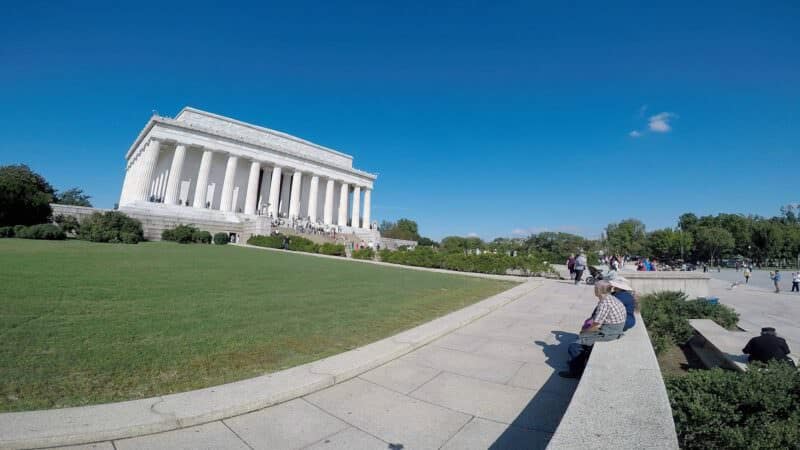
Unique to GoPro, SuperView is an even wider view than the standard wide view. It’s good for an exaggerated immersive look such as from chest harnesses or helmets, but it also adds even more distortion by stretching the content and drastically bending straight lines at the edges of the frame. And it’s not the most flattering look with people in the frame.
Wide
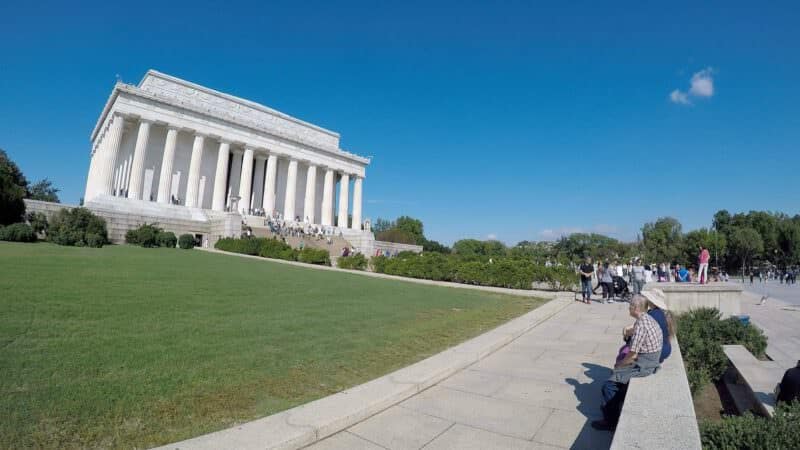
This is the most commonly used field of view. It provides a wide-angle perspective but also adds that distinctive fisheye look that GoPro footage has become known for. It’s possible to correct the fisheye distortion in post-production.
Medium
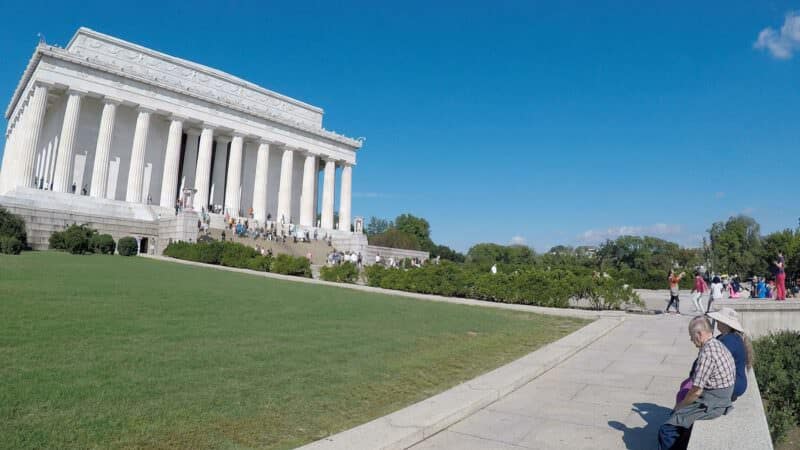
This is a zoomed-in field of view, focusing on the center of the frame. Note that the “zooming” is a digital manipulation, not an optical change in the lens. That is, it’s really a type of cropping, although the output dimensions remain the same.
Linear
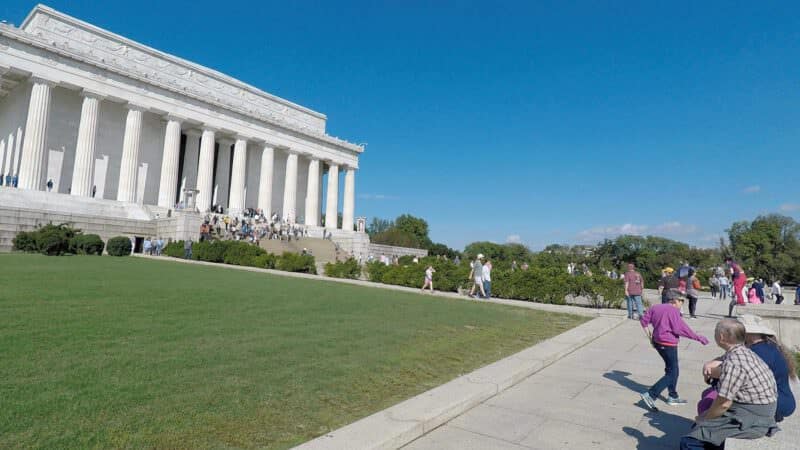
This is a new setting with the HERO5 line that corrects for the fisheye distortion in-camera rather than having to do it in post. It’s good if you want a more traditional perspective, for aerial drone footage, or you don’t want bendy lines that should be straight. It reduces the field of view around the edges of the frame. I have more details on the linear FOV setting here, along with more examples.
Narrow
This is the most-zoomed-in perspective. But again, it’s really a type of digital cropping, not optical zooming (although the output video dimensions remain the same).
Master list of video modes available on the GoPro HERO5 Session
Below is a master list of all the video resolutions and framerates, along with the corresponding bitrates and whether or not stabilization is available at that setting. If you’re deciding between the cameras in the range, I also have video modes compared with the HERO5 Black and HERO Session.
| Resolution | FPS | FOV | Dimensions | Aspect Ratio | Bitrate (megabits/s) – Protune / + Protune | Stabilization? |
|---|---|---|---|---|---|---|
| 4K | 30 | Wide | 3840×2160 | 16:9 | 60 / 60 | ✘ |
| 25 | Wide | 3840×2160 | 16:9 | 60 / 60 | ✘ | |
| 2.7K | 48 | Medium | 2704×1520 | 16:9 | 60 / 60 | ✓ |
| 30 | SuperView | 2704×1520 | 16:9 | 45 / 60 | ✓ | |
| Wide | 2704×1520 | 16:9 | 45 / 60 | ✓ | ||
| Medium | 2704×1520 | 16:9 | 45 / 60 | ✓ | ||
| Linear | 2704×1520 | 16:9 | 45 / 60 | ✓ | ||
| 25 | SuperView | 2704×1520 | 16:9 | 45 / 60 | ✓ | |
| Wide | 2704×1520 | 16:9 | 45 / 60 | ✓ | ||
| Medium | 2704×1520 | 16:9 | 45 / 60 | ✓ | ||
| Linear | 2704×1520 | 16:9 | 45 / 60 | ✓ | ||
| 24 | SuperView | 2704×1520 | 16:9 | 45 / 60 | ✓ | |
| Wide | 2704×1520 | 16:9 | 45 / 60 | ✓ | ||
| Medium | 2704×1520 | 16:9 | 45 / 60 | ✓ | ||
| Linear | 2704×1520 | 16:9 | 45 / 60 | ✓ | ||
| 2.7K 4:3 | 30 | Wide | 2704×2028 | 4:3 | 45 / 60 | ✓ |
| 25 | Wide | 2704×2028 | 4:3 | 45 / 60 | ✓ | |
| 1440p | 60 | Wide | 1920×1440 | 4:3 | 45 / 60 | ✓ |
| 50 | Wide | 1920×1440 | 4:3 | 45 / 60 | ✓ | |
| 48 | Wide | 1920×1440 | 4:3 | 30 / 45 | ✓ | |
| 30 | Wide | 1920×1440 | 4:3 | 30 / 45 | ✓ | |
| 25 | Wide | 1920×1440 | 4:3 | 30 / 45 | ✓ | |
| 24 | Wide | 1920×1440 | 4:3 | 30 / 45 | ✓ | |
| 1080p | 90 | Wide | 1920×1080 | 16:9 | 60 / 60 | ✘ |
| 60 | SuperView | 1920×1080 | 16:9 | 30 / 45 | ✓ | |
| Wide | 1920×1080 | 16:9 | 30 / 45 | ✓ | ||
| Linear | 1920×1080 | 16:9 | 30 / 45 | ✓ | ||
| 50 | SuperView | 1920×1080 | 16:9 | 30 / 45 | ✓ | |
| Wide | 1920×1080 | 16:9 | 30 / 45 | ✓ | ||
| Linear | 1920×1080 | 16:9 | 30 / 45 | ✓ | ||
| 30 | SuperView | 1920×1080 | 16:9 | 30 / 45 | ✓ | |
| Wide | 1920×1080 | 16:9 | 30 / 45 | ✓ | ||
| Medium | 1920×1080 | 16:9 | 30 / 45 | ✓ | ||
| Linear | 1920×1080 | 16:9 | 30 / 45 | ✓ | ||
| Narrow | 1920×1080 | 16:9 | 30 / 45 | ✓ | ||
| 25 | SuperView | 1920×1080 | 16:9 | 30 / 45 | ✓ | |
| Wide | 1920×1080 | 16:9 | 30 / 45 | ✓ | ||
| Medium | 1920×1080 | 16:9 | 30 / 45 | ✓ | ||
| Linear | 1920×1080 | 16:9 | 30 / 45 | ✓ | ||
| Narrow | 1920×1080 | 16:9 | 30 / 45 | ✓ | ||
| 24 | SuperView | 1920×1080 | 16:9 | 30 / 45 | ✓ | |
| Wide | 1920×1080 | 16:9 | 30 / 45 | ✓ | ||
| Medium | 1920×1080 | 16:9 | 30 / 45 | ✓ | ||
| Linear | 1920×1080 | 16:9 | 30 / 45 | ✓ | ||
| Narrow | 1920×1080 | 16:9 | 30 / 45 | ✓ | ||
| 960p | 100 | Wide | 1280×960 | 4:3 | 30 / 45 | ✘ |
| 60 | Wide | 1280×960 | 4:3 | 30 / 45 | ✓ | |
| 50 | Wide | 1280×960 | 4:3 | 30 / 45 | ✓ | |
| 30 | Wide | 1280×960 | 4:3 | 30 / 45 | ✓ | |
| 25 | Wide | 1280×960 | 4:3 | 30 / 45 | ✓ | |
| 720p | 120 | Wide | 1280×720 | 16:9 | 30 / 45 | ✘ |
| 60 | SuperView | 1280×720 | 16:9 | 30 / 45 | ✓ | |
| Wide | 1280×720 | 16:9 | 30 / 45 | ✓ | ||
| Medium | 1280×720 | 16:9 | 30 / 45 | ✓ | ||
| 50 | SuperView | 1280×720 | 16:9 | 30 / 45 | ✓ | |
| Wide | 1280×720 | 16:9 | 30 / 45 | ✓ | ||
| Medium | 1280×720 | 16:9 | 30 / 45 | ✓ | ||
| 30 | SuperView | 1280×720 | 16:9 | 30 / 45 | ✓ | |
| Wide | 1280×720 | 16:9 | 30 / 45 | ✓ | ||
| Medium | 1280×720 | 16:9 | 30 / 45 | ✓ | ||
| 25 | SuperView | 1280×720 | 16:9 | 30 / 45 | ✓ | |
| Wide | 1280×720 | 16:9 | 30 / 45 | ✓ | ||
| Medium | 1280×720 | 16:9 | 30 / 45 | ✓ |
Filetypes
The HERO5 Session outputs H.264 .mp4 files in 8-bit with a variable bitrate setting. You can see more technical details on it below.
HERO5 Session bitrates
Like the HERO5 Black, the HERO5 Session’s top video modes record at 60 megabits per second. Turning on Protune increases the number of video modes that record at 60 Mbps.
The other bitrates used are 45 Mbps and 30 Mbps.
While the 60 Mbps bitrate provides pretty high-quality video, it also means that you’ll need a microSD card that’s fast enough to handle the stream of data.
Formats
It can shoot in NTSC and PAL formats — you choose which in the main camera preferences, not in the video settings, where you might expect it. Some FPS settings are only available in the corresponding format.
Technical specs
If you’re interested in even more technical specs, here’s a sample readout from MediaInfo for 4K30 Protune video shot with the HERO5 Black.


I have a hero session five, and I want to ask what the best resolution would be for Mountain Bike riding.
If you’d like to use the in-camera stabilization to help smooth out the footage, then not 4K (stabilization isn’t available in the HERO5’s 4K mode). Beyond that, the choice has less to do with the mountain biking part than what you want to do with it.
If you want to keep a version with the most detail but still keep stabilization then one of the 2.7K modes would be a good choice. The basic 2.7K has the standard wider aspect ratio that we’re used to with modern HD TVs, smartphones, computers, etc. The 2.7K4:3 does offer an advantage for this because it has more vertical space. That gives you more room to capture action at the top or bottom of the frame. The output is then a squarer shape.
If you’re only going to share clips on social media and don’t care about keeping the highest possible resolution version on file, the 1080p (or 1440p) and 720p (or 960p) are also good options but come with convenience advantages of working with smaller filesizes.
If it was me, I’d probably start with 2.7K4:3 with stabilization on and see if you like the results. If you find that’s more resolution than you need, it’s much easier to step down in size than to step up.
hi , what is the best setup to shoot Slow Mo video on GOPRO HERO5 seession , and how can i share it on slow mo ( on FB or INST )
thank you
I have the hero 5 session and cannot find how to change the format to Pal or is it default for UK purchased cameras ?
Thanks
In the GoPro mobile app, under the camera settings, it’s near the bottom of the Setup panel (just above Set Date and Time).
You have this part “Master List of Video Modes Available on the GoPro HERO5 Black”, cant you do the same for the GoPro hero session 5?
Sorry, the section title was wrong (but now corrected). The table is for the HERO5 Session.