
Here are some test images I shot to try out the Fujifilm X100VI‘s digital teleconverter feature, so you can see what it looks like in visual terms.
The short version: it crops the 40MP frame to simulate 50mm and 70mm, so you trade resolution for reach — about 20MP at 50mm and 10MP at 70mm — and the RAW file is left alone.
NB: I’m focusing here on the X100VI’s built-in digital teleconverter feature, which is quite different from the optical conversion lenses that attach to the front of the camera.
They’re not mutually exclusive, though. With an optical converter fitted, the digital teleconverter stacks on top of it. With the wide converter (WCL-X100 or WCL-X100 II) you get roughly 28mm, 41mm, and 58mm equivalent; with the tele converter (TCL-X100 or TCL-X100 II) roughly 50mm, 72mm, and 100mm.
What the digital teleconverter is & isn’t
The Feature: Digital Teleconverter (simulates 50mm & 70mm)
Resolution at 23mm (Off): 40MP (7728 x 5152)
Resolution at 50mm: ~20MP (5472 x 3648)
Resolution at 70mm: ~10MP (3888 x 2592)
Constraint: Works on JPEGs only (RAW files remain full 23mm)
Video Note: Use the separate “Digital Zoom” menu for video recording
First, it’s worth mentioning that the teleconverter is only available when shooting stills photos. It’s not available when shooting video, which is important, because that would arguably make more sense.1
Video has its own version of this. If you want to crop in while recording, that’s the separate digital zoom setting used for video — a different function with a different name, which is why looking for the teleconverter in movie mode comes up empty.
It’s not a zoom. Yes, the manual refers to “zoom angle,” but it’s not a true zoom.2
Nor is it a true optical teleconverter. Again, there’s nothing optical going on here — it’s all done with digital processing. Unlike some smartphones that use AI to upscale the cropped image back to full resolution, the X100VI simply crops the pixels. You are trading resolution for reach: 40MP becomes 20MP (at 50mm) or 10MP (at 70mm).
It only works with JPGs, not RAW. Because it’s a digitally processed image, it only works with JPGs and doesn’t affect the underlying RAW image. If you want to apply it to photos you’ve taken in RAW, you can, but it’s an extra processing step. To do it, go to the playback menu and choose ON for the RAW CONVERSION > DIGITAL TELE-CONV. setting. And then process the images in the camera. But I’m not sure there’s any real benefit to doing that rather than doing it in editing software on a phone or computer.
One thing worth knowing if you use the camera’s other crop mode: the digital teleconverter leaves your RAW file alone, but Sports Finder Mode’s 1.29x crop is baked into the RAW. Two crop features on the same camera, opposite behavior. So if you shoot RAW+JPEG, the digital teleconverter costs you nothing — you always still have the full 23mm frame to fall back on.
It doesn’t magically create new detail. With an optical teleconverter, you can get more detail as you increase the magnification. That doesn’t work here because they’re all derived from the original resolution.

What 35mm, 50mm & 70mm look like side by side
The teleconverter option has 3 settings:
- Off (i.e., 35mm)
- 50mm
- 70mm
Here are some examples of what the teleconverter function looks like in visual terms.

I’ve included the pixel dimensions for each in the caption below, and you’ll notice that it gets smaller with each step up. That’s how it works; it really is a crop. (These were all taken with the default 3:2 aspect ratio.)
In Fujifilm’s own terms, the two settings are 1.4x and 2x crops of the 40MP frame. That’s where the 50mm and 70mm figures come from: 23mm multiplied out, then expressed as the full-frame equivalent.
Since the lens is fixed, this is as close as the X100VI gets to a zoom range: three framings — 35mm, 50mm, and 70mm equivalent — with nothing in between. Anything between them you do with your feet. Add one of the optical converters and the set of available framings stretches from 28mm at the wide end to 100mm at the long end, but they’re still fixed steps, not a continuous zoom.
You can click on each image for a closer look.
Set 1

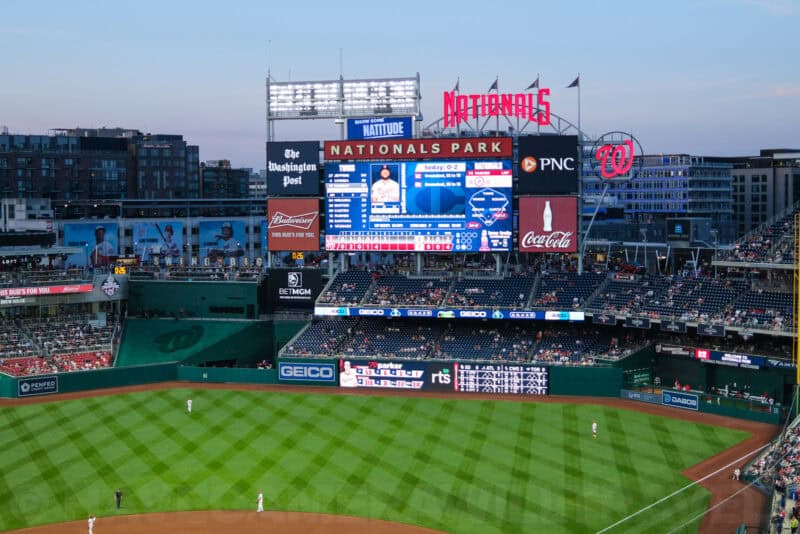
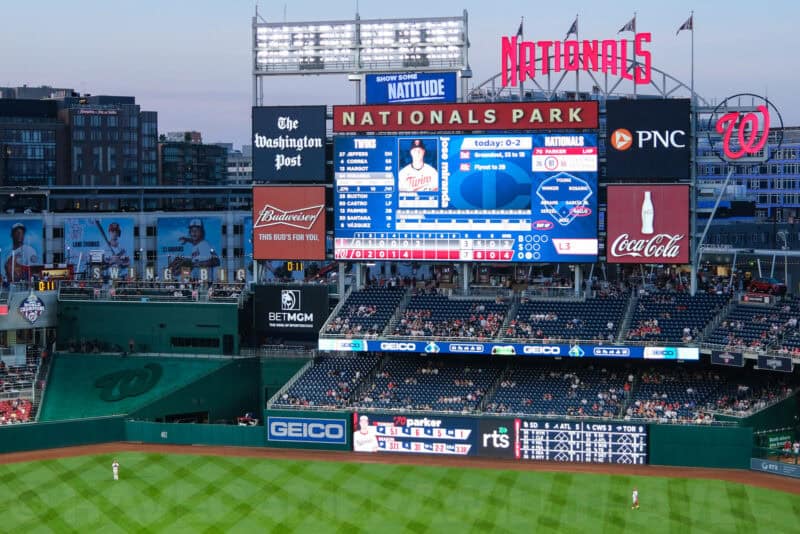
Set 2

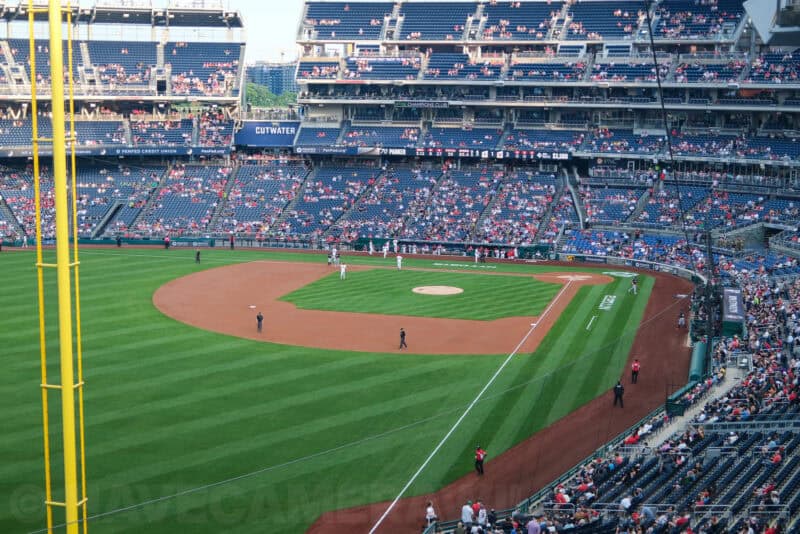
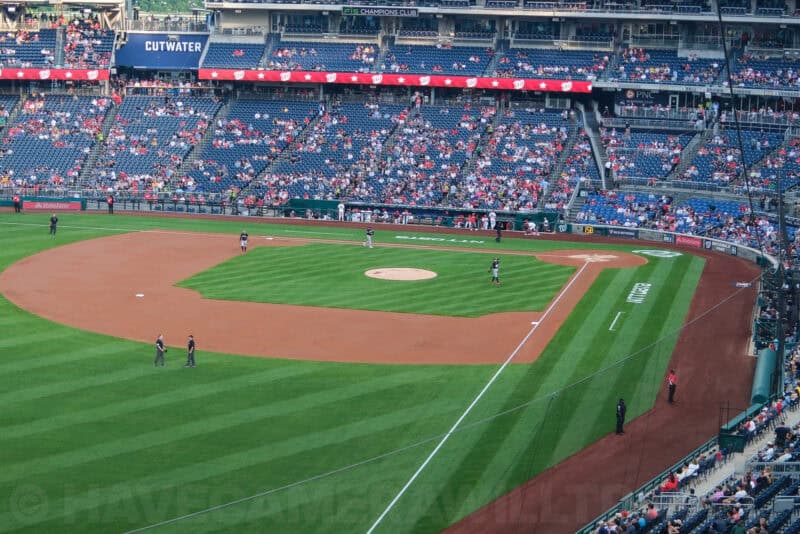
Why would you use it?
So why would you use it? It doesn’t add any detail, but cropping in the camera does change two things you can’t get back afterwards: what you see while you’re composing, and what the meter reads.
- It can be useful as a composition tool for visualizing a shot.
- Focus Verification: By cropping in the EVF, you see your subject larger. This makes it much easier to confirm critical focus on eyes/faces than when looking at a wide 23mm shot, especially for portraits, and it pairs well with setting up back-button focus so you can verify focus without triggering a new shutter press.
- Metering Accuracy: If you use “Multi” or “Average” metering (found under the camera’s photometry settings), cropping out the bright sky or dark corners (by using the 50mm mode) forces the camera to expose only for your subject, often resulting in better JPEGs straight out of camera.
But, to be honest, this isn’t a feature I use much myself. So why am I even bothering with posting about it, then?
Well, I probably wouldn’t have even noticed that the feature was there except that I ran into the annoyance of repeatedly accidentally activating it. And it took me some time and effort to figure out how to disable it completely.
So before I disabled it completely, I thought it might be worth figuring out what it is and whether it was something worth using. And I thought someone might find it helpful to see real-world examples.
How to change the teleconverter setting
By default, the teleconverter is applied to the lens control ring. I found that quite annoying, so I disabled it. I also put together a quick guide on how to do it.
There’s also a menu item you can use to change the setting: SHOOTING SETTING > DIGITAL TELE-CONV.
Camera Icon (Shooting Setting) 3/3 > Digital Tele-ConvI also found that it was automatically engaging when I bumped the lens’s control ring, so I put together a post on how to disable that.
Fujifilm X100VI price & availability
The price of the Fujifilm X100VI isn’t as straightforward as it once was. It launched at $1,599.95, but Fujifilm raised the US MSRP to $1,799.95 from August 2025, a tariff-driven increase.
The complication is supply. When it was initially released, there were major shortages and long waits on backorder lists. That has improved somewhat, but it still isn’t a camera you can count on buying off the shelf — Fujifilm’s own US store has been listing both versions as out of stock. And rather than drifting down with age, the price has gone the other way.
Explore the Fujifilm X100VI
Here’s a tool I created to help identify which buttons and dials are where — and what they’re called, because every brand has their own dialect and jargon.

Notes & References:
- The ‘Digital Teleconverter’ setting discussed here is strictly for photos. However, the X100VI does have a separate ‘Digital Zoom’ feature in the Movie Menu that allows for smooth zooming during video recording. [↩︎]
- Some camera manufacturers, like GoPro, refer to functionality like this as a digital zoom. In the case of GoPro cameras, though, you have some control over a sliding scale of magnification rather than just a few preset intervals. But the underlying concept is the same — it’s a crop. [↩︎]


