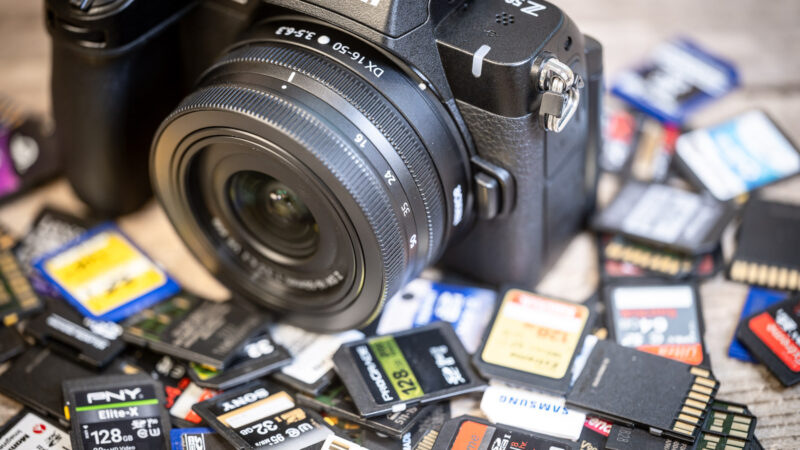
The Nikon Z50 II is Nikon’s updated mid-level DX mirrorless camera, and it’s been getting a lot of well-deserved buzz.
It brings some meaningful upgrades over the original Z50, some of which affect which memory cards you’ll want to use in it. Here’s what you need to know about memory cards for it.
Quick recommendations
If you want to take full advantage of all of the Z50 II’s capabilities and features, particularly its 4K60p video, here are cards that work well:
For photographers who primarily shoot stills and occasional 4K video at lower frame rates, a quality UHS-I card like the SanDisk Extreme V30 will work fine and cost less, but you should know that it will limit some of the Z50 II’s video capture features.
- Type: SDXC
- Video Speed Class: V60
- UHS Bus Interface Type: UHS-II
- Maximum Read Speed: 300 MB/s
- Storage Capacities: 64GB, 128GB, 256GB, 512GB, 1TB, 2TB
Check current price and availability at:
- Type: SDXC
- Video Speed Class: V60
- UHS Bus Interface Type: UHS-II
- Maximum Read Speed: 250 MB/s
- Storage Capacities: 128GB, 256GB, 512GB, 1TB
Check current price and availability at:
- Type: SDXC
- Video Speed Class: V60
- UHS Bus Interface Type: UHS-II
- Maximum Read Speed: 280 MB/s
- Storage Capacities: 128GB, 256GB, 512GB, 1TB
Check current price and availability at:
Recommendations checked: August 2026
In brief:
- The Z50 II has a single SD card slot.
- Use a UHS-II card for maximum compatibility and speed with shooting video and burst photos.
- Stick with V60 and V90 cards (they’ll all be UHS-II).
- Cards that are in the 128GB to 512GB range are probably ideal in terms of practicality and cost, but there’s no problem using lower and higher storage capacities (SD cards can be up to 2TB).
Two important changes from the Z50
There are a lot of updates in the Z50 II over the Z50, but here are two key changes relevant to choosing your memory card for it.
UHS-II support
The most important upgrade is that the Z50 II now supports UHS-II memory cards.
The original Z50 only had UHS-I support. If you’re upgrading from the Z50, your old UHS-I cards will still work in the Z50 II, but you won’t be taking advantage of the faster slot.
With the Z50 II’s UHS-II slot, the V60 cards below write at around 130–150 MB/s, against the roughly 90 MB/s ceiling a good UHS-I card manages. That’s still a big jump, and it’s more than enough headroom for anything this camera records.
This matters for a few things. Firstly, clearing the buffer more quickly when shooting bursts of RAW files. Secondly, in keeping up with the camera’s higher video bitrates. And thirdly, it’s especially critical for the Z50 II’s new Pre-Release Capture feature. A slow card will take much longer to flush that pre-buffered burst to the card, locking you out of viewing images or changing settings for longer.
If you’re shooting video with the Z50 II, your best bet is to go with a UHS-II card. There are a few different ways to identify those.
- They have “II” on the packaging and printed on the card itself.
- They’ll be rated for V60 or V90 video speed class.
- When you turn the memory card over, you’ll see a second row of contacts on the back.
What about UHS-III cards? You might see mentions of UHS-III. Yes, they can be faster. But there’s a very big catch: they’re only faster in devices that UHS-III interfaces, and for now they’re exceedingly rare. The Z50 II has a UHS-II interface, so even if you manage to track down a UHS-III card, it does no good in this camera. I have a more detailed explanation of UHS-III SD cards separately.
Much higher video bitrates
The Z50 II can record 4K video at up to 60p, compared to the Z50’s maximum of 4K 30p.
Importantly, that’s not just a matter of a higher resolution and larger pixel dimensions. It also comes with a much higher maximum video bitrate, which maintains the image quality across that higher resolution. In the Z50 II, the maximum bitrate has jumped from 144 Mbps (in the Z50) to 340 Mbps in the Z50 II when shooting 4K 60p in H.265 10-bit. Even 4K 60p in 8-bit runs at 300 Mbps.1
This means cards that worked perfectly well in the Z50 will probably struggle with the Z50 II’s highest quality video modes. You might end up with errors, dropped frames, or even lockups. Shooting 4K60p in H.265 generates data at approx. 340 Mbps, which equals 42.5 MB/s. Since V30 cards are only guaranteed to sustain 30 MB/s, recording will likely stop unexpectedly after a few seconds if you try to use these settings with a V30 card. And it’s why Nikon is using a UHS-II slot in this camera.
The catch with 4K 60p: It’s cropped
Before you buy a card specifically to shoot 4K 60p, there’s something you should know about that mode, because it might change your mind about using it.
4K 60p on the Z50 II is cropped. Nikon’s manual puts it plainly: at 3840×2160 60p and 50p, “videos are recorded with an angle of view equivalent to approximately 1.5 times that of a normal video.” That 1.5× is on top of the DX crop the camera already has, so relative to a full-frame camera you’re looking at roughly a 2.25× crop.
In practical terms, with the Z DX 16-50mm kit lens: at 16mm you normally get a field of view like a 24mm lens on full frame. Switch to 4K 60p and the same 16mm gives you something closer to 36mm. If you’re filming in a small room or trying to get a wide establishing shot, that’s a meaningful loss.
The 4K modes at 30p, 25p, and 24p have no such crop. They use the full width of the sensor and downsample from about 5.6K, which is also why they look as sharp as they do.


So there’s a real decision here, and it isn’t only about cards:
- If you shoot 4K 30p and below, you get the full field of view, better detail, and a bitrate a V30 UHS-I card can handle.
- If you need 60p for motion, you accept the tighter framing and you need a faster card to feed it.
Plenty of people buy this camera for family video and travel clips and will be happier at 4K 30p on both counts. If that’s you, a good V30 UHS-I card is genuinely all you need.
Why the crop exists: reading the entire sensor 60 times a second is more work than the camera can do at that speed. Cropping to a smaller area means fewer pixels to read per frame, which the hardware can keep up with. It’s the same tradeoff a lot of cameras in this class make; Nikon’s higher-end bodies with faster stacked sensors don’t have to.
N-Log isn’t N-RAW
Worth clearing up, because the two get mixed up and it affects what card people think they need.
The Z50 II records N-Log — a flat color profile that keeps more highlight and shadow detail for grading afterward. It’s the first Nikon DX camera to offer it, which is a genuinely nice thing at this price.
It does not record N-RAW, Nikon’s raw video format. Nikon’s specifications list the Z50 II’s video compression as H.265/HEVC (8-bit and 10-bit) and H.264/AVC (8-bit) — that’s the complete list. N-RAW is a Z6III, Z8, and Z9 feature, and it’s the format with the genuinely enormous data rates.
So if you were budgeting for a card fast enough to handle raw video, you don’t need to. The Z50 II’s most demanding mode is 4K 60p in H.265 10-bit at approximately 340 Mbps, which is 42.5 MB/s.
Nikon Z50 II memory card compatibility & requirements
The Z50 II has a single SD card slot that supports SD, SDHC, and SDXC memory cards. It’s compatible with both UHS-I and UHS-II cards.
Nikon’s official guidance on memory cards that are compatible with the Z50 II is unnecessarily muddled.
On page 868 of the manual (the “Approved memory cards” section), they recommend “UHS Speed Class 3 or better” for video recording.
But that’s outdated and confusing in the context of UHS-II. What they mean here is a card that has a rating of U3, which guarantees a minimum sustained write speed of 30 MB/s — adequate for basic 4K video at 30p and below. But that’s also older terminology that’s used for SD and microSD cards; the newer version uses a “V” rating system, and the equivalent to U3 is V30. Both U3 and V30 ratings guarantee a minimum sustained write speed of 30 MB/s, so they’re functionally equivalent. The V-class system is newer and clearer for video work, but Nikon still uses the older U3 terminology in their manuals.
But while Nikon’s manual lists ‘UHS Speed Class 3’ (U3) as a minimum, U3 only guarantees 30 MB/s. Since the Z50 II’s high-quality video modes require ~42.5 MB/s, following Nikon’s minimum U3 advice could actually lead to dropped frames in 4K60p. You must use V60 or higher for the best video settings.
And it gets even more tangled. For high frame rate video and the high-speed frame capture+ mode, Nikon gets more specific: “UHS Speed Class 3 or better SD memory cards with a maximum data transfer rate of at least 250 MB/s.” That 250 MB/s specification is Nikon’s way of saying you need a UHS-II card. UHS-I tops out at 104 MB/s by the standard itself, and real cards write somewhat below that — so to hit 250 MB/s, you need the UHS-II interface. And V30 cards max out at UHS-I. So what you actually want to take full advantage of all of the camera’s features is a V60 or V90 card, all of which will be UHS-II.
V60 cards are the current lower-end of UHS-II cards. And they're designed for cameras that have UHS-II slots to take advantage of that faster BUS interface. There's a faster step above these -- the V90 cards -- but for the purposes of this camera, the V60 cards are often a more cost-effective option while still giving you full access to all your camera's features.
SanDisk Extreme PRO V60 UHS-II
- Type: SDXC
- Video Speed Class: V60
- UHS Bus Interface Type: UHS-II
- Maximum Read Speed: 300 MB/s
- Storage Capacities: 64GB, 128GB, 256GB, 512GB, 1TB, 2TB
Check current price and availability at:
SanDisk's Extreme Pro range is their top line, but, confusingly, they have Extreme Pro cards that carry V30, V60, and V90 ratings. And, as you move up in speed, the price increases. This is the V60 UHS-II version, and it's usually a little cheaper than the V90 version.
ProGrade Digital SDXC UHS-II V60 250R Gold
- Type: SDXC
- Video Speed Class: V60
- UHS Bus Interface Type: UHS-II
- Maximum Read Speed: 250 MB/s
- Storage Capacities: 128GB, 256GB, 512GB, 1TB
Check current price and availability at:
ProGrade Digital was born out of some corporate upheaval at Lexar several years ago. Since then, they've built solid name recognition for their higher-end cards, and I can speak from personal experience that they make very good memory cards (and other accessories). I routinely use ProGrade CFexpress and SD cards in several of my cameras, as well as their top-notch memory card readers. I've been impressed.
This is their V60 line (they also have a V90 card). It's available from 128GB up to 1TB, and you can often find good deals on 2-packs (very useful if shooting video!).
Lexar Professional SILVER PRO V60 UHS-II
- Type: SDXC
- Video Speed Class: V60
- UHS Bus Interface Type: UHS-II
- Maximum Read Speed: 280 MB/s
- Storage Capacities: 128GB, 256GB, 512GB, 1TB
Check current price and availability at:
Over many years of using Lexar memory cards, I've found them to be good, reliable performers, and they've remained so even after going through a change of ownership several years ago.
Somewhat confusingly, this Silver Pro branding replaces the older Silver 1667x cards.
PNY EliteX-PRO60 V60 UHS-II
- Type: SDXC
- Video Speed Class: V60
- UHS Bus Interface Type: UHS-II
- Maximum Read Speed: 280 MB/s
- Storage Capacities: 128GB, 256GB, 512GB
Check current price and availability at:
New Jersey-based PNY have been making very good flash memory for quite some time. While they don't have the name recognition of some of the other brands here, that's more of a product of their lower marketing budget than any reflection on the quality of their cards. To the contrary, having used several of their cards, I've found them to be excellent.
Recommendations checked: August 2026
Do you need UHS-II cards?
If you want to be able to use all of the camera’s features, including the 4K 60p mode, you’ll want at least a V60 card.
Whether you need UHS-II depends on how you’ll use the camera.
You should get UHS-II cards if:
- You shoot 4K video at 60p regularly
- You shoot long bursts of RAW files and want the buffer to clear faster
- You shoot 4K video at any frame rate and want reliable performance without dropped frames
UHS-I cards are adequate if:
- You primarily shoot stills
- Your video work is mostly 1080p or 4K at 30p and below
- You want to save money
| Shooting Scenario | Minimum Card Class | Why? |
| Photography (Single Shot) | UHS-I U3 / V30 | Files are small enough to clear quickly. |
| 4K Video (24p/30p) | UHS-I U3 / V30 | Bitrates run about 190 Mbps (10-bit) or 150 Mbps (8-bit) — roughly 24 and 19 MB/s, inside a V30’s guaranteed floor. |
| 4K Video (60p) | UHS-II V60 | Requires ~42.5 MB/s sustained write. |
| High-Speed Bursts / Sports | UHS-II V60 or V90 | Clears the buffer 2-3x faster than UHS-I. |
The reality is that with the Z50 II’s upgraded processor and UHS-II slot, you’re leaving performance on the table with UHS-I cards. But a quality V30 UHS-I card will handle most of what this camera does.
A small supporting detail: Nikon’s own published battery-endurance and video-capacity figures for this camera were measured with SanDisk Extreme PRO UHS-II cards. When the manufacturer’s benchmark numbers come from UHS-II cards, that tells you something about what they expect people to use.
V60 vs V90: Video and burst have different answers
For video, V60 is the sweet spot — 4K 60p’s 42.5 MB/s sits comfortably inside V60’s 60 MB/s guaranteed floor. Burst shooting is a different story. Owners report that a UHS-II V60 card fills the buffer at around 100 frames, while a V90 card reaches the full 200-frame buffer — and Nikon’s own buffer figures were measured on a V90-class card. At 11 fps of 20MP raw+JPEG, the math works out to roughly 300 MB/s of sustained demand.
One more wrinkle from the same owner reports: a partly cleared buffer doesn’t resume the full frame rate — it has to empty completely first.
So: shooting mostly video or casual bursts? V60 is the sweet spot. Chasing the full 200-frame buffer at 11 fps? That’s what V90 buys you — and nothing else on this camera needs it.
What size card should you get?
The Z50 II takes SD, SDHC, and SDXC cards, which in practice means anything up to 2TB. Here’s what the capacities actually buy you, using Nikon’s own published figures.
For stills, measured on a 32GB card:
| What you’re shooting | File size | Shots on a 32GB card |
|---|---|---|
| RAW, lossless compressed | approx. 24.4 MB | 763 |
| RAW, high efficiency★ | approx. 15.6 MB | 1,700 |
| RAW, high efficiency | approx. 10.6 MB | 2,400 |
| JPEG fine, large | approx. 10.0 MB | 2,100 |
| JPEG normal, large | approx. 5.7 MB | 4,200 |
Multiply by four for a 128GB card, by eight for 256GB. Shooting lossless RAW, a 128GB card holds roughly 3,000 frames — comfortably more than a full day.
For video, measured on a 256GB card:
| Mode | Recording time on 256GB |
|---|---|
| 4K 60p / 50p | approx. 94 minutes |
| 4K 30p / 25p / 24p | approx. 187 minutes |
| 1080p 120p / 100p | approx. 187 minutes |
| 1080p 60p / 50p | approx. 369 minutes |
| 1080p 30p / 25p / 24p | approx. 721 minutes |
Any single clip maxes out at 125 minutes regardless of card size, and the camera may stop earlier than that if it gets warm.
My recommendation: 128GB or 256GB. Below 64GB you’ll be swapping cards mid-day if you shoot any video. Above 256GB you’re putting a lot of eggs in one basket, and this camera has only one slot — no second card mirroring your shots as backup. Two 128GB cards is a better bet than one 256GB card if you’re traveling, for exactly that reason.
One physical detail worth knowing: the card slot shares a door with the battery, on the bottom of the camera. If you use an L-bracket or a quick-release plate, check it has a cutout for that door, or every card swap means unmounting the camera.
Format the card in the camera
Every time you put a card in this camera for the first time, format it in the camera rather than on your computer. It takes ten seconds and it heads off a category of problems that are annoying to diagnose later.
MENU → setup menu → [Format memory card]
Formatting in-camera writes the exact directory structure and file system the camera expects. A card formatted by Windows or macOS often works, right up until it doesn’t — and the failures show up as write errors partway through a shoot rather than as an obvious error at the start.
Unlike most Nikon bodies, the Z50 II has no two-button format shortcut — there are no buttons marked in red with FORMAT. The menu is the only route, so it’s worth assigning it to your i menu if you format often.
- Do it after you’ve offloaded, not before. Formatting is the fastest way to clear a card, but recovering from it is a project.
- Don’t turn the camera off while “Formatting memory card.” is on the display.
- Format, don’t delete. Deleting images one at a time leaves the card progressively more fragmented. Format resets it.
If you do format a card by accident, stop using it immediately — every new file written reduces the chance of getting your images back. Recovery software works reasonably well on a card that hasn’t been written to since.
Nikon Z50 II memory card recommendations in detail
Nikon’s manual lists approved memory cards but doesn’t name specific brands or models. The manual’s main guidance is that UHS Speed Class 3 cards are recommended for video, and cards with 250 MB/s transfer rates are recommended for high frame rate recording.
My focus is on cards that meet the Z50 II’s requirements, come from manufacturers with strong track records, and offer good value. These are all readily available at major retailers.
Notes & References:
- The camera uses variable bitrate encoding, so actual bitrates fluctuate depending on the scene. [↩︎]



A most informative and helpful article. Thank you.
Glad you found it useful! And thanks for taking the time to let me know!