
The memory card is one of the essential features of a digital camera. Without it, you’re not going to be able to take many photos. But the Sony Alpha a6400 doesn’t come with one.1
There are some bundles that retailers put together that might include a memory card, but chances are it’s something you’re going to have to pick up separately.
So which card should you get? What are the best SD memory cards for the a6400?
I’ve put together these practical recommendations in the hope that it makes it a little easier to know which memory cards work well in the Sony a6400 mirrorless camera.
The short answer: the a6400 has a single UHS-I card slot, so a UHS-I SDXC card rated U3 (or V30, which is the same minimum write speed) covers everything the camera can do, including 4K at 100 Mb/s. For most people a 64GB or 128GB card is the practical size. UHS-II cards will work, but the camera can’t use the extra speed, so you’re paying for performance you won’t see.
Some Quick Recommendations
If you’d like to get right down to business, here are some quick recommendations for good memory cards for the Sony a6400. You can find more detailed explanations and more options below.
- Type: SDXC / SDHC
- Video Speed Class: V30
- UHS Bus Interface Type: UHS-I
- Maximum Read Speed: 230 MB/s
- Storage Capacities: 32GB, 64GB, 128GB, 256GB, 512GB
Check current price and availability at:
- Video Speed Class: V30
- UHS Bus Interface Type: UHS-I
- Maximum Read Speed: 150 MB/s
- Storage Capacities: 64GB, 128GB, 256GB
Check current price and availability at:
- Type: SDXC
- Video Speed Class: V30
- UHS Bus Interface Type: UHS-I
- Maximum Read Speed: Up to 180 MB/s
- Storage Capacities: 128GB, 256GB, 512GB, 1TB
Check current price and availability at:
Recommendations checked: August 2026
Any of these offers a good combination of compatibility with the a6400 and cost-effectiveness, are quite readily available at major retailers, and are produced by reliable manufacturers. Even though they’re not among the fastest SD cards you can buy, they are fast enough for the a6400 without paying the premium prices of the very fastest memory cards. So any of them makes for a good choice.
Why It’s Not as Simple as it Seems
The instruction manuals for cameras tend to be pretty unhelpful when it comes to recommending which memory cards to get for the camera. That’s largely unavoidable, in part because there are new models of memory cards coming out all the time, and by the time the manual is printed, there’s a good chance any specific model recommendations will be out of date.
The Sony a6400 manual is no exception. If you go looking for information on what SD memory cards work best in this camera, this is what you’ll find:
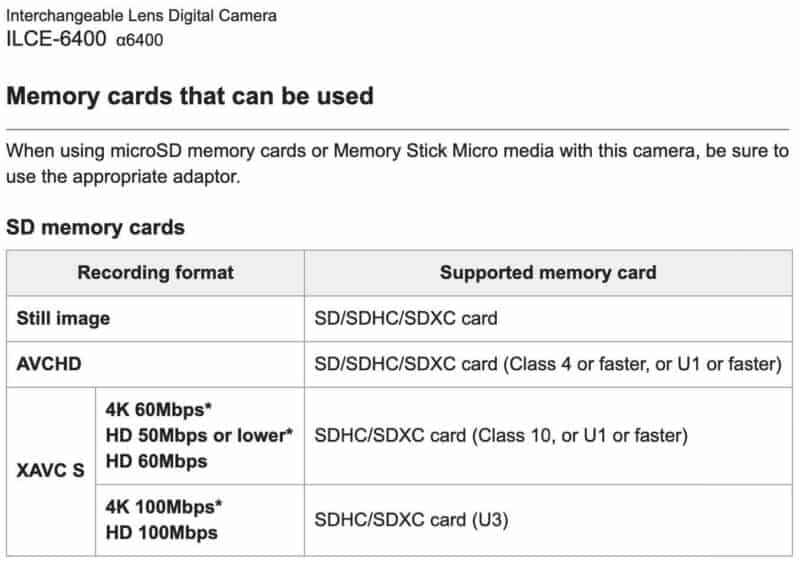
So get an SD card that’s faster than Class 4, correct? These days, you’d be hard-pressed to find a card at a retailer that’s not Class 10 or faster. So you’re all set, right?
If you’re only shooting still images, then yes. Any SD card of any size that’s Class 4 or above will work fine. There are advantages to having a faster one if you’re shooting in burst mode or trying to speed up the process of downloading photos from the memory card, but for the most part, the a6400 is not especially picky about memory cards in the photo modes.
But the catch is the a6400’s video modes are more demanding on the SD card. So if you’re shooting video with this camera, you’ll want to pay more attention to the speed of the memory card.
Which Memory Cards Work with XAVC S Video Mode on the Sony a6400?
The catch is if you’re trying to record video footage. If you’ve tried to record video in the high-quality XAVC S mode in 4K or HD, you might have come across this error message:
Cannot record in this recording setting. Either switch to a UHS-I U3 / UHS-II U3 compatible memory card or change the record setting.
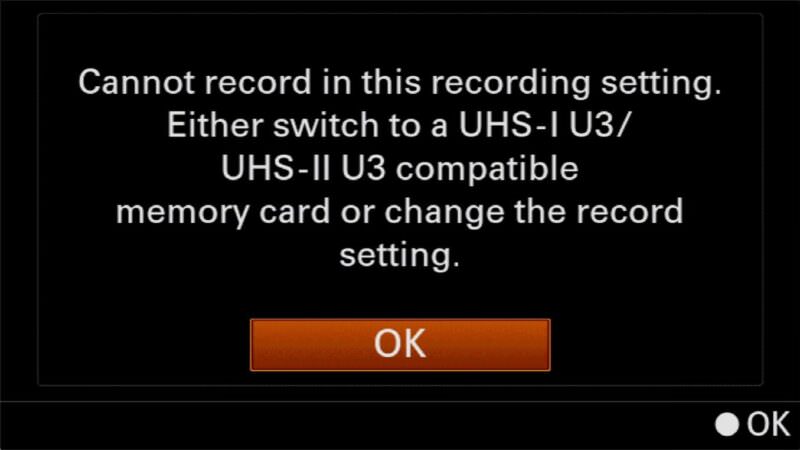
That, frankly, is more helpful and specific than the previous version. The key information is the U3. That’s a rating for recording video streams. So you can get one that’s rated for U3, but you can also use ones with ratings that a V30, V60, or V90, all of which are faster ratings still.
Sony a6400 Memory Card Compatibility and Recommendations in Detail
The Sony a6400 is compatible with SD, SDHC, and SDXC cards. So you can use any card with those marks on them.
Most of the cards available these days are either SDHC and SDXC. In practice, you’ll find SDHC on cards from 8GB through 32GB and SDXC on cards 64GB and larger.
But if you want to take full advantage of the a6400’s features, here are some cards that work well.
My emphasis here is on ones that meet the requirements, are from manufacturers of high-quality cards, are readily available at retail, and are cost-effective. There are faster, fancier, and more expensive cards that also work well, but those aren’t the ones I’m focusing on here.
These cards are all rated V30 and work well in a very wide variety of cameras, with good versatility for shooting photos and 4K video.
My emphasis here is on cards that meet these criteria:
- They're fast enough for all the features of this camera.
- They're from a reputable and reliable brand, so you can count on them working well.
- They're readily available at major retailers, so you should be able to find them without much trouble.
- They're good value for money, so you're not paying too much for a card that is more than your camera can take full advantage of.
If you want to use a faster, fancier card, you can, but you won't see any extra benefit in doing so while you're operating the camera (but you might see some faster speeds when downloading the photos to a computer, depending on your computer and memory card reader combination). And, as always, I recommend buying from a major retailer to minimize the chances of getting burned with a counterfeit memory card.
SanDisk Extreme V30 UHS-I
- Type: SDXC / SDHC
- Video Speed Class: V30
- UHS Bus Interface Type: UHS-I
- Maximum Read Speed: 230 MB/s
- Storage Capacities: 32GB, 64GB, 128GB, 256GB, 512GB
Check current price and availability at:
SanDisk's Extreme range are good bets for many cameras, and that's true here too. SanDisk has faster ranges, like the Extreme Pro line, but this Extreme line is both quick enough for most cameras and usually less expensive than those faster cards.
One thing to note with SanDisk cards is that they recycle their model names. So you can find Extreme cards that are older and slower. You'll probably find those older versions work just fine — it really depends how far back you go. I've used many SanDisk Extreme cards over the years in many different cameras and have found them to be very reliable. They're also often good value, and you can sometimes find them sold in 2-packs (it's always good to have a spare on hand!).
Lexar High-Performance 800x PRO BLUE Series V30 UHS-I
- Video Speed Class: V30
- UHS Bus Interface Type: UHS-I
- Maximum Read Speed: 150 MB/s
- Storage Capacities: 64GB, 128GB, 256GB
Check current price and availability at:
The Lexar 800x Pro range is a relatively new model that replaces the old 633x cards that were mainstays of Lexar's SD cards for a long time. This newer V30 card is still a good combination of speed, reliability, and value, and you can often find them in multipacks to have spares on hand.
Delkin Devices ADVANTAGE V30 UHS-I SDXC (180 MB/s)
- Type: SDXC
- Video Speed Class: V30
- UHS Bus Interface Type: UHS-I
- Maximum Read Speed: Up to 180 MB/s
- Storage Capacities: 128GB, 256GB, 512GB, 1TB
Check current price and availability at:
Delkin Devices have recently come out with a range of new SD cards of varying speeds and specs. This is one of their mid-range cards that is rated for V30 video recording speeds. This newer version is rated for read speeds of up to 180 MB/s (the older version of the Advantage maxxed out at 90 MB/s).
Nextorage Classic V30 UHS-I SDXC Card
- Type: SDXC
- Video Speed Class: V30
- UHS Bus Interface Type: UHS-I
- Maximum Read Speed: Up to 200 MB/s
- Storage Capacities: 128GB, 256GB, 512GB
Check current price and availability at:
Japanese brand Nextorage makes excellent memory cards, although they're not always easy to find in stores in the US. But if you can find them, in my experience they're a very good bet. This is their basic (or "Classic") model, rated for V30.
Recommendations checked: August 2026
Sony Memory Stick?
Sony has its own memory card format known as Memory Stick. It’s a completely separate format from SD — a Memory Stick PRO Duo is smaller than an SD card (about 31 x 20 x 1.6mm against 32 x 24 x 2.1mm) and won’t work in an SD-only slot. The a6400’s slot is a dual-format one that accepts either type.
In short, there are no Sony memory stick cards available that are fully compatible with every shooting mode on the a6400. The closest it comes is the Memory Stick Pro-HG Duo, which works with most of the video modes but won’t work with the 4K and the highest-bitrate (100 Mb/s) option of the HD video mode.
But there’s a catch. Way back when SD cards were a new thing, there were practical benefits to the Memory Stick specification. But that’s no longer true. As SD cards have improved in speed and capacity, the case for Memory Sticks has become hard to make, and the Memory Stick system never really took off. That means that they’re often hard to find. That’s especially true of the larger capacities such as 64GB and above. Just as with the SD cards, if you use a 32GB card or smaller, you won’t have full compatibility with all of the camera’s video modes.
A further complication is that when you do find them, there seems to be an unusual number of counterfeit cards. So I’d recommend caution when buying them such as sticking to reputable retailers, buying only Sony originals, and steering clear of knockoffs from brands like “Sonyy” or brands you’ve never heard of.
Overall, I’d generally recommend using an SDXC card in the Sony a6400 rather than going to extra effort to hunt down a Sony Memory Stick.
Video Bitrates of the Sony a6400
The Sony a6400 records video with a variable bitrate. What that means is that it tries to adjust the amount of data being used to the image in the frame. A moving, detailed scene will use a higher bitrate than a still scene with little detail and few color tones.
When you’re using the highest quality codec, the XAVC S mode, the video is recorded with a target bitrate of 100 Mb/s, which is substantially higher than when using the more basic and lower-quality AVCHD, which maxes out at 24 Mb/s. Sometimes it’s a little more and sometimes a little less — that’s the variable bitrate coming into play — but it averages out around 100 Mb/s regardless of which frame rate setting you’re using.
What Size Memory Card to use in the Sony a6400?
As a technical matter, you can use a card with any storage capacity.
That means you can use an 8GB card if you want, or one of the 1TB cards. But as a practical matter, when considering price and convenience, the sweet spot in terms of the cards currently on the market is probably in the 64GB to 256GB range.
Here’s an idea of how much video recording you can fit on cards of various sizes. These are with the Proxy Recording turned off; turning it on will use more storage space, so you’ll fit less footage on the card. These figures are taken directly from Sony’s estimates.
| Codec | Resolution/FPS/Bitrate | 32 GB | 64 GB | 256 GB |
|---|---|---|---|---|
| AVCHD | 60i 24M(FX) /50i 24M(FX) | 2 h 55 min | 6 h | 24 h 15 min |
| 60i 17M(FH) /50i 17M(FH) | 4 h 5 min | 8 h 15 min | 33 h 15 min | |
| XAVC S | 4K 30p 100M/25p 100M | 35 min | 1 h 15 min | 5 h 15 min |
| 4K 30p 60M/25p 60M | 1 h | 2 h 5 min | 8 h 35 min | |
| 4K 24p 100M | 35 min | 1 h 15 min | 5 h 15 min | |
| 4K 24p 60M | 1 h | 2 h 5 min | 8 h 35 min | |
| HD 120p 100M/100p 100M | 35 min | 1 h 15 min | 5 h 15 min | |
| HD 120p 60M/100p 60M | 1 h | 2 h 5 min | 8 h 35 min | |
| HD 60p 50M /50p 50M | 1 h 15 min | 2 h 35 min | 10 h 25 min | |
| HD 60p 25M /50p 25M | 2 h 25 min | 5 h | 20 h 10 min | |
| HD 30p 50M /25p 50M | 1 h 15 min | 2 h 35 min | 10 h 25 min | |
| HD 30p 16M /25p 16M | 3 h 50 min | 7 h 45 min | 31 h 30 min | |
| HD 24p 50M | 1 h 15 min | 2 h 35 min | 10 h 25 min |
It’s also worth noting that these are not the same limits as continuous recording limits. The a6400 is one of the Sony models that dropped the old 30-minute clip limit, so there’s no built-in cutoff at half an hour. Sony puts the maximum length of a single recording session at around 13 hours, and in practice what stops you first is heat, battery, or card space rather than the old EU camera classifications. You can find more information on it here.
And if you’re shooting in the AVCHD mode, the camera uses chaptering. What that means is that the footage is broken up into chunks, each a separate file of 2GB or less. You can join the files back together seamlessly in post-production, and you shouldn’t lose any frames in the process.
And here are estimates on how many photos you can fit on cards of various sizes. Again, these numbers are taken directly from the ones Sony provides.
| JPEG Quality/ File Format | 32 GB | 64 GB | 128 GB | 256 GB |
|---|---|---|---|---|
| Standard | 5300 | 10500 | 20000 | 40000 |
| Fine | 3300 | 6600 | 13000 | 26000 |
| Extra fine | 1600 | 3250 | 6500 | 13000 |
| RAW & JPEG (Fine) | 880 | 1750 | 3500 | 7000 |
| RAW | 1200 | 2400 | 4800 | 9600 |
These are approximations. Because of the way image compression works, not every image file comes out to precisely the same file size. So you can expect some wiggle room with these. But they’re still useful for ballpark numbers.
The Sony a6400 Memory Card Slot
The Sony a6400 has a single memory card slot. This means it takes one memory card at a time (that’s worth mentioning because some other higher-end models have dual SD card slots).
One thing I don’t like with the a6400 is where the SD card slot is. It goes in easily enough, but because it’s so close to the compartment door, it’s finicky to take it out again. I even learned recently that they make such a thing as a little plastic tab that you can attach to your SD card specifically because of the way that the SD card jams in next to the battery in some of the Sony Alpha cameras (and no, I haven’t tried them, but if you want to, you can find them here).
If you’re not removing your memory card often and are using the wireless connection or connecting a cable directly to the camera to download images, it’s not something you’ll run into often. But if, like me, you prefer to put the memory card into a memory card reader to download the images and footage, then it’s an annoyance — a minor one, admittedly, but one nonetheless. All that said, there’s not much you can do about it — I just wish the camera’s designers had done things a little differently.

Formatting the Memory Card
It’s always a good idea to format the memory card in the camera rather than doing it with a computer. That reduces the risk of something going wrong, and some cameras, such as the a6400, add extra things like image databases that can’t be done on a computer.
But if that’s not possible or not what you want to do, you can also format cards using a computer. There are some things to know, though, when formatting SD cards to minimize the risks of your camera having problems with them. So I’ve put together guides on how to format SD cards on Mac and how to use the free SD Card Formatter app for Windows or Mac.
Things Worth Knowing
Here are some things worth knowing when choosing which SD card to buy for the Sony a6400.
UHS-I SD Cards vs UHS-II SD Cards
Most of the cards available today are either UHS-I or UHS-II. Sometimes it shows on the packaging as just a I or II. That refers to something known as ultra-high-speed bus, which is the interface between the SD card and the camera. UHS-II technology is potentially faster than UHS-I, but it’s not that simple. It is one factor in high-speed performance of memory cards, but not the only one. And, crucially, both the device and the card have to be UHS-II for to have the full speed potential available. In other words, if you put a UHS-II SD card into a camera that only has a UHS-I interface, your maximum potential will be UHS-I.
The Sony a6400 camera has a UHS-I interface. The way that the system is designed, that means you can use a UHS-II in it if you want to, but you’re not going to get any benefit from that — the camera is still going to continue using UHS-I.
And while I’ve seen some recommendations elsewhere to use SanDisk Extreme Pro or Canvas React Plus or other UHS-II cards in the a6400, they’re overkill. And you pay more for those faster, higher-end cards. UHS-I cards are both less expensive (usually) and more widely available.
The better course is to get a card that’s a more suitable fit for the a6400 and put any money leftover towards building up your lens collection (or a tripod, or filters, or anything else that actually helps you get better photos in more situations).
If you’re interested in the fastest SD cards anyway, you can find my detailed tests here.
U1, U3, V30, V60, V90? Video Write Speeds Explained
Most SD cards on the market today come with one of these ratings on them. These refer to a video recording speed rating system. They are designed to indicate that the card can sustain a minimum write speed at a certain level to support various resolutions (or, more accurately, bitrates) of video recording such as full HD video or 4K or even 8K video.
For the a6400, cards with U3 or V30 make the most logical sense. You can certainly use cards that are rated for V60 or V90, but those are overkill for shooting with the a6400.
SD Card Read Speeds
Much of the packaging and marketing around SD cards features read speeds more prominently than write speeds. That’s because they’re usually higher and sound more impressive. But they’re also much less relevant to shooting.
Read speed refers to the speed at which data can be pulled off the memory card. What’s far more important in a camera is how fast you can write data to the memory card.
So when buying a memory card for the Sony a6400, or any other camera, for that matter, take more notice of the write speed. In general, you want one that’s fast enough for the camera but still cost-effective.
Are SD Cards X-Ray Proof?
This is a question that comes up mostly in relation to airport security scanners. No one wants to come home from the trip of a lifetime to find all of their photos missing. That used to happen a lot back in the film days, when airport x-ray machines could easily fog the film and make the images unsalvageable.
The good news is that yes, SD cards are resilient against airport scanners. I have more detail on this here.
They also happen to be quite water-resistant and temperature-proof (within reason). They’re also strong. In short, they’re resilient little things.
Notes & References:
- The a6400 is also known as the α6400, ILCE-6400 (which is body only), ILCE-6400L (which is body + 16-50mm zoom lens kit), and ILCE-6400M (which is the body + 18-135m zoom lens kit). This post applies to all of those. [↩︎]


