
First, here are some quick recommendations on microSD cards that work well in the Insta360 Ace Pro 2, Ace Pro, and Ace in case you just want to cut to the chase. I go into detail about why I’ve chosen these cards further down this page. But the gist is that these cards allow you to use all of the camera’s features without having to worry about dropped frames, lockups, or worse.
- Type: microSDXC
- Video Speed Class: V30
- UHS Bus Interface Type: UHS-I
- Maximum Read Speed: 245 MB/s
- Storage Capacities: 32GB–2TB
Check current price and availability at:
- Type: microSDXC
- Video Speed Class: V30
- UHS Bus Interface Type: UHS-I
- Maximum Read Speed: 205 MB/s
- Storage Capacities: 64GB, 128GB, 256GB, 512GB, 1TB
Check current price and availability at:
- Type: microSDXC
- Video Speed Class: V30
- UHS Bus Interface Type: UHS-I
- Maximum Read Speed: 180 MB/s
- Storage Capacities: 128GB, 256GB, 512GB, 1TB
Check current price and availability at:
Recommendations checked: August 2026
Detailed SD card recommendations for the Insta360 Ace Pro 2, Ace Pro & Ace
I’m referring to all three cameras together here — including the newer Ace Pro 2 — because their memory card requirements are identical. I personally use the Ace Pro and the Ace Pro 2, and the requirements of the original Ace are the same. There are plenty of differences between the cameras, but they’re not of the type that has bearing on which SD card to choose.
Recommendation: Look for these on the card’s label or packaging: microSDXC, V30, and UHS-I. And make sure it’s no larger than 1TB storage capacity.
I explain below each of these in detail.
Compatibility & requirements
Neither the Insta360 Ace nor Ace Pro have internal storage.
And they don’t come with a microSD card as standard. It’s treated as an optional extra, although it’s really not optional. But it means you’ll have to pick one up separately.
The good news is that there are microSD cards that will work (obviously, or it wouldn’t be much use getting the camera!). But you do have to be quite selective about which microSD card to get for your Insta360 Ace or Ace Pro.

Have Camera Will Travel Newsletter
Practical field notes, hands-on gear tests, and the fun of exploring the world with a camera in hand.

Insta360 does offer some official guidance on choosing a microSD card for these cameras. They say:
To consistently achieve the best results with your Ace/Ace Pro, you should use UHS-I Micro SD cards with a V30 or above speed class and exFAT format, or the shooting may stop and the footage may be damaged by unmatched storage cards. Notice: Please do not use UHS-II, UHS-III Micro SD/TF cards or memory cards larger than 1TB. These cards are not compatible and may cause your recording to fail.
Their list hasn’t been updated with newer card models, and it only includes SanDisk and Lexar cards. But from my own tests, there are other cards that also work well.
That guidance was written for the original pair, but the Ace Pro 2’s official guidance is identical: UHS-I, V30 or higher, exFAT format, nothing over 1TB, and no UHS-II or UHS-III cards. Whichever of the three cameras you’re using, you’re shopping for the same card.
In terms of what size to get, Insta360 says you can use anything up to 1TB, which also happens to be the largest I’ve seen with fast microSD cards (the microSDXC spec allows for up to 2TB, but the largest I’ve seen in stores so far is 1.5TB, but that’s for a slower card that isn’t suitable in these cameras).
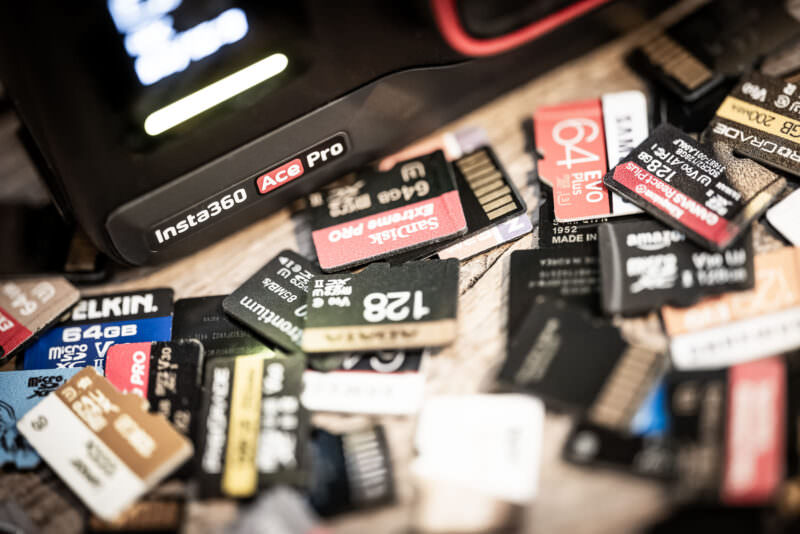
So here are some recommendations. In general, stick to microSD cards that have UHS-I interfaces and are rated for V30.
Maximum video bitrate
The two types of shooting that are most demanding on the memory card are the high-bitrate video modes and burst photo modes.
Both the Ace and the Ace Pro have the same maximum video bitrate: 170 Mbps.
That’s high for an action camera. Of its most direct competitors, the GoPro HERO12 Black, for instance, maxes out at 120 Mbps. And the DJI Osmo Action 4 maxes out at 130 Mbps. So the Insta360 Ace and Ace Pro are significantly higher.
Insta360 doesn’t publish a single maximum bitrate for the Ace Pro 2 — it varies with the resolution, frame rate, and encoding you’ve set — but as a reference point, their manual cites roughly 120 Mbps for 4K60 at the High bitrate setting. Even with the Ace Pro 2’s 8K mode, the V30 requirement doesn’t change.
It’s not high compared to larger mirrorless cameras. Those can easily shoot at 400 Mbps or even much higher. But those often use full-size SD cards or even CFexpress cards. They don’t generally use microSD cards, and microSD cards tend not to be on the cutting edge of speed relative to some of the larger form factors.
UHS-I vs UHS-II
The fastest microSD cards have a UHS-II interface. That refers to the contact point between memory card and host device, which in this case is the camera.
But the catch is that these cameras — Ace, Ace Pro, and Ace Pro 2 alike — have a UHS-I interface. That means there’s no point paying extra for a faster UHS-II card, because you won’t get any extra benefit from it in the camera. To get the benefits of UHS-II, both the card and host device have to support UHS-II.
So stick to a UHS-I card. And that means you’re looking for a card that’s rated with the V30 video speed class. And that aligns with Insta360’s official guidance.
microSDXC vs microSDHC
Insta360’s guidance above specifically mentions the exFAT filesystem. The reason for that is to avoid having to break large, high-bitrate videos into chunks under 4GB that then have to be rejoined when editing (a process known as chaptering).
The practical implication here is that you should stick to microSDXC cards, not microSDHC. That’s because microSDHC cards, which are 32GB and under, use the FAT32 filesystem that only supports individual files up to 4GB.
There’s also an emerging spec known as microSDUC. They’re not really in stores yet, but if you happen to stumble across one, don’t get it for this camera; it won’t work.
Ditto on microSDExpress cards. It’s another emerging standard, and they are starting to turn up in stores already. They will function in the camera because they’re designed to be backward compatible, but you’ll be paying exorbitantly for a type of card that the Insta360 can’t take advantage of.
SanDisk Extreme microSD V30 UHS-I
- Type: microSDXC
- Video Speed Class: V30
- UHS Bus Interface Type: UHS-I
- Maximum Read Speed: 245 MB/s
- Storage Capacities: 32GB–2TB
Check current price and availability at:
Fast, cost-effective, reliable, and widely available, the SanDisk Extreme cards are safe bets for a wide range of cameras. They're readily available at major retailers and quite cost-effective,
The latest version of the SanDisk Extreme comes in 32GB, 64GB, 128GB, 256GB, 512GB, 1TB, and 2TB versions.
As with most of its product names, SanDisk recycles them with newer, faster cards. So you can find "Extreme" cards that are actually several years old. It's therefore worth checking the model number (in this case it's SDSQXH9), although in practice you'll probably find that older versions of the Extreme cards will also work well.
SanDisk uses a three-part model numbering system in the format SDSQXH9-128G-GZ6MA. In this example, SDSQXH9 is the model number, 128G refers to the amount of memory, and the last 5 characters are used by the marketing department for different parts of the world but the cards are otherwise the same. So the first part is the crucial part if you're looking to see which model the card is, and you don't have to take much notice of the last 5 characters.
Lexar Professional SILVER PLUS microSDXC V30 UHS-I
- Type: microSDXC
- Video Speed Class: V30
- UHS Bus Interface Type: UHS-I
- Maximum Read Speed: 205 MB/s
- Storage Capacities: 64GB, 128GB, 256GB, 512GB, 1TB
Check current price and availability at:
Samsung PRO Plus microSDXC V30 UHS-I
- Type: microSDXC
- Video Speed Class: V30
- UHS Bus Interface Type: UHS-I
- Maximum Read Speed: 180 MB/s
- Storage Capacities: 128GB, 256GB, 512GB, 1TB
Check current price and availability at:
PNY PRO Elite Prime microSDXC V30 UHS-I
- Type: microSDXC
- Video Speed Class: V30
- UHS Bus Interface Type: UHS-I
- Maximum Read Speed: 200 MB/s
- Storage Capacities: 64GB–1.5TB
Check current price and availability at:
Recommendations checked: August 2026
Kitting out an Ace-series camera? I also have a guide to Insta360 battery compatibility, and a full rundown of shooting photos with the Ace Pro 2, with sample images.


