
The rollout of the GoPro HERO10 has been, shall we say, a bit bumpy. The biggest issues have been related to overheating and poor battery life. But other issues have frustrated users, such as the delayed rollout of Max Lens Mod compatibility and a botched firmware update (v1.15).
GoPro has released a new firmware version (v1.16) that makes an effort to address the overheating and poor battery performance issues (and fixes the automatic rebooting that 1.15 introduced).
The 1.16 update added some new video shooting categories:
- Maximum Video Performance
- Extended Battery
- Tripod/Stationary Video
They’ve removed the previous options to choose between Standard and High bitrate when shooting video. Instead, the shooting categories function as bitrate selectors.
I was curious to see how these new video categories worked with video bitrate. As I expected, they actually relate to lowering the bitrate. By doing that, it means less processing for the GP2 chip and less data being written to the memory card. Both of those things will help reduce the heat that’s naturally generated as overhead.1 The Tripod/Stationary Video mode also disables HyperSmooth and GPS.
So it’s a logical way to help users have fewer issues with overheating, although it falls more into the category of a workaround than a solution. It doesn’t actually solve the efficiency and physics issues related to the heavy in-camera processing and power demands of the GP2 chip, writing large, sustained streams of data to flash memory, and a small physical package with few heatsinking opportunities.
So here’s the master list of video bitrates used for each combination. For now, this refers only to HEVC video. H.264 compression is still available in some video mode combinations on the HERO10 Black, but I haven’t yet added those here. These bitrates were taken from real-world tests using a GoPro HERO10 Black running firmware v.1.16.2

Have Camera Will Travel Newsletter
Practical field notes, hands-on gear tests, and the fun of exploring the world with a camera in hand.

| Resolution | Framerate | Maximum Video Performance | Extended Battery | Tripod/Stationary Video |
|---|---|---|---|---|
| 5.3K | 60 | 100 | - | 60 |
| 50 | 100 | - | 60 | |
| 30 | 100 | 60 | 60 | |
| 25 | 100 | 60 | 60 | |
| 5.3K 4:3 | 30 | 100 | - | - |
| 25 | 100 | - | - | |
| 4K | 120 | 100 | - | 60 |
| 100 | 100 | - | 60 | |
| 60 | 100 | 60 | 60 | |
| 50 | 100 | 60 | 60 | |
| 30 | 100 | 45 | 45 | |
| 25 | 100 | 45 | 45 | |
| 24 | 100 | - | - | |
| 4K:4:3 | 60 | 100 | - | - |
| 50 | 100 | - | - | |
| 2.7K | 240 | 100 | - | - |
| 200 | 100 | - | - | |
| 120 | 100 | - | - | |
| 100 | 100 | - | - | |
| 60 | 100 | 45 | - | |
| 50 | 100 | 45 | - | |
| 2.7K4:3 | 120 | 100 | - | - |
| 100 | 100 | - | - | |
| 60 | 100 | 60 | - | |
| 50 | 100 | 60 | - | |
| 1080p | 240 | 78 | - | - |
| 200 | 78 | - | - | |
| 120 | 60 | 45 | - | |
| 100 | 60 | 45 | - | |
| 60 | 60 | 45 | - | |
| 50 | 60 | 45 | - | |
| 30 | 60 | 34 | - | |
| 25 | 60 | 34 | - | |
| 24 | 60 | - | - |
Related: the newer models’ chart: HERO13 Black and HERO12 Black bitrates.
How to switch Video Performance Modes
There are two ways to switch between the new Video Performance Modes.
On the Camera:
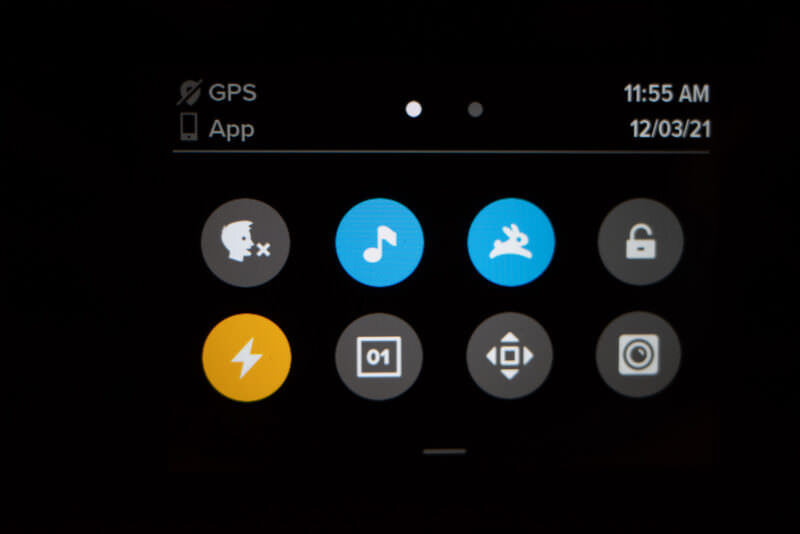
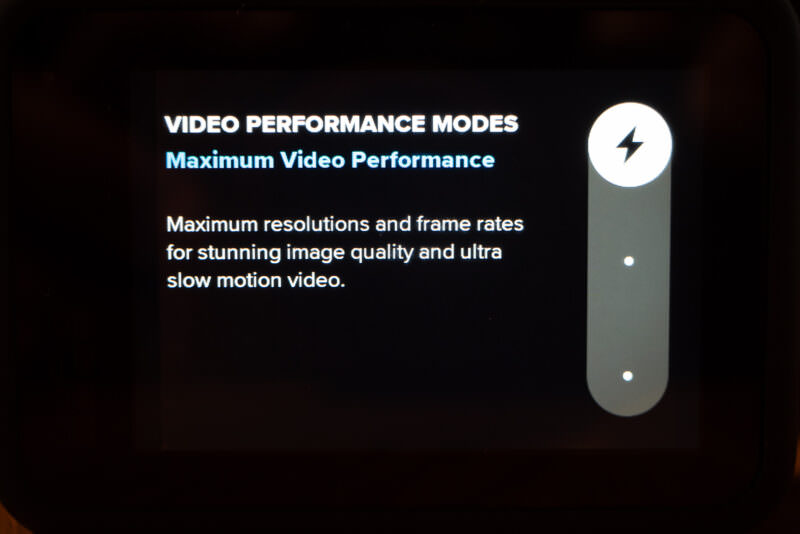
- On the HERO10’s back screen, swipe down to get the dashboard. The bottom-left icon represents the Video Performance Modes. A lightning bolt icon represents the Maximum Video Performance Mode. A battery icon represents the Extended Battery mode. And a camera on a tripod represents the Tripod/Stationary Video mode. If you click on that icon, you’ll get the Video Performance Modes menu.
- Use the slider at right to choose which Video Performance Mode to use.
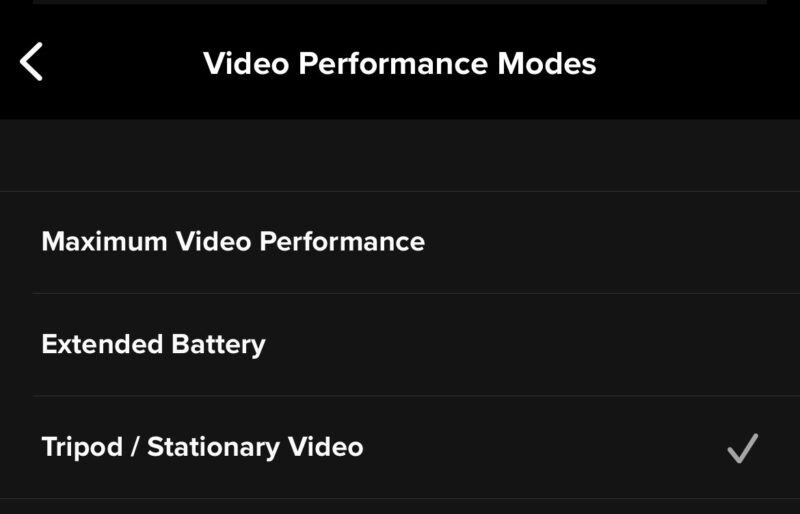
On the GoPro Quik Mobile App:
- Put the app into video recording mode.
- Click on the wrench icon at the top right of the screen to open Camera Preferences.
- Scroll down to Video Performance Mode.

What Size SD Card to get for the GoPro HERO10 Black?
The video bitrate is important for video image quality. And it’s also important with respect to the storage capacity of your recording media, in this case, the microSD card.
Bitrate vs SD card calculator
So I created this simple calculator to give a general idea of how much video footage from the HERO10 Black can fit on an SD card of a particular storage capacity. Choose the size of the memory card in the selector.
Calculator notes:
- This is approximate and is obviously affected by any other data you have on the memory card (including the extra LRV files that the camera generates automatically).
- I’m using the maximum bitrate here, but not every video mode uses the maximum bitrate. Some use lower bitrates, and if you’re shooting with one of those, the corresponding file sizes are smaller, which in turn means you can fit more video on the SD card.
SD card recommendations for the GoPro HERO10 Black
I have a more in-depth post on the best SD cards for the GoPro HERO10 Black, but here are some quick recommendations.
- SanDisk Extreme V30 UHS-I
- Lexar Professional 1066x Silver V30 UHS-I
- Kingston Canvas Go Plus V30 UHS-I
- Samsung EVO Select V30 UHS-I
- Type: microSDXC
- Video Speed Class: V30
- UHS Bus Interface Type: UHS-I
- Maximum Read Speed: 245 MB/s
- Storage Capacities: 32GB–2TB
Check current price and availability at:
- Type: microSDXC
- Video Speed Class: V30
- UHS Bus Interface Type: UHS-I
- Maximum Read Speed: 205 MB/s
- Storage Capacities: 64GB, 128GB, 256GB, 512GB, 1TB
Check current price and availability at:
- Type: microSDXC
- Video Speed Class: V30
- UHS Bus Interface Type: UHS-I
- Maximum Read Speed: 180 MB/s
- Storage Capacities: 128GB, 256GB, 512GB, 1TB
Check current price and availability at:
Recommendations checked: August 2026
Things worth knowing
Another firmware update is expected in mid-December 2021 to include Max Lens Mod compatibility. It will also include some new resolution/framerate combinations, and tweaks to which modes SuperView is available in. That firmware is currently in beta, but you can download and manually install it prior to the official release.
GoPro has posted a bitrate chart, but at the time of writing it still refers to the pre-1.16 way and is outdated (i.e., there are no Video Performance Modes and a choice between High and Standard bitrates).
Memory card tools
Here are a few other related tools I’ve put together that can be useful when working with memory cards and data rates.
Converting Mbps to MB/s & X speed rating to MB/s
Another related and common calculation that often needs to be done when working with memory cards is converting the convention for measuring video bitrate (Mbps, Mb/s, or megabits per second) to the convention for measuring the speed of memory cards (MBps, MB/s, or megabytes per second).
So I’ve put together a simple calculator for that separately. You can find it here:
- Convert Megabits Per Second to Megabytes Per Second Calculator
- Convert Memory Card X Speed Rating to MB/s
Memory card size calculators
If you’re trying to figure out what size memory card to buy, it can be useful to know how much video footage from the camera you can fit on a card. Here are a few tools that can be useful for that:
- Video Bitrate vs Memory Card Size Calculator
- How Much 4K Video Can 128GB Hold?
- How Much 4K Video Can 256GB Hold?
- How Much 4K Video Can 64GB Hold?
Working with memory cards
Here are some related posts for making sense of memory cards and working with them.
- Fastest SD Card Speed Tests. With cameras getting improved 4K, 5K, and even 8K video recording and burst shooting features all the time, some of them need the write speeds that only the fastest SD cards provide. So here’s a roundup of the fastest SD cards based on my independent tests.
- Fastest MicroSD Card Speed Tests. Need a fast microSD card? If you’re shooting 4K, 5K, or 8K video, high-speed burst-mode photos, or some other demanding use, speed matters. These are the results from my independent speed tests of the fastest microSD cards.
- Types of SD Cards Explained. There are several different types of SD cards, as well as multiple speed rating systems and cryptic codes. Here’s a rundown of what the differences are.
- UHS-I vs UHS-II on microSD & SD Cards. Wondering what the difference is between UHS-I and UHS-II with SD and microSD cards? Here’s an explanation.
- What are the A1 and A2 Ratings on SD and microSD Cards? You might have seen new A1 and A2 speed ratings on some of the newer SD and microSD cards. So what do they mean? And when should you take notice of it?
- SD Card Formatter App for Formatting, Wiping & Repairing SD & microSD Cards. Here’s a guide to using the SD Association’s official SD Card Formatter for preparing your SD and microSD cards for use.
- How to Format SD Cards on Mac. Here’s a step-by-step guide for formatting both SD and microSD cards.
- Best Free Data Recovery Software for SD Cards. Here’s a rundown of the best free data recovery software to use if you’ve accidentally deleted photos or videos from your SD card.
- How to Rover Deleted Photos from SD Card: SD Card Recovery Options. All those photos you took have disappeared from the SD card. The good news is that there’s still a good chance you can recover photos from the SD card. Here’s what to do. Includes free and paid SD card recovery options.
Notes & References:
- There may also be some other unannounced tweaks under the hood, but they’re not immediately apparent. [↩︎]
- These settings are precisely the kind that GoPro can tweak with firmware updates, and it’s possible that a future firmware update might produce slightly different results. If so, I’ll do my best to update here with the newer firmware. [↩︎]


Thank you for this chart.
I shoot at 4k 60fps, so GoPro’s bitrate is 100.
I have been postprocessing and rendering at 120.
Does that mean that 120 is overkill and I should be rendering at 100 instead?
thanks.